System Setting
Screen Reference > System Setting
The System Setting page lets you see the AWC Plug-in version, factory-reset the plug-in, and configure system settings.
This page is only accessible by Administrator accounts.
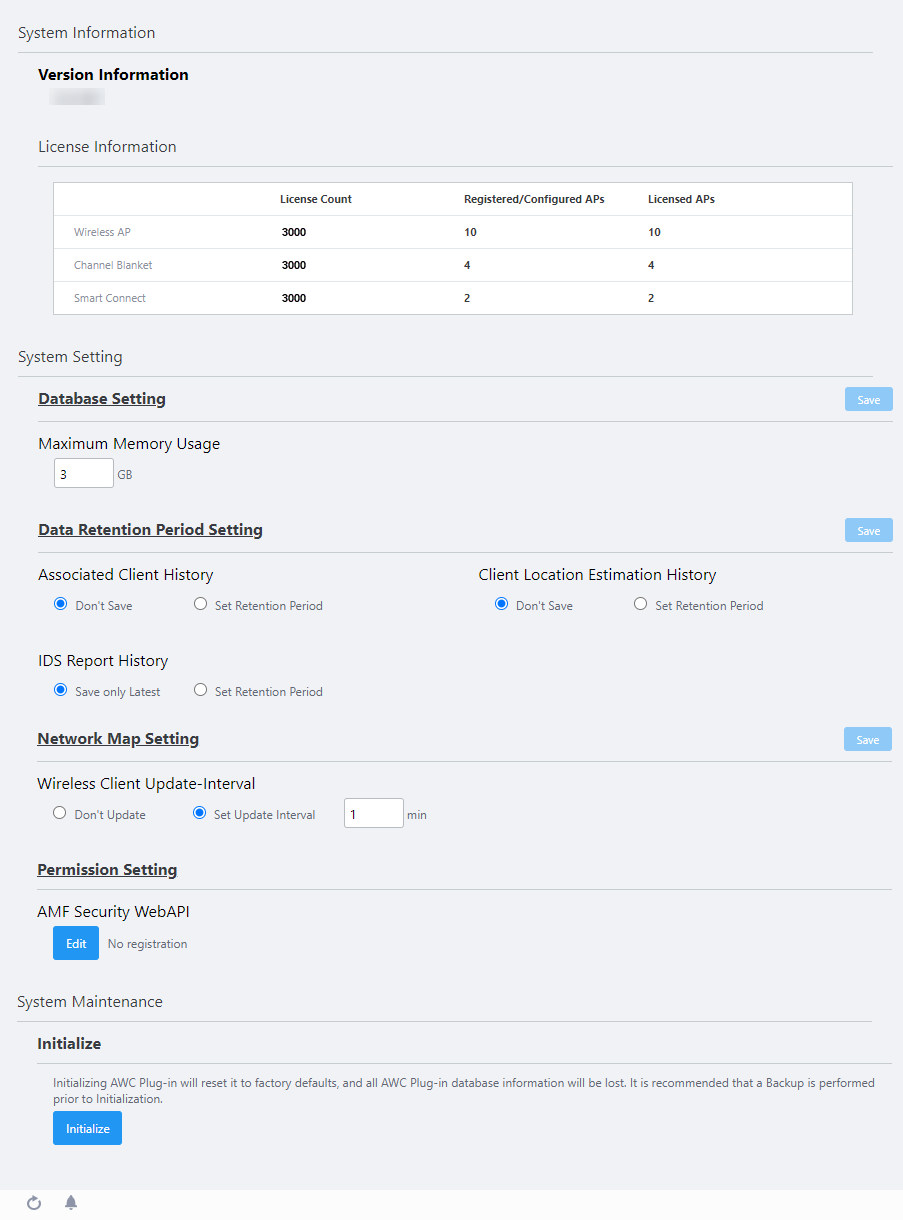
◼ System Information
Table 1: System Information
| Item Name |
Description |
| Version Information |
Shows the AWC Plug-in's version information. |
License Information
|
- Wireless AP:
Shows the number of APs allowed by the wireless LAN controller license and the number of APs which are being managed by the AWC Plug-in.
- License count:
Shows the number of APs which are allowed to be managed by the installed wireless LAN controller license.
- Registered/Configured APs:
Shows the number of APs which have been added to the AWC Plug-in's management database.
- Licensed APs:
Shows the number of APs which are being managed by the AWC Plug-in.
- Channel Blanket:
Shows the number of APs allowed by the channel blanket license and the number of APs which are operating in the AWC Plug-in's channel blankets.
- License count:
Shows the number of APs which are allowed to be managed by the installed channel blanket license.
- Registered/Configured APs:
Shows the number of APs which have been added to the AWC Plug-in's channel blankets.
- Licensed APs:
Shows the number of APs which are operating in the AWC Plug-in's channel blankets.
- Smart Connect:
Shows the number of APs allowed by the Smart Connect license and the number of APs which are operating in the AWC Plug-in's Smart Connect networks.
- License count:
Shows the number of APs which are allowed to be managed by the installed Smart Connect license.
- Registered/Configured APs:
Shows the number of APs which have been added to the AWC Plug-in's Smart Connect networks.
- Licensed APs:
Shows the number of APs which are operating in the AWC Plug-in's Smart Connect feature.
|
◼ System Setting
Table 2: System Setting
| Item Name |
Description |
| Database Setting |
Maximum Memory Usage
|
Specify the maximum amount of system memory that can be used for the AWC Plug-in database.
If you want more managed APs, more IDS history, or more client history, you need to allocate more memory to the database. Refer to the Vista Manager EX Datasheet for system requirement details.
|
| "Save" button |
Save and apply configuration changes to the database. |
| Data Retention Period Setting |
Associated Client History
|
Specify a retention period for associated client histories that are displayed on the Screen Reference > Wireless Monitoring > Floor Map screen.
- Don't Save:
The AWC Plug-in does not retain associated client history. Clients are not shown on the Floor Map's client history screen.
- Set Retention Period:
The AWC Plug-in retains associated client histories within the specifed period. The range for the retention period can be from 1 to 31 days.
When you change this setting, the associated client history is initialized.
The Data Retention Period Setting can be set up to 31 days on the screen, but the operation with the period up to 14 days is supported.
|
Client Location Estimation History
|
Specify a retention period for client location estimation histories that are displayed on the Screen Reference > Wireless Monitoring > Floor Map screen.
- Don't Save:
The AWC Plug-in does not retain estimated client location information. Clients are not shown on the Floor Map's associated client location estimation history screen. Device counter in the Floor Map Associated Client View also will not count the number of clients of which the locations are estimated.
- Set Retention Period:
The AWC Plug-in retains client location estimation histories within the specifed period. The range for the retention period can be from 1 to 31 days.
When you change this setting, the client location estimation history will be initialized.
The Data Retention Period Setting can be set up to 31 days on the screen, but the operation with the period up to 14 days is supported.
Client Location Estimation is available on this version of the AWC Plug-in combined with AT-TQ5403/5403e firmware version 6.0.1-1.x or later.
When this feature is enabled, the maximum number of wireless APs that can have CB Profiles applied is 500 over the entire system.
|
IDS Report History
|
Specify a retention period for IDS reports that are displayed on the Screen Reference > Wireless Monitoring > IDS/IPS Report page.
- Save only latest:
The AWC Plug-in only retains neighbor AP information that has been detected within the last day. Rogue APs are not shown in the Floor Map's Rogue AP View.
- Set Retention Period:
The AWC Plug-in retains neighbor AP information that has been detected during the specifed period. The range for the retention period can be from 1 to 31 days.
When you change this setting, the IDS report information is initialized.
The Data Retention Period Setting can be set up to 31 days on the screen, but the operation with the period up to 14 days is supported.
|
| Network Map Setting |
Wireless Client Update-Interval
|
Specify the refresh interval for associated clients that are displayed on the Vista Manager EX "Network Map" screen.
- Don't Update:
The AWC Plug-in does not refresh client information automatically.
- Set Update Interval:
The AWC Plug-in refreshes client information automatically. The range for refresh interval can be from 1 to 9999 minutes. The update interval for links between AWC-SC APs on the Network Map also depends on this setting. It is set to 1 minute by default.
|
| "Save" button |
Save and apply configuration changes to the network map. |
| Permission Setting |
AMF Security WebAPI
|
This item is not supported.
|
◼ System Maintenance
Table 3: System Maintenance
| Item Name |
Description |
| Initialize |
| "Initialize" button |
Initialize the AWC Plug-in's data, such as its configuration and various histories. |
For detailed procedures to factory-reset the AWC Plug-in system, refer to
Operation Reference > Plug-in System Data Management > Initialize AWC Plug-in System.
24 Mar 2021 10:12