Authentication Flow via AMF Security
OpenFlow Authentication
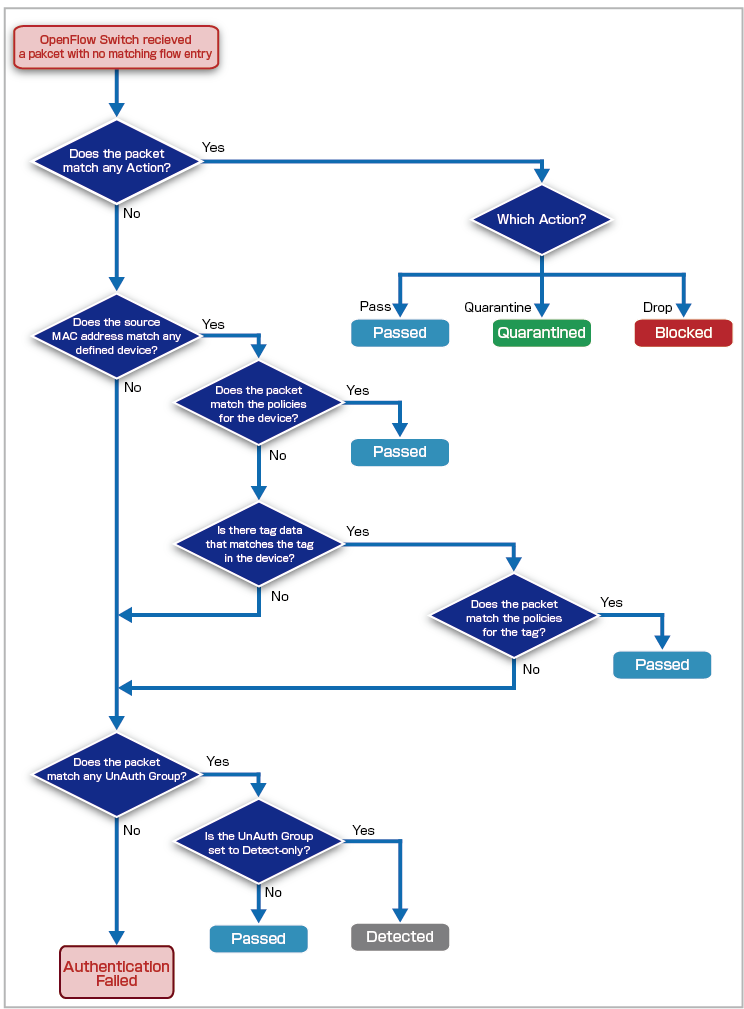
This section describes the flow of terminal authentication in an OpenFlow configuration.AMF Security performs authentication at the request of the OpenFlow Switches it manages.
OpenFlow Switches ask AMF Security for authentication in the following manner.
- OpenFlow Switch receives packets from the terminal
- The OpenFlow Switch checks whether a flow entry has been registered for the source MAC Address of the terminal's packet. When a matching flow entry is found, the OpenFlow Switch transmits the packet according to the flow entry.
- If there is no matching flow entry, the OpenFlow Switch sends a packet to query AMF Security.
AMF Security has four major authentication processes: Device Authentication Data, Authentication using Tag, UnAuth Group and Action.
- Device Authentication Data
The network (VLAN) to connect to is determined based on the security policy (Policy) of the Device ID (Device) associated with the MAC Address.
- Authentication using Tag
The VLAN to connect to is determined based on the policy set on the tag, not the policy of the device with which the MAC Address is associated.
- UnAuth Group
For MAC Addresses that are not registered in Device Authentication Data, the connection destination VLAN is determined based on the policy set for the UnAuth Group.
- Action
Individually discard/isolate or specify the destination VLAN for terminals that match the conditions of the device's MAC Address, IPv4 Address, Device, Device Tag, Location, OpenFlow Switch, and Connecting Network, or specify the destination VLAN. It is possible to manually create actions similar to the ones provided by interacting applications.
As an example, the behavior in the case where Action, Device Authentication Data, and UnAuth Group are registered is shown.
| Action ID: Drop | |
| Condition | MAC Address 00:00:00:00:00:01 |
| OpenFlow/TQ Action | Drop(Block) |
| Device ID: Device_A | |
| MAC Address | 00:00:00:00:00:01 |
| Policies | VLAN100 |
| Device ID: Device_B | |
| MAC Address | 00:00:00:00:00:02 |
| Policies | VLAN101 |
| Group ID: Unregistered | |
| Policies | VLAN200 |
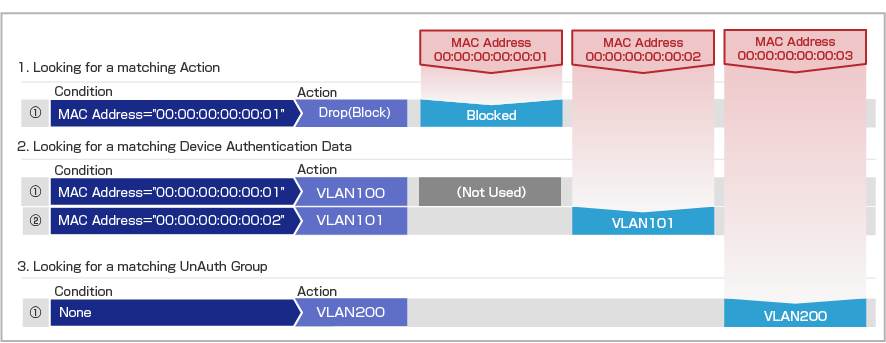
- The MAC Address "00:00:00:00:00:01" is registered in both "Action ID: Drop" and Device Authentication Data of "Device ID: Device_A". If the device authentication processing meets the conditions of the action that is performed first and Drop(Block) is applied, subsequent authentication processing of Device Authentication Data is not performed.
- The MAC Address "00:00:00:00:00:02" matches Device Authentication Data of "Device ID: Device_B", so it is connected to VLAN101.
- If the MAC Address "00:00:00:00:00:03" is not registered in AMF Security, it is connected to VLAN200 of UnAuth Group because it does not match the registered Device Authentication Data. Since the policy for the UnAuth Group does not specify a location or schedule, all devices (MAC Addresses) that are not registered with AMF Security are connected to VLAN200.
Authentication for AMF Application Proxy in AW+
This section explains the authentication flow of devices in the AMF application proxy configuration of AW+.There are two components in the AMF application proxy of AW+, but since device authentication is handled by the whitelist feature, this section explains the AMF application proxy whitelist feature.
- AMF Application Proxy Whitelist
- AMF Application Proxy Blacklist
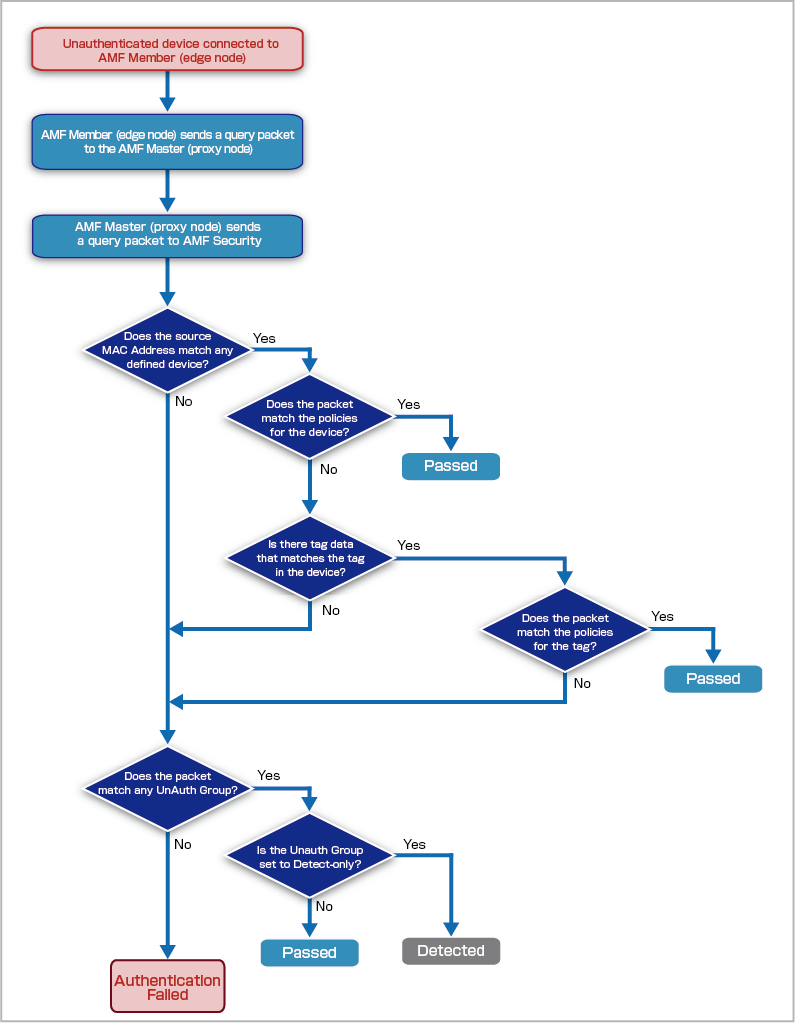
The basic flow leading up to an AMF Member (edge node) sending a request to AMF Security is as follows.
- An AMF Member (edge node) receives a packet from a device.
- The AMF Member (edge node) checks whether authentication has been performed for the source MAC Address of the packet from the device. If the device has been successfully authenticated, the AMF Member (edge node) forwards the packet according to the corresponding VLAN.
- If the device has not been authenticated, the AMF Member (edge node) sends a request packet to the AMF Master (proxy node).
- The AMF Master (proxy node) forwards the request packet received from the AMF Member (edge node) to AMF Security.
The authentication process of AMF Security is broadly categorized into four types: Device Authentication Data, Tag Authentication Data, UnAuth Group, and action. However, the action-based authentication process is not used in authentication via the AMF application proxy.
- Device Authentication Data
The network (VLAN) to connect to is determined based on the security policy (Policy) of the Device ID (Device) associated with the MAC Address.
Note
The OpenFlow switch, switch port, and the “Indefinite expiration date” option configured in each policy are not supported.
- Authentication using Tag
The VLAN to connect to is determined based on the policy set on the tag, not the policy of the device with which the MAC Address is associated.
- UnAuth Group
For MAC Addresses that are not registered in Device Authentication Data, the connection destination VLAN is determined based on the policy set for the UnAuth Group.
As an example, the following describes the behavior when both Device Authentication Data and an UnAuth Group are registered.
| Device ID: Device_A | |
| MAC Address | 00:00:00:00:00:01 |
| Policies | VLAN100 |
| Group ID: Unregistered | |
| Policies | VLAN200 |
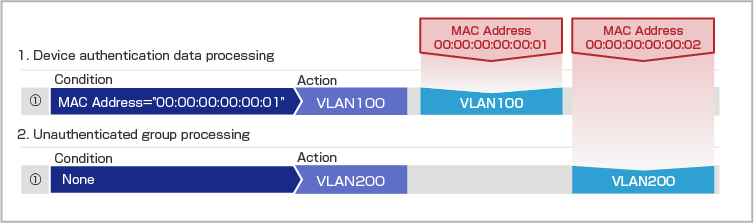
- Since the MAC Address “00:00:00:00:00:01” matches the Device Authentication Data for “Device ID: Device_A,” it is connected to VLAN100.
- Since the MAC Address “00:00:00:00:00:02” is not registered with AMF Security and does not match any registered Device Authentication Data, it is connected to VLAN200 as part of the UnAuth Group. Since the policy for the UnAuth Group does not specify a location or schedule, all devices (MAC Addresses) that are not registered with AMF Security are connected to VLAN200.
Authentication for AMF Application Proxy in TQ
This section explains the authentication flow for wireless devices in the AMF application proxy configuration of TQ.AMF Security performs authentication in response to requests from managed TQ devices. However, for a wireless device to be able to communicate, both the authentication by the AMF application proxy (AMF Security) and the authentication configured in the VAP (multi-SSID) security settings must succeed.
NoteThe basic authentication flow for wireless devices is as follows.If a wireless device succeeds in authentication by AMF Security but fails in the authentication configured in the VAP security settings, the device will be displayed as “Authorized” on the Device > Connected Device List page of AMF Security. Therefore, the actual status of the wireless device does not match its display in AMF Security.
- A wireless device connects to the wireless network of TQ.
- TQ checks the authentication status of the source MAC Address of the wireless device. If a wireless device is successfully authenticated by both AMF Security and the VAP security settings, TQ forwards the packet according to the VLAN assigned to the device.
- If a wireless device is not authenticated, TQ sends a request packet to AMF Security.
- Once authentication by AMF Security succeeds, authentication configured in the VAP security settings is performed.
Note
When WPA Enterprise is used in the VAP security settings of TQ, the VLAN assigned to a wireless device varies depending on whether dynamic VLAN is disabled or enabled. For details, refer to Quick Tour About AMF Security > AMF Application Proxy Function of TQ and TQR / Behavior when using TQ dynamic VLAN.
AMF Security has four major authentication processes: Device Authentication Data, Authentication using Tag, UnAuth Group and Action.
- Device Authentication Data
The network (VLAN) to connect to is determined based on the security policy (Policy) of the Device ID (Device) associated with the MAC Address.
- Authentication using Tag
The VLAN to connect to is determined based on the policy set on the tag, not the policy of the device with which the MAC Address is associated.
- UnAuth Group
For MAC Addresses that are not registered in Device Authentication Data, the connection destination VLAN is determined based on the policy set for the UnAuth Group.
Note
The following items configured in each policy are not supported: location, schedule, OpenFlow switch, switch port, and the “Set flow expiration to unlimited” option.
- Action
Specify individual actions—discard, quarantine, or assign a destination VLAN—for wireless terminals that match the conditions of MAC Address, IPv4 Address, device, device tag, and connected network. It is possible to manually create actions similar to the ones provided by interacting applications.
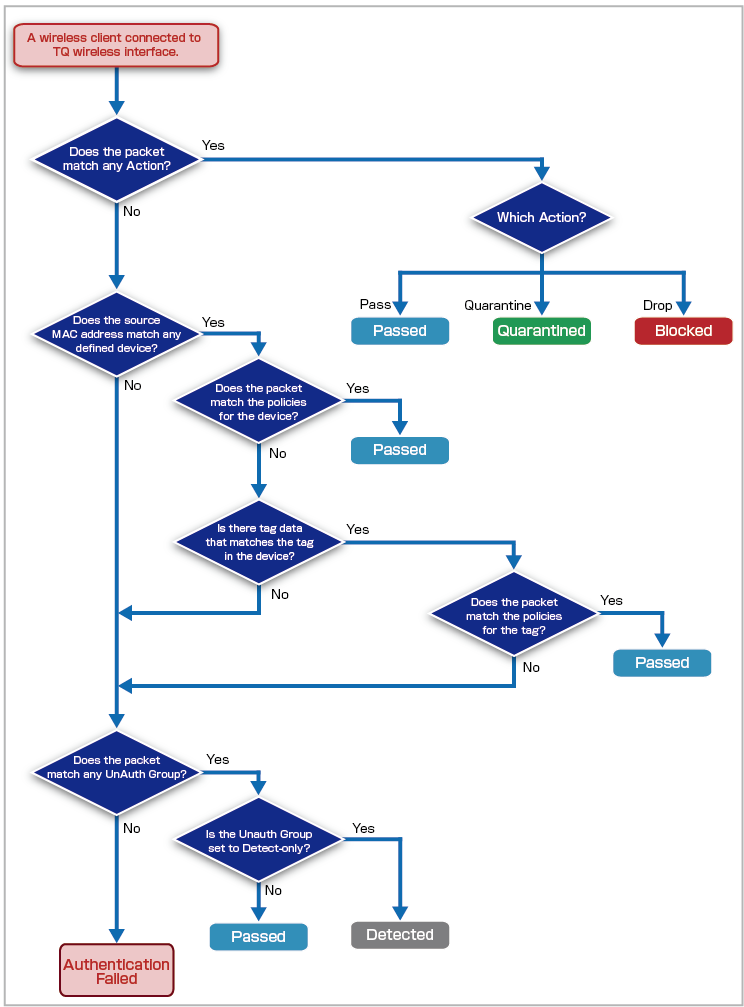
As an example, the behavior in the case where Action, Device Authentication Data, and UnAuth Group are registered is shown.
| Action ID: Drop | |
| Condition | MAC Address 00:00:00:00:00:01 |
| OpenFlow/TQ Action | Drop(Block) |
| Device ID: Device_A | |
| MAC Address | 00:00:00:00:00:01 |
| Policies | VLAN100 |
| Device ID: Device_B | |
| MAC Address | 00:00:00:00:00:02 |
| Policies | VLAN101 |
| Group ID: Unregistered | |
| Policies | VLAN200 |
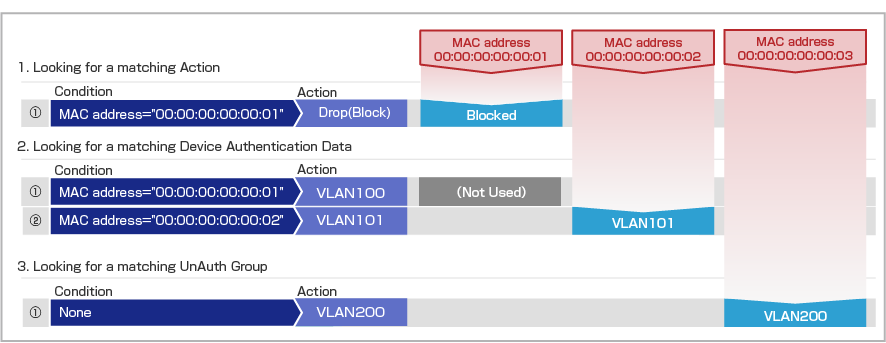
- The MAC Address "00:00:00:00:00:01" is registered in both "Action ID: Drop" and Device Authentication Data of "Device ID: Device_A". If the device authentication processing meets the conditions of the action that is performed first and Drop(Block) is applied, subsequent authentication processing of Device Authentication Data is not performed.
- The MAC Address "00:00:00:00:00:02" matches Device Authentication Data of "Device ID: Device_B", so it is connected to VLAN101.
- If the MAC Address "00:00:00:00:00:03" is not registered in AMF Security, it is connected to VLAN200 of UnAuth Group because it does not match the registered Device Authentication Data.
01 Oct 2025 12:50