Policy Settings
From "Policy Settings" in the navigation menu, you can view and configure security policies for devices and the UnAuth Group.
You can also view and add actions from this menu.
About Security Policies
Each security policy consists of the following attributes.- Network
A tagged VLAN to which devices are assigned to.
If the registered device is connected to the AMF Member (Edge Node), TQ of the AMF Application Proxy, it is connected to the VLAN subnet configured in the network.
If the network is not registered on the device, it is connected to the VLAN configured on the edge node.
AMF Security mini achieved this VLAN assignment by instructing the switch to add VLAN tags with the specified VLAN ID when the switch forwards packets from the device out of their upstream port.
Note
If a device can access untagged VLAN, depending on the switch settings, the device may be able to connect to devices on the control plane.
Note
If the device with the MAC Address is connected to the TQ of the AMF Application Proxy, it depends on the TQ settings. Refer to Quick Tour's What is AMF Security mini > TQ's AMF Application Proxy/Behavior when using TQ dynamic VLAN.
- Location
A physical location where a device can access the network.
If you specify a Location for the device, connection is possible only from the edge node registered in the location.
If you do not specify a Location, a device can access the network from any switches.
- Schedule
A time period during a device can access the network (Start Date / Time, and End Date / Time).
If you specify a Schedule for a device, the device can access the network only when the schedule is effective. If you do not specify a schedule, a device can always access the network.
When a device has multiple security policies attached, a matching policy with the lowest priority value is used.
When a security policy has a specific schedule, AMF Security mini determines what action to take based on the date/time when a device gets connected.
This section describes an example in which the security policies shown in the following table:
| Priority | Schedule Start Date / Time | Schedule End Date / Time | Network |
|---|---|---|---|
| 10 | 20XX-04-01 00:00:00 | 20XX-09-30 23:59:59 | VLAN10 |
| 20 | 20XX-01-01 00:00:00 | 20XX-12-31 23:59:59 | VLAN20 |
As the time goes on, the device is re-assigned to the VLAN10 at "20XX-04-01 00:00:00" because the time suddenly goes into the valid range of the security policy with the higher priority value of 10.
About the start date and time and end date and time of the schedule
The Start Date / Time and End Date / Time to be set are the date and time of the timezone currently set on the System Settings > Date / Time Settings page.If the timezone is changed after registering the schedule, the Start Date / Time and End Date / Time of the schedule is changed according to the changed timezone.
As an example, if you register the schedule with the timezone set to "UTC" and then change the timezone to "Asia/Tokyo", the Start Date / Time of the schedule is "UTC + 9 hours".
| Schedule Start Date / Time | Schedule End Date / Time |
|---|---|
| 20XX-04-01 08:00:00 | 20XX-09-30 23:59:59 |
| Schedule Start Date / Time | Schedule End Date / Time |
|---|---|
| 20XX-04-01 17:00:00 | 20XX-10-01 08:59:59 |
- Add / update schedule in "Policy Settings"
- Export / Import Authentication Data on the System Settings > System Information page
- Registration of Authentication Data by AMF Security mini linked application (API)
NoteThe system settings exported on the System Settings > System Information page include timezone settings. Since the initial setting of the time zone of AMF Security mini is "UTC", import the backed up system settings and authentication data in the following order after initializing AMF Security mini or after a new installation. (1) Import "System Settings" (2) Restarting AMF Security mini instance (stop and start) (3) Import of "Authentication Data"
Refer to the AlliedWare Plus device manual for the setting method.
Network List
This page shows a list of Networks.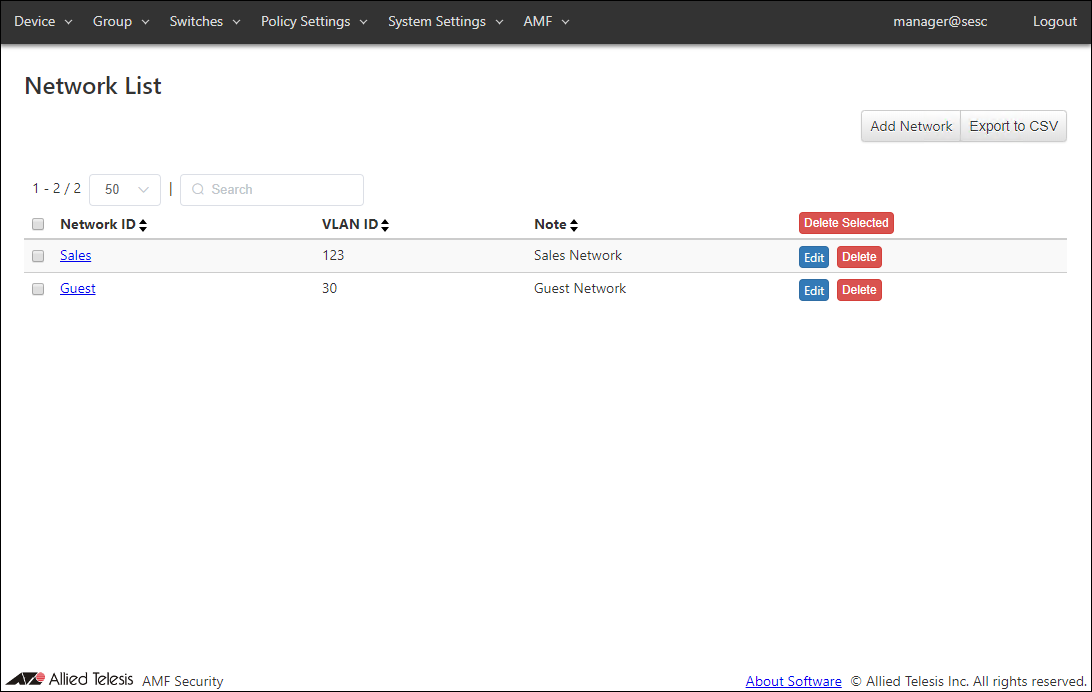
| Item Name | Search | Sort |
|---|---|---|
| Network ID | × | × |
| VLAN ID | × | × |
| Note | × | × |
| Item Name | Description |
|---|---|
| Network ID | ID (Name) of the network. When clicked, the Update Network page for the Network is displayed. |
| VLAN ID | VLAN ID for the network. |
| Note | Arbitrary string (comment) for the network. |
| Item Name | Description |
|---|---|
| Page Top | |
| Add Network | Open the Add Network page. |
| Export to CSV | Start downloading of a list of networks in CSV format. |
| Network List | |
| Delete Selected | Delete all the checked networks. |
| Edit | Open the Update Network page. |
| Delete | Delete the network. |
NoteRefer to Appendix > CSV File for CSV Files.
Add Network
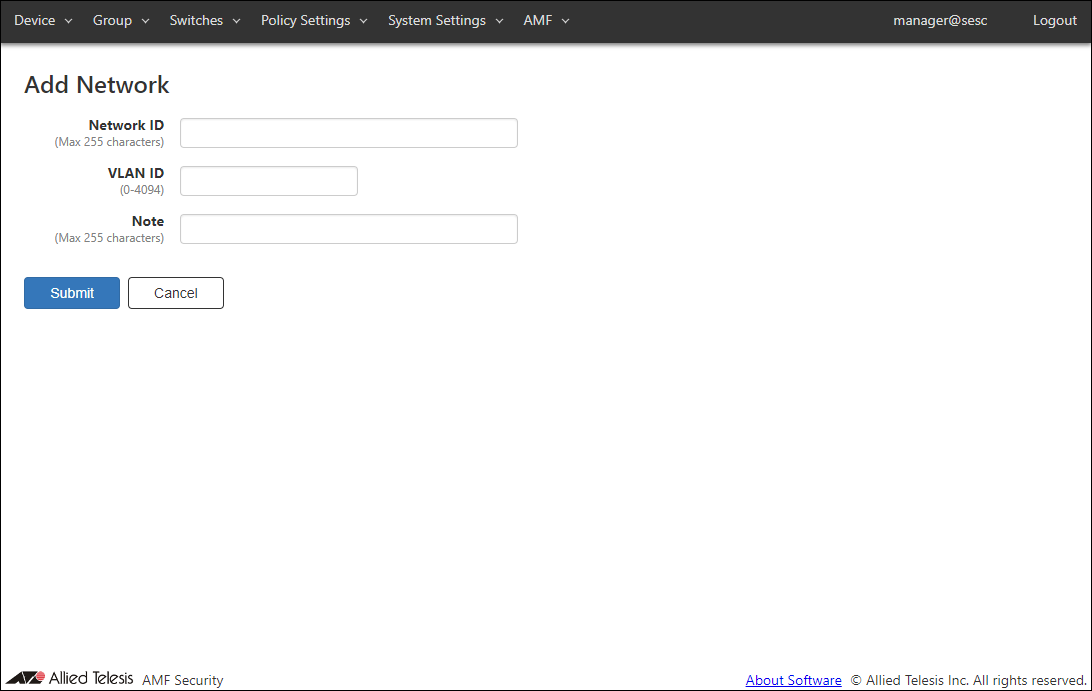
This page lets you create a new network with its VLAN ID.Networks are used for specifying which VLAN to put an allowed device in.
AMF Security mini achieves this by telling switches to add appropriate VLAN tags to the packet originating from the allowed devices.
| Item Name | Description |
|---|---|
| Network ID (Mandatory) | ID (Name) of the network. Network ID must be unique. Max 255 characters |
| VLAN ID (Mandatory) | A VLAN ID for the network. You cannot specify a VLAN ID which is already assigned to another network. If you specify VLAN ID 0, VLAN tag is not added for the network. This is the same as the network is not specified in a policy. VLAN ID must be in the range of 0 to 4094. |
| Note | Arbitrary string (comment) for the network. Max 255 characters. |
| Item Name | Description |
|---|---|
| Page Bottom | |
| Submit | Add a new network with the input data. |
| Cancel | Cancel the operation for adding a new network. |
Update Network
This page lets you update the information of an existing network.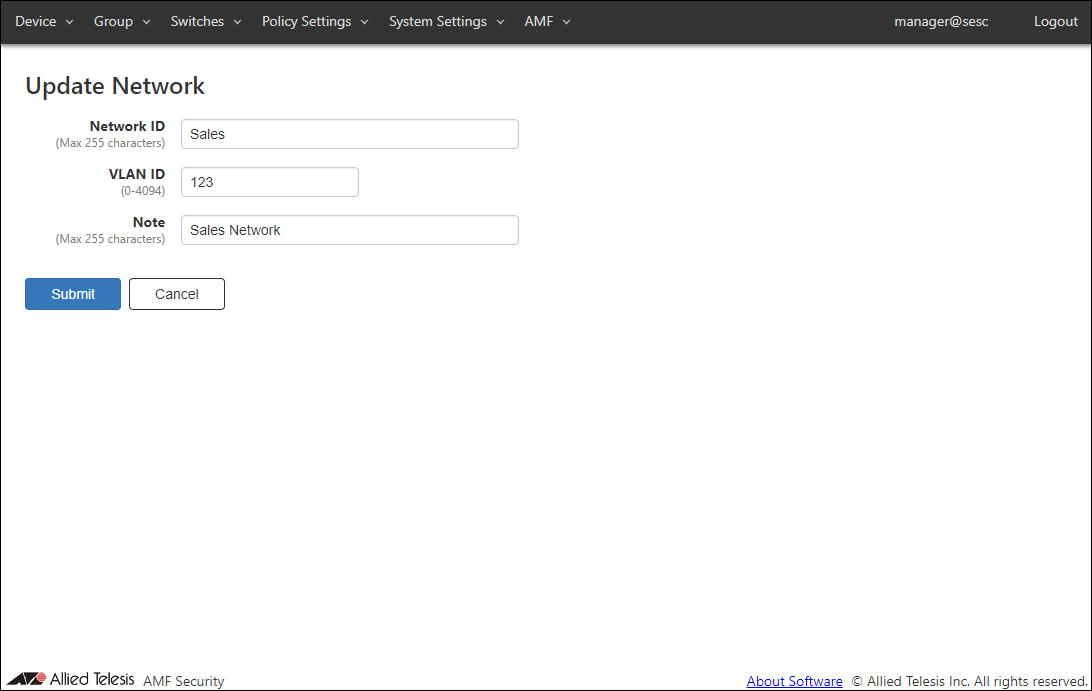
| Item Name | Description |
|---|---|
| Network ID (Mandatory) | ID (Name) of the network. Network ID must be unique. Max 255 characters |
| VLAN ID (Mandatory) | A VLAN ID for the network. If you specify VLAN ID 0, VLAN tag is not added for the network. This is the same as the network is not specified in a policy. VLAN ID must be in the range of 0 to 4094. |
| Note | Arbitrary string (comment) for the network. Max 255 characters. |
| Item Name | Description |
|---|---|
| Page Bottom | |
| Submit | Update information of the network with the input data. |
| Cancel | Cancel the operation for updating the network. |
Location List
This page shows a list of Locations.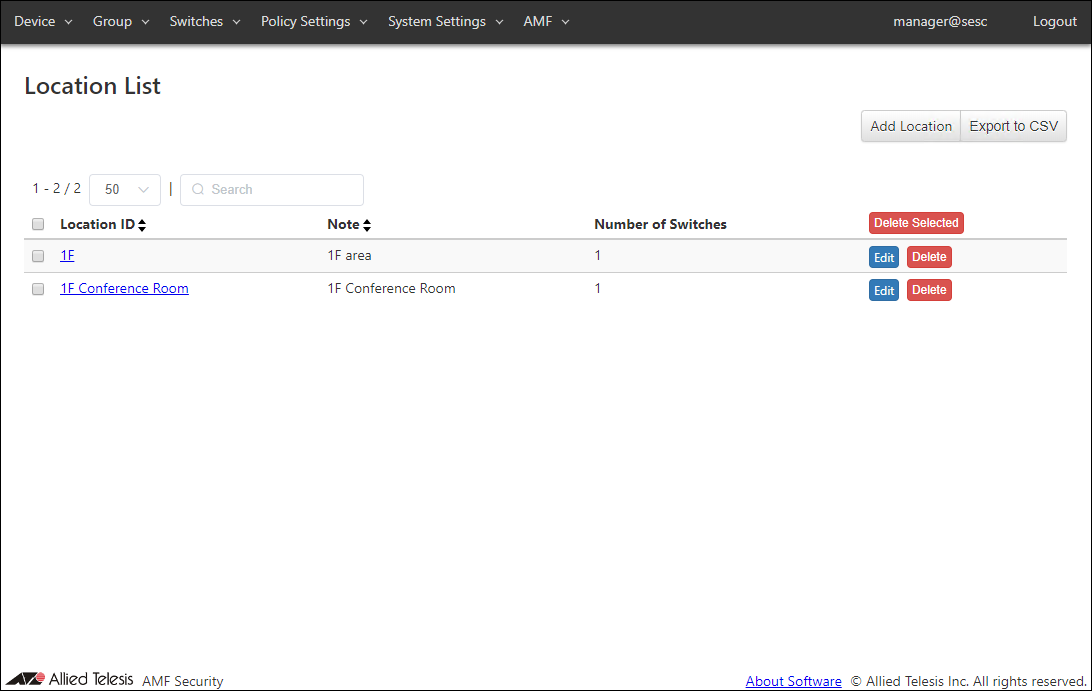
| Item Name | Search | Sort |
|---|---|---|
| Location ID | × | × |
| Note | × | × |
| Number of Switches | × | × |
| Item Name | Description |
|---|---|
| Location ID | ID (Name) of the location. When clicked, the Update Location page for the location is displayed. |
| Note | Arbitrary string (comment) for the location. |
| Number of Switches | The number of AMF Members registered at the location. |
| Item Name | Description |
|---|---|
| Page Top | |
| Add Location | Open the Add Location page. |
| Export to CSV | Start downloading of a list of locations in CSV format. |
| Location List | |
| Delete Selected | Delete all the checked locations. |
| Edit | Open the Update Location page for the location. |
| Delete | Delete the location. |
NoteRefer to Appendix > CSV File for CSV Files.
Add Location
This page lets you add a new Location and associate the AMF Members with the location.If you specify an added Location for a device, the device can access the network only from the AMF Members associated with the location.
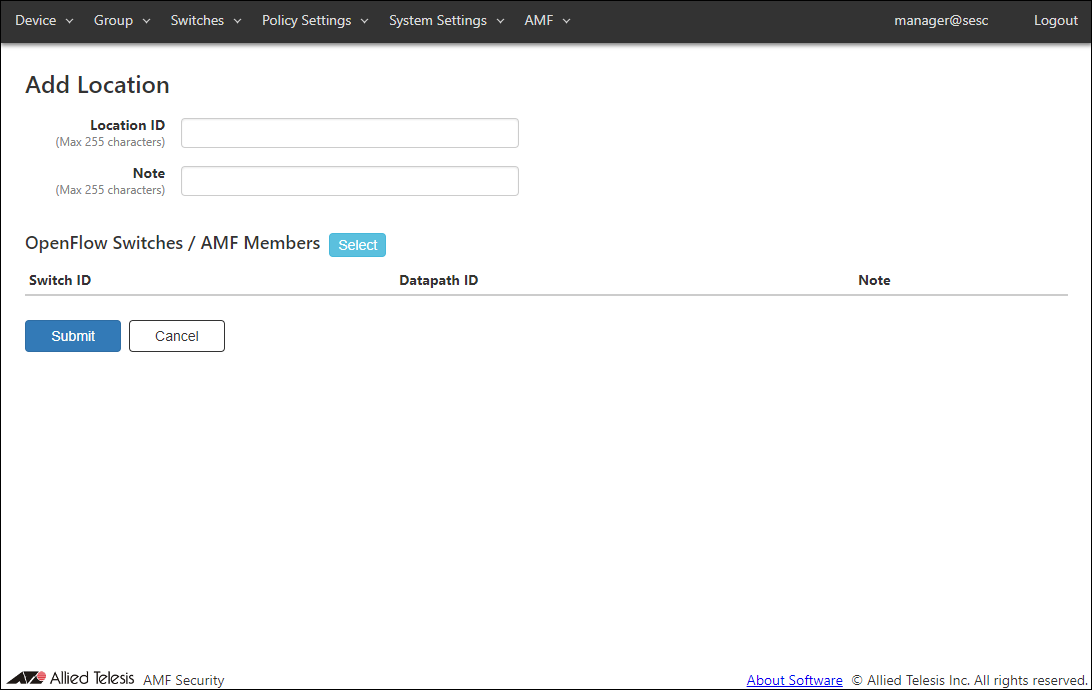
| Item Name | Description |
|---|---|
| Location ID (Mandatory) | ID (Name) of the location. Location ID must be unique. Max 255 characters |
| Note | Arbitrary string (comment) for the location. Max 255 characters. |
| OpenFlow Switches / AMF Members | List of the AMF Members associated with the location. |
| Item Name | Description |
|---|---|
| OpenFlow Switches / AMF Members | |
| Switch ID | ID (Name) of the AMF Members associated with the location. |
| Datapath ID | Not supported in this version. |
| Note | Arbitrary string (comment) for the AMF Member. |
| Item Name | Description |
|---|---|
| OpenFlow Switches / AMF Members | |
| Select | Open the OpenFlow Switches / AMF Members dialog. |
| Page Bottom | |
| Submit | Add a new location with the input information on this page and subordinate dialogs by committing the information for the newly added location. |
| Cancel | Cancel the operation for updating the list of switches which belong to the location. |
OpenFlow Switches / AMF Members
This dialog lets you associate or dissociate the AMF Members with the location.This page displays a list of the AMF members registered in the Switches > AMF Member List page.
By checking the box at the left end of the AMF Member list, the AMF member is added to the location.
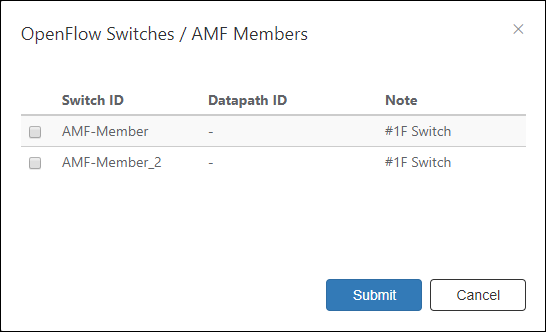
| Item Name | Description |
|---|---|
| Switch ID | Name of a registered the AMF Member. |
| Datapath ID | Not supported in this version. |
| Note | Arbitrary string (comment) for the AMF Member. |
| Item Name | Description |
|---|---|
| Bottom of the dialog | |
| Submit | Add the checked the AMF Members to the location. |
| Cancel | Cancel the operation on the list of the AMF Members in the location. |
Update Location
This page lets you update the information of an existing location.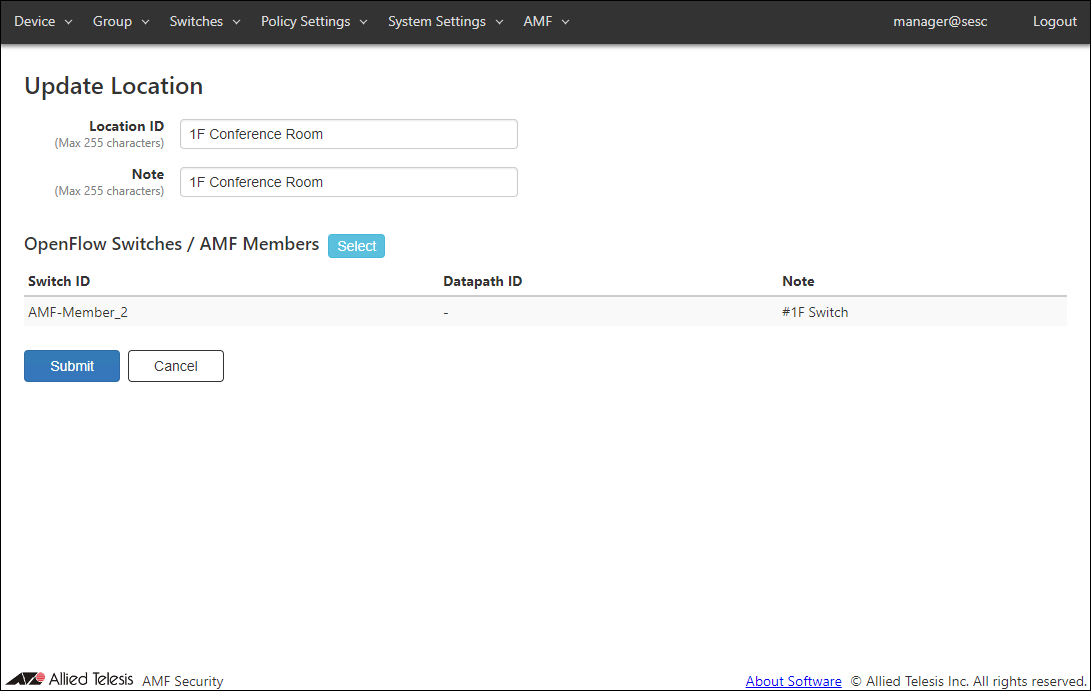
| Item Name | Description |
|---|---|
| Location ID (Mandatory) | ID (Name) of the location. Location ID must be unique. Max 255 characters |
| Note | Arbitrary string (comment) for the location. Max 255 characters. |
| OpenFlow Switches / AMF Members | List of the AMF Members associated with the location. |
| Item Name | Description |
|---|---|
| OpenFlow Switches / AMF Members | |
| Switch ID | ID (Name) of the AMF Members associated with the location. |
| Datapath ID | Not supported in this version. |
| Note | Arbitrary string (comment) for the AMF Member. |
| Item Name | Description |
|---|---|
| OpenFlow Switches / AMF Members | |
| Select | Open the OpenFlow Switches / AMF Members dialog. |
| Page Bottom | |
| Submit | Update the location. |
| Cancel | Cancel the operation for updating the location. |
OpenFlow Switches / AMF Members
This dialog lets you associate or dissociate the AMF Members with the location.This page displays a list of the AMF members registered in the Switches > AMF Member List page.
By checking the box at the left end of the AMF Member list, the AMF member is added to the location.
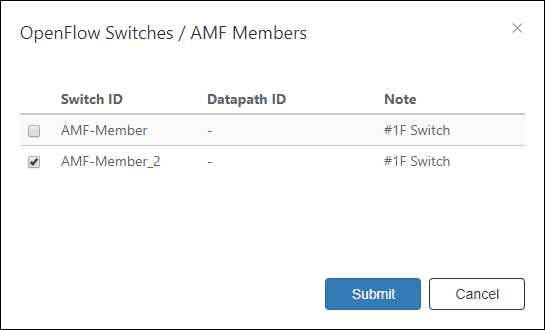
| Item Name | Description |
|---|---|
| Switch ID | Name of a registered the AMF Member. |
| Datapath ID | Not supported in this version. |
| Note | Arbitrary string (comment) for the AMF Member. |
| Item Name | Description |
|---|---|
| Bottom of the dialog | |
| Submit | Add the checked the AMF Members to the location. |
| Cancel | Cancel the operation for updating the list of switches which belong to the location. |
Schedule List
This page shows a list of Schedules.NoteThe Start Date / Time and End Date / Time to be set are the date and time of the timezone currently set on the System Settings > Date / Time Settings page.
For details, refer to Policy settings > About the start date and time and end date and time of the schedule.
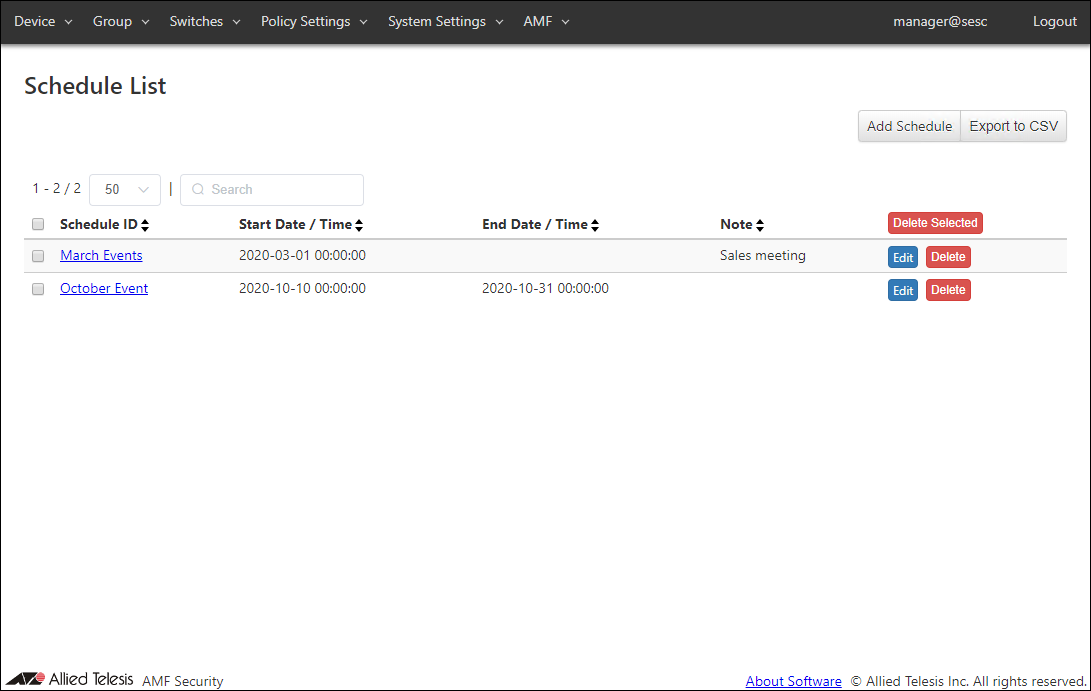
| Item Name | Search | Sort |
|---|---|---|
| Schedule ID | × | × |
| Start Date / Time | × | × |
| End Date / Time | × | × |
| Note | × | × |
| Item Name | Description |
|---|---|
| Schedule ID | ID (Name) of the schedule. When clicked, the Update Schedule page for the schedule is displayed. |
| Start Date / Time | The beginning of the time range during a device is allowed to connect to the network. This can be also used as a condition for detecting unauthenticated devices with the UnAuth Group. |
| End Date / Time | The end of the time range during a device is allowed to connect to the network. This can be also used as a condition for detecting unauthenticated devices with the UnAuth Group. |
| Note | Arbitrary string (comment) for the schedule. |
| Item Name | Description |
|---|---|
| Page Top | |
| Add Schedule | Open the Add Schedule page. |
| Export to CSV | Start downloading of a list of schedules in CSV format. |
| Schedule List | |
| Delete Selected | Delete all the checked schedules. |
| Edit | Open the Update Schedule page. |
| Delete | Delete the schedule. |
NoteRefer to Appendix > CSV File for CSV Files.
Add Schedule
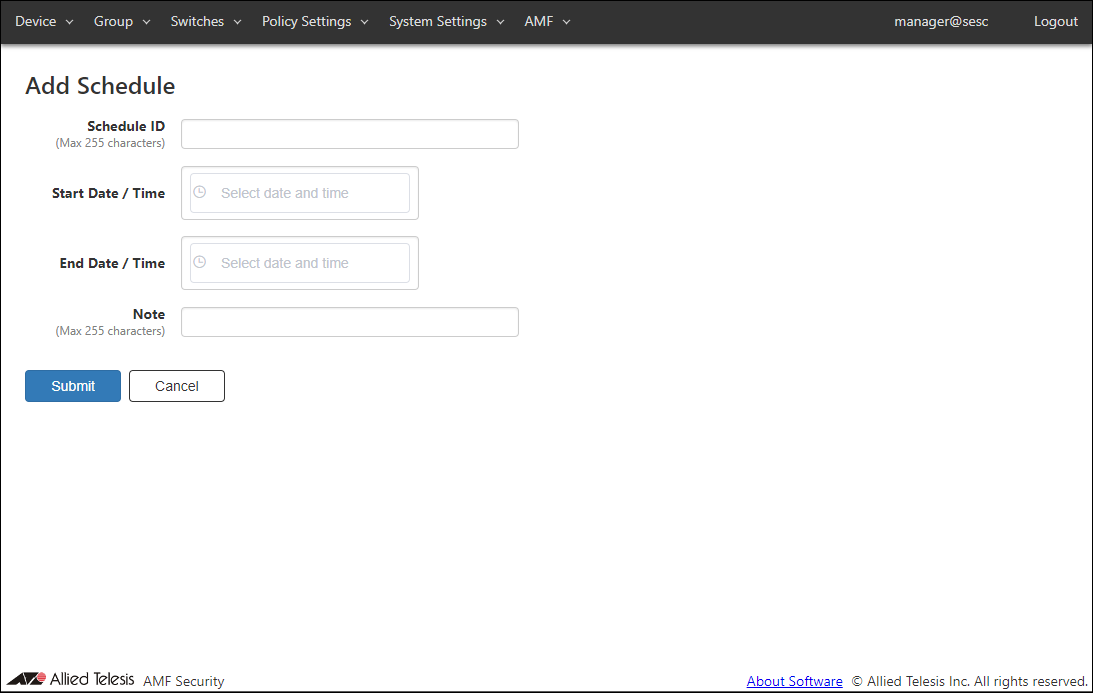
This page lets you add a new schedule.You can control when devices can access the network by specifying schedules in security policies.
| Item Name | Description |
|---|---|
| Schedule ID (Mandatory) | ID (Name) of the schedule. Schedule ID must be unique. Max 255 characters |
| Start Date / Time | The beginning of the time range during a registered device or a device in the UnAuth Group is allowed to connect to the network. Date / Time can be selected using calendar controls or entered manually. When you enter them manually, use the format "YYYY-mm-dd" for date and "HH:MM:SS" for time. |
| End Date / Time | The end of the time range during a registered device or a device in the UnAuth Group is allowed to connect to the network. Date / Time can be selected using calendar controls or entered manually. When you enter them manually, use the format "YYYY-mm-dd" for date and "HH:MM:SS" for time. |
| Note | Arbitrary string (comment) for the schedule. Max 255 characters. |
- Date
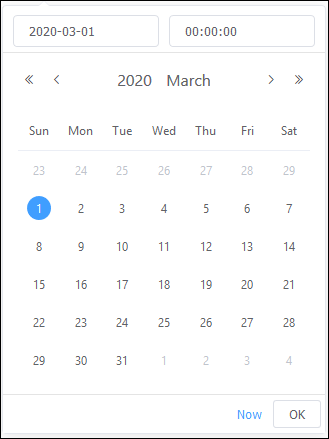
- Time
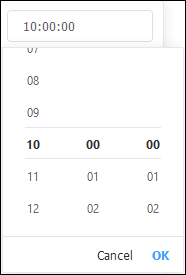
Note
Day of the week cannot be specified.
| Item Name | Description |
|---|---|
| Page Bottom | |
| Submit | Add a new schedule. |
| Cancel | Cancel the operation for adding a new schedule. |
Update Schedule
This page lets you update information of an existing schedule.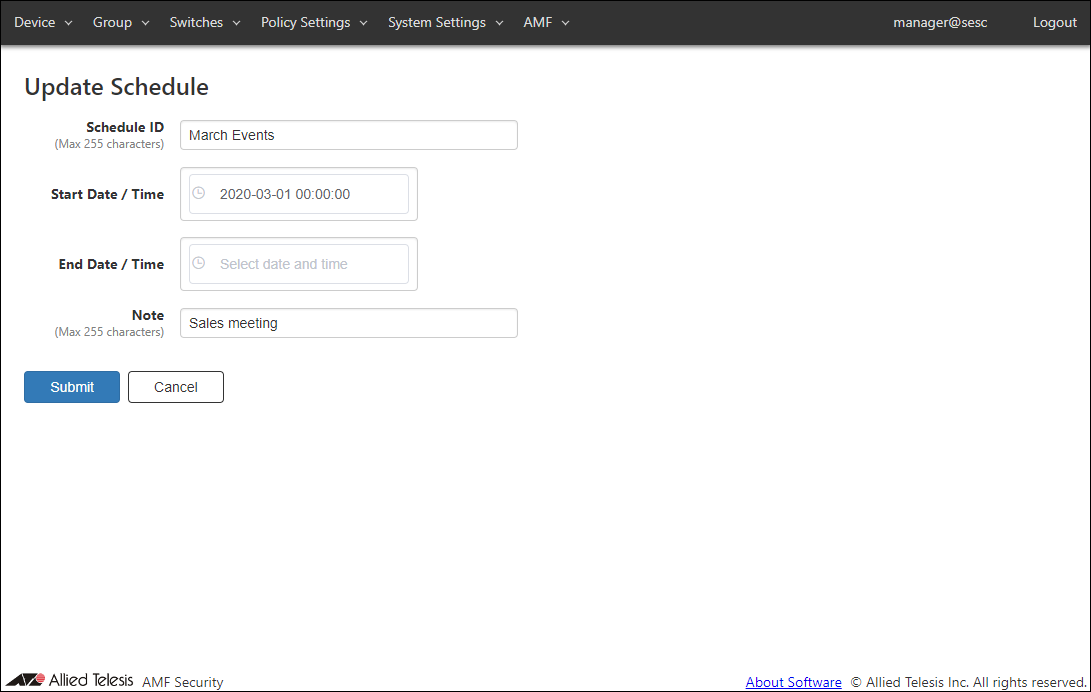
| Item Name | Description |
|---|---|
| Schedule ID (Mandatory) | ID (Name) of the schedule. Schedule ID must be unique. Max 255 characters |
| Start Date / Time | The beginning of the time range during a registered device or a device in the UnAuth Group is allowed to connect to the network. Date / Time can be selected using calendar controls or entered manually. When you enter them manually, use the format "YYYY-mm-dd" for date and "HH:MM:SS" for time. |
| End Date / Time | The end of the time range during a registered device or a device in the UnAuth Group is allowed to connect to the network. Date / Time can be selected using calendar controls or entered manually. When you enter them manually, use the format "YYYY-mm-dd" for date and "HH:MM:SS" for time. |
| Note | Arbitrary string (comment) for the schedule. Max 255 characters. |
- Date
- Time
| Item Name | Description |
|---|---|
| Page Bottom | |
| Submit | Update the schedule. |
| Cancel | Cancel the operation for updating the schedule. |
Action List
This page shows a list of actions such as Block and Quarantine which are being executed on the Device > Active Device List page or at the request of external applications.You can also unblock devices by deleting actions on this page.
NoteTo unblock an AMF Security mini reported suspected device in an AMF Application Proxy environment, use this page to delete a corresponding action. Refer to Quick Tour's What is AMF Security mini > What is the AMF Application Proxy for more details on the AMF Application Proxy.
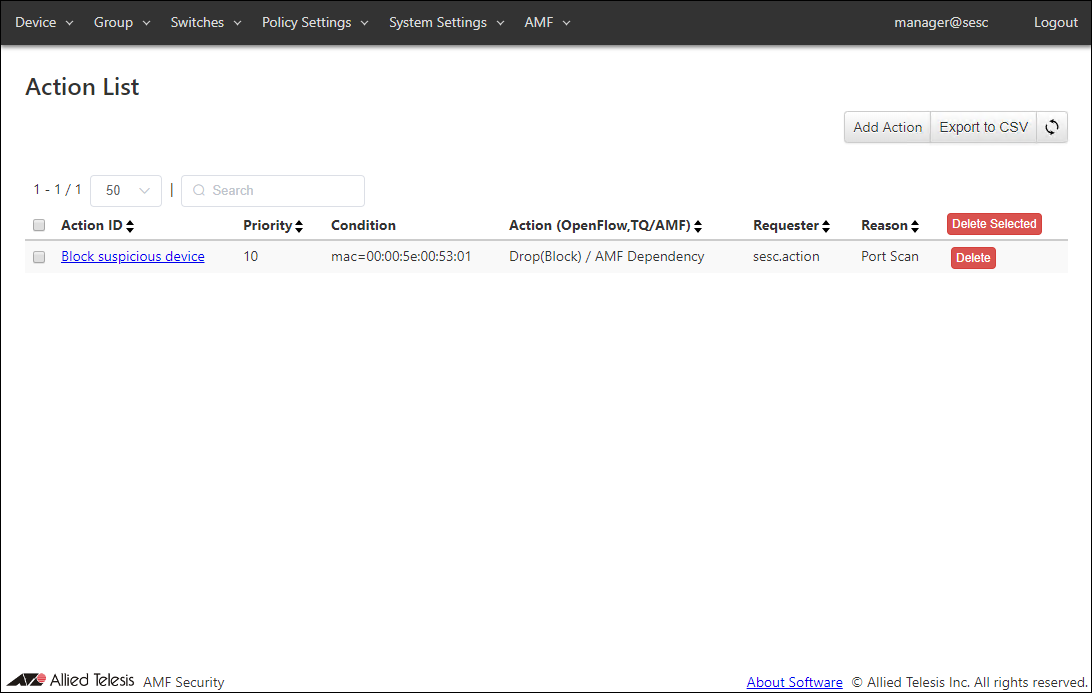
| Item Name | Search | Sort | Note |
|---|---|---|---|
| Action ID | × | × | |
| Priority | × | × | |
| Condition | △* | × | |
| Action (OpenFlow, TQ/AMF) | △ *1 | △*2 | |
| Requester | × | × | |
| Reason | × | × |
| Item Name | Description |
|---|---|
| Action ID | ID (Name) of the action. It is automatically assigned if unspecified. When clicked, the Action Detail page for the action is displayed. |
| Priority | Priority of the action. Smaller number has higher priority. Thus the matching action with the smaller priority value is executed. |
| Condition | Trigger condition of the action. |
| Action (OpenFlow, TQ/AMF) | Action OpenFlow/TQ Action (Pass(Permit), Quarantine, Drop(Block) and Log-Only) and AMF Action (Quarantine, Drop Packets, Link-Down and IP-Filter) are displayed. |
| Requester | Name or identifier of the system which runs the action. "Sesc.action" indicates the action operated by AMF Security mini, and "sesc.trap.XXX" indicates the action from the linked application (XXX is different depending on the linked application). |
| Reason | Reason why the action is triggered. |
| Item Name | Description |
|---|---|
| Page Top | |
| Add Action | Open the Add Action page. |
| Export to CSV | Start downloading of a list of actions in CSV format. |
| Refresh | Refresh the Action List page. |
| Action List | |
| Delete Selected | Delete all the checked actions. |
| Delete | Delete the action. |
NoteRefer to Appendix > CSV File for CSV Files.
Add Action
This page lets you add a new action.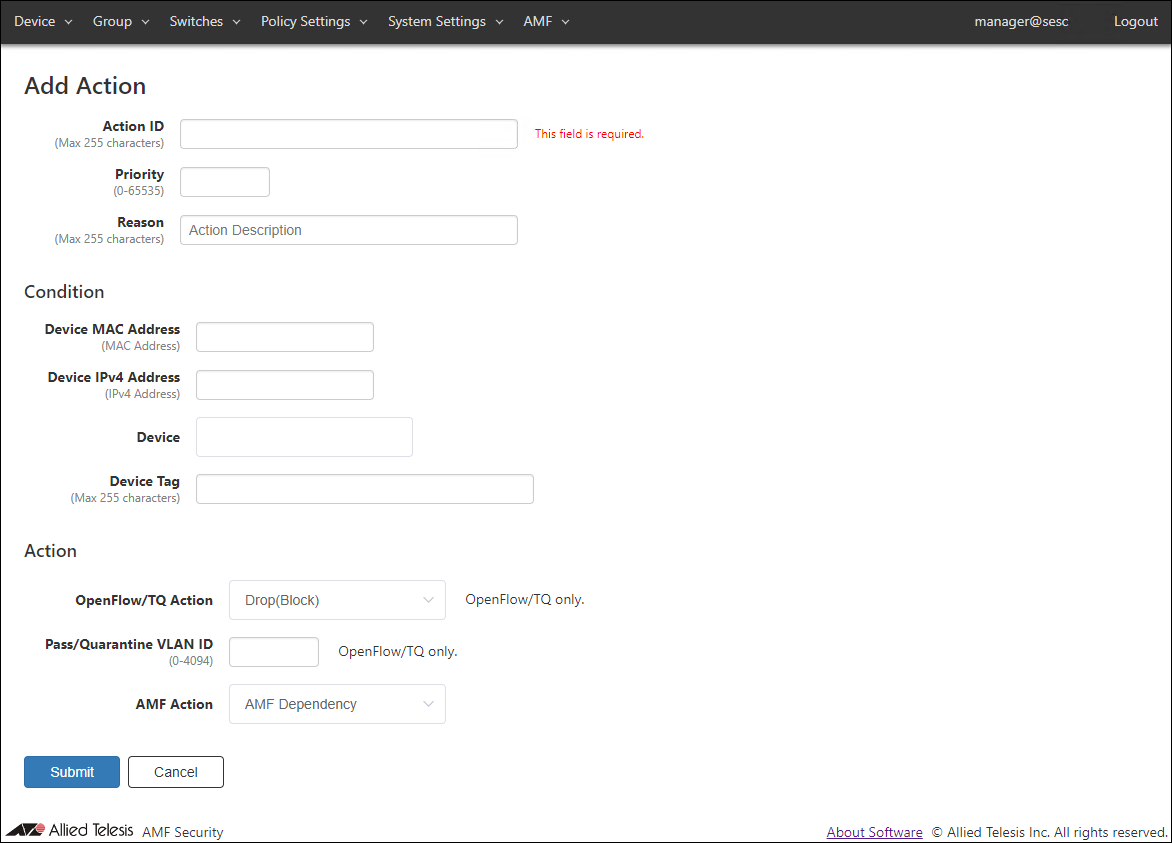
| Item Name | Description |
|---|---|
| Action ID (Mandatory) | ID (Name) of the action. Action ID must be unique. Max 255 characters |
| Priority | Priority of the action. It must be an integer between 1 and 65535. Smaller number has higher priority. Thus the matching action with the smaller priority value is executed. Priority value is set to 10 if it is unspecified. |
| Reason | Administrative comment such as a reason for running this action. Max 255 characters |
| Condition | |
| Device MAC Address | Unicast MAC Address of the target device. Valid formats are as follows xx:xx:xx:xx:xx:xx, xx-xx-xx-xx-xx-xx, xxxx.xxxx.xxxx |
| Device IPv4 Address | Unicast IPv4 Address of the target device. |
| Device | Device ID of the target device. Maximum 100 device IDs are shown in the dropdown list. If you enter text in the field, device IDs in the dropdown list are dynamically filtered to the ones which contain the input text in Device ID, Tag or Note (it shows maximum 100 elements). From the dropdown list, select a Device ID for the device. |
| Device Tag | Device Tag of the target device. |
| Action | |
| OpenFlow/TQ Action | An action of TQ's AMF Application Proxy to be applied to the target device.
|
| Pass/Quarantine VLAN ID | A VLAN ID on which the device is allowed to transmit packets. |
| AMF Action | An action to be taken on the AMF network deploying AW+ AMF Application Proxy.
|
| Item Name | Description |
|---|---|
| Page Bottom | |
| Submit | Add a new action with the input data. |
| Cancel | Cancel the operation for adding a new action. |
Action Detail
This page shows detailed information about the action.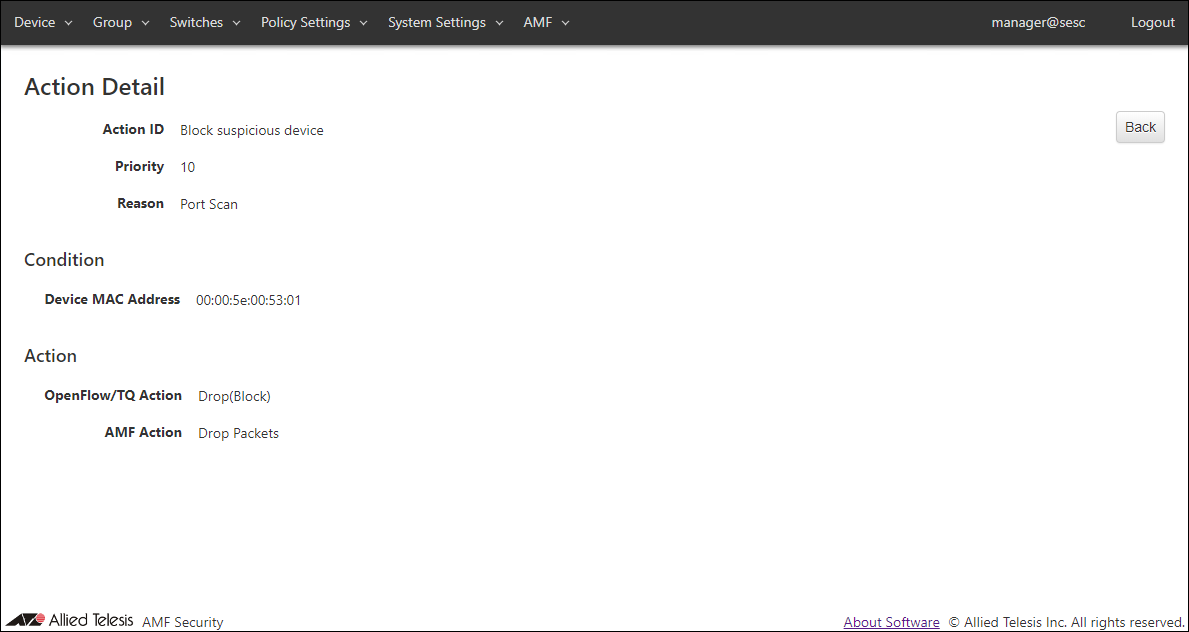
| Item Name | Description |
|---|---|
| Action ID | ID (Name) of the action. It is automatically assigned if unspecified. |
| Priority | Priority of the action. Smaller number has higher priority. Thus the matching action with the smaller priority value is executed. |
| Reason | Reason why the action is triggered. |
| Condition | |
| Device MAC Address | Unicast MAC Address of the target device. |
| Action | |
| OpenFlow/TQ Action | An action of TQ's AMF Application Proxy to be applied to the target device.
|
| Pass/Quarantine VLAN ID | A VLAN ID on which the device is allowed to transmit packets. This item is displayed when the OpenFlow/TQ Action is Pass(Permit) and Quarantine. |
| AMF Action | An action to be taken on the AMF network deploying AW+ AMF Application Proxy.
|
| Item Name | Description |
|---|---|
| Page Top | |
| Back | Go back to the Action List page. |
12 Jul 2022 15:30