SNMP Parameter
A SNMP Parameter is a group of SNMP configurations such as community name, username, context name and security level. It is used by the SNMP Plug-in to access devices via SNMP.
This section explains how to create, view and edit SNMP Parameters.
SNMP Parameter List
"SNMP Parameter List" lists all SNMP Parameters with some of their properties such as parameter name, comment and community name.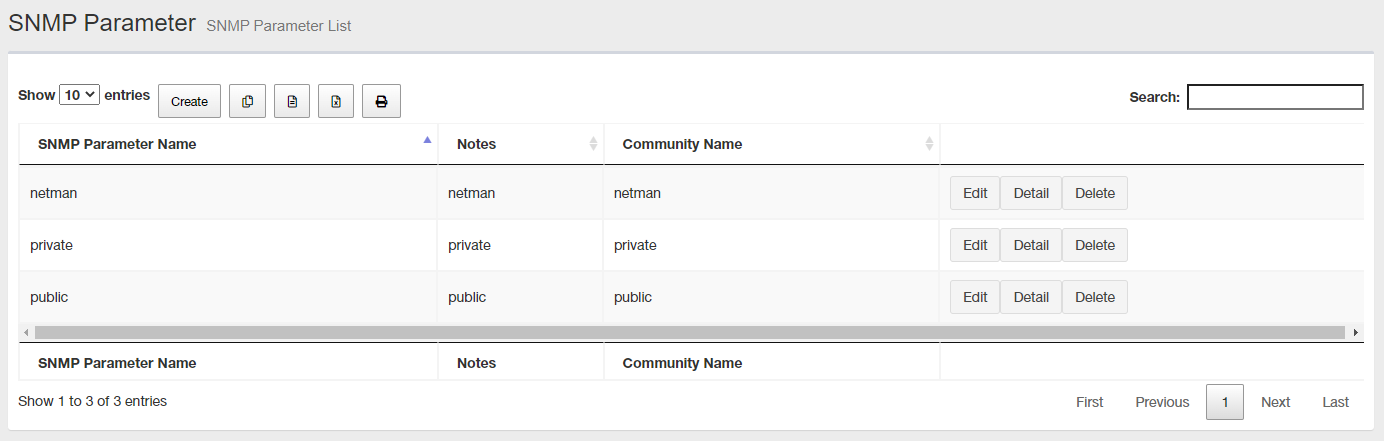
| Item Name | Description |
|---|---|
| Number of items displayed on the page | Lets you select a number of SNMP Parameters displayed on a single page. |
| "Create" button | Lets you create a new SNMP Parameter. |
 Copy to Clipboard |
Copies the SNMP Parameter list (name, comment and community name) to clipboard as a tab-delimited text. It is useful when you want to copy a list to your text editor. You can filter target subnets with "Search" box. "Number of items on the page" and the current page do not affect an output. |
 Export to CSV file |
Exports the SNMP Parameter list (name, comment and community name) to a CSV file. You can filter target subnets with "Search" box. "Number of items on the page" and the current page do not affect an output. |
 Export to Excel |
Exports the SNMP Parameter list (name, comment and community name) to an Excel book file (.xlsx for Microsoft Excel 2007 or later). You can filter target subnets with "Search" box. "Number of items on the page" and the current page do not affect an output. |
 |
Shows the SNMP Parameter list (name, comment and community name) on another browser window or tab and opens a print dialog box. You can filter target subnets with "Search" box. "Number of items on the page" and the current page do not affect an output. |
| Search field | Lets you filter target subnets by keywords. The search ignores case. |
| SNMP Parameter Name | Shows a name of the SNMP Parameter. |
| Notes | Shows a comment configured for the SNMP Parameter. |
| Community Name | Shows an SNMP community name configured for the SNMP Parameter. |
| "Edit" button | Opens Edit SNMP Parameter page for the SNMP Parameter. |
| "Details" button | Opens Edit SNMP Parameter page for the SNMP Parameter. |
| "Delete" button | Opens "Delete SNMP Parameter" dialog box for the SNMP Parameter. Click "Yes" to delete the SNMP Parameter. Click "No" or "Close (x)" button at the top left of the dialog box allows you to cancel the delete operation and go back to the "SNMP Parameter List" page. |
| Displayed Range | Currently displayed range of the list is shown as "From Xth to Yth out of Z items". |
| Page Navigation | Lets you view a specific page of the list.
|
Create SNMP Parameters
This page lets you create a new SNMP Parameter.Required parameters vary depending on a SNMP version you are going to use.
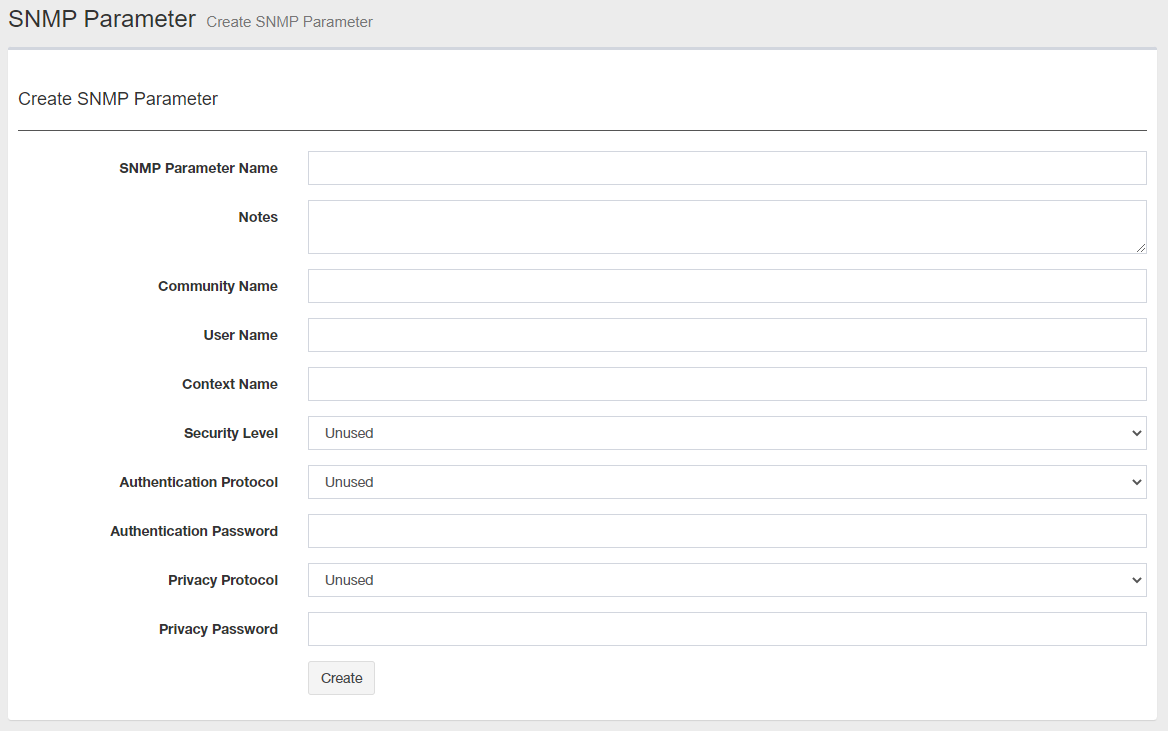
| Item Name | SNMP Versions | Description |
|---|---|---|
| SNMP Parameter Name | v1/v2c/v3 | Enter a name of the SNMP Parameter. You can specify 1 to 255 single-byte alphabets, numbers, and symbols (only spaces " % , - < > ^ _ ` { | } ~ can be used). A SNMP Parameter is a group of SNMP configurations such as community name, username, context name and security level. It is used by the SNMP Plug-in to access devices via SNMP. |
| Notes | Any | Enter a comment. You can specify half-width alphabets, numbers, and symbols within 255 characters. |
| Community Name | v1/v2c | Enter a community name. You can specify half-width alphabets, numbers, and symbols (space ! # $ % & ' ( ) * + - . / : ; < = > @ [ \ ] ^ , _ ` { | } ~) within 255 characters. |
| Username | v3 | Enter Username. You can specify 1 to 32 single-byte letters, numbers, and spaces. |
| Context Name | v3 | Enter Context Name You can specify 1 to 32 single-byte alphabets and numbers. |
| Security Level | v3 | Select a security level. Select either "None", "NoAuth / NoPriv", "Auth / NoPriv" or "Auth / Priv". |
| Authentication Protocol | v3 | "MD5" or "SHA" (When "Security Level" is set to "Auth / NoPriv" or "Auth / Priv"). "None" (When "Security Level" is other than the previously mentioned.). |
| Authentication Password | v3 | Enter an authentication password. You can specify 1 to 64 single-byte alphabets and numbers. |
| Encryption Protocol | v3 | "DES" or "AES" (When "Security Level" is set to "Auth / Priv"). "None" (When "Security Level" is other than the previously mentioned.). |
| Encryption Password | v3 | Enter an encryption password. You can specify 1 to 64 single-byte alphabets and numbers. |
| "Create" button | Creates a new SNMP Parameter with the data you input on the page. |
SNMP Parameter Details
You can see the details of an SNMP Parameter on this page.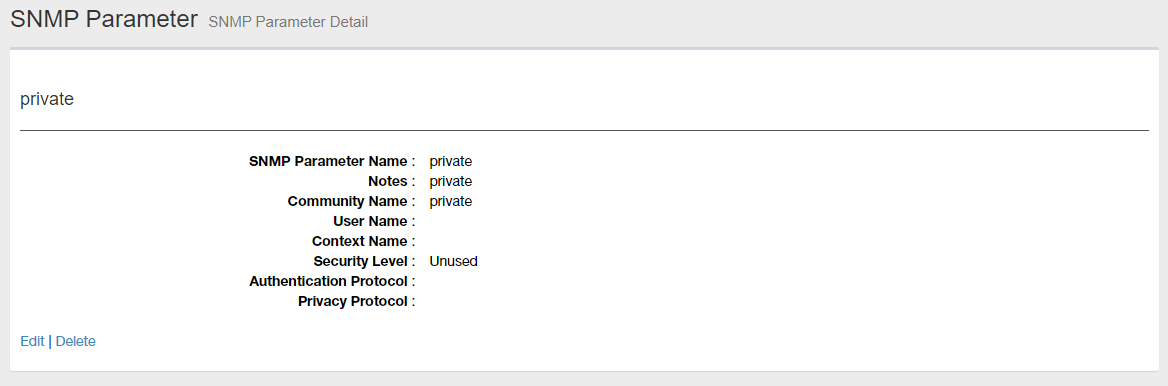
| Item Name | Description |
|---|---|
| SNMP Parameter Name | Shows a name of the SNMP Parameter. |
| Notes | Shows a comment. |
| Community Name | Shows a community name for SNMPv1 and v2c. |
| Username | Shows a Username for SNMPv3. |
| Context Name | Shows a context name for SNMPv3. |
| Security Level | Shows an SNMPv3 security level. |
| Authentication Protocol | Shows an authentication protocol for SNMPv3. |
| Encryption Protocol | Shows an encryption protocol for SNMPv3. |
| Edit | Opens Edit SNMP Parameter page for the SNMP Parameter. |
| Delete | Opens "Delete SNMP Parameter" dialog box for the SNMP Parameter. Click "Yes" to delete the SNMP Parameter. Click "No" or "Close (x)" button at the top left of the dialog box allows you to cancel the delete operation and goes back to "SNMP Parameter Details" page. |
Edit SNMP Parameter
This page lets you change a SNMP Parameter properties.Required parameters vary depending on a SNMP version you are going to use.
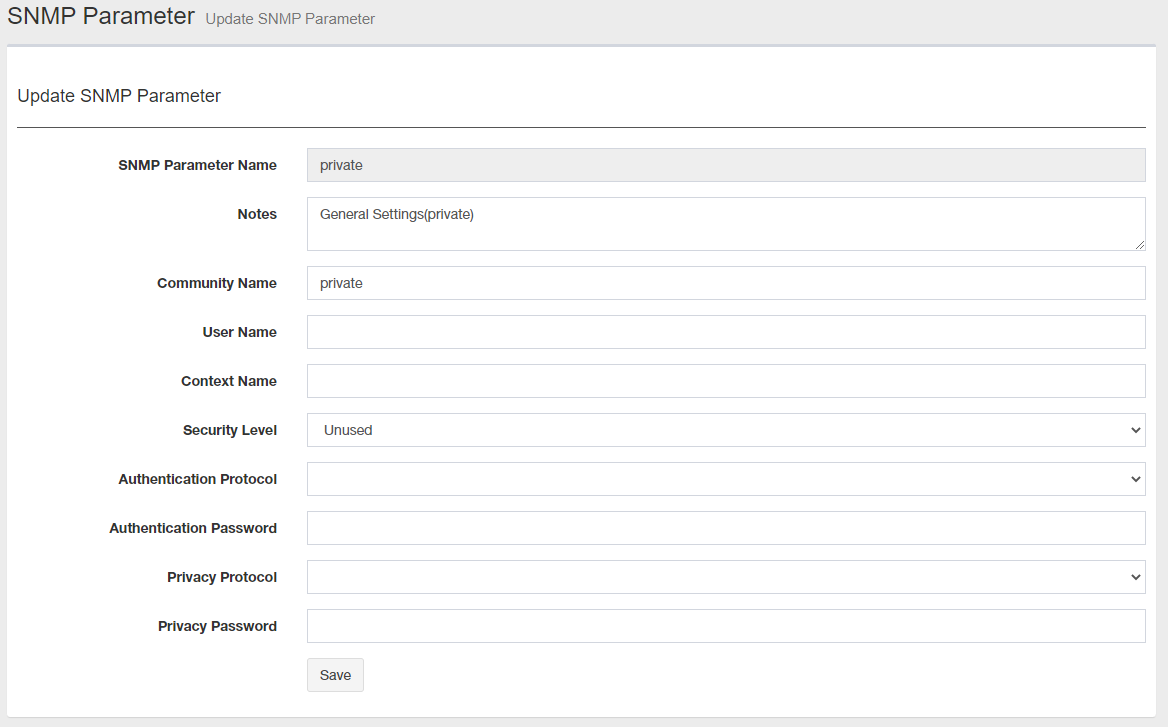
| Item Name | SNMP Versions | Description |
|---|---|---|
| SNMP Parameter Name | v1/v2c/v3 | Shows a name of the SNMP Parameter.NoteAn SNMP Parameter name cannot be changed once it was created. |
| Notes | Any | Enter a comment. |
| Community Name | v1/v2c | Enter a community name (max 255 characters). |
| Username | v3 | Enter a Username (1 to 32 characters). |
| Context Name | v3 | Enter a context name (max 32 characters). |
| Security Level | v3 | Select a security level. Select either "None", "NoAuth / NoPriv", "Auth / NoPriv" or "Auth / Priv". |
| Authentication Protocol | v3 | "MD5" or "SHA" (When "Security Level" is set to "Auth / NoPriv" or "Auth / Priv"). "None" (When "Security Level" is other than the previously mentioned.). |
| Authentication Password | v3 | Enter an authentication password (max 64 characters). |
| Encryption Protocol | v3 | "DES" or "AES" (When "Security Level" is set to "Auth / Priv"). "None" (When "Security Level" is other than the previously mentioned.). |
| Encryption Password | v3 | Enter an encryption password (max 64 characters). |
| "Change" button | Saves changes to the SNMP Parameter. |
01 Sep 2023 11:25