Device List
Device List
This page lists all devices stored in the SNMP Plug-in's database.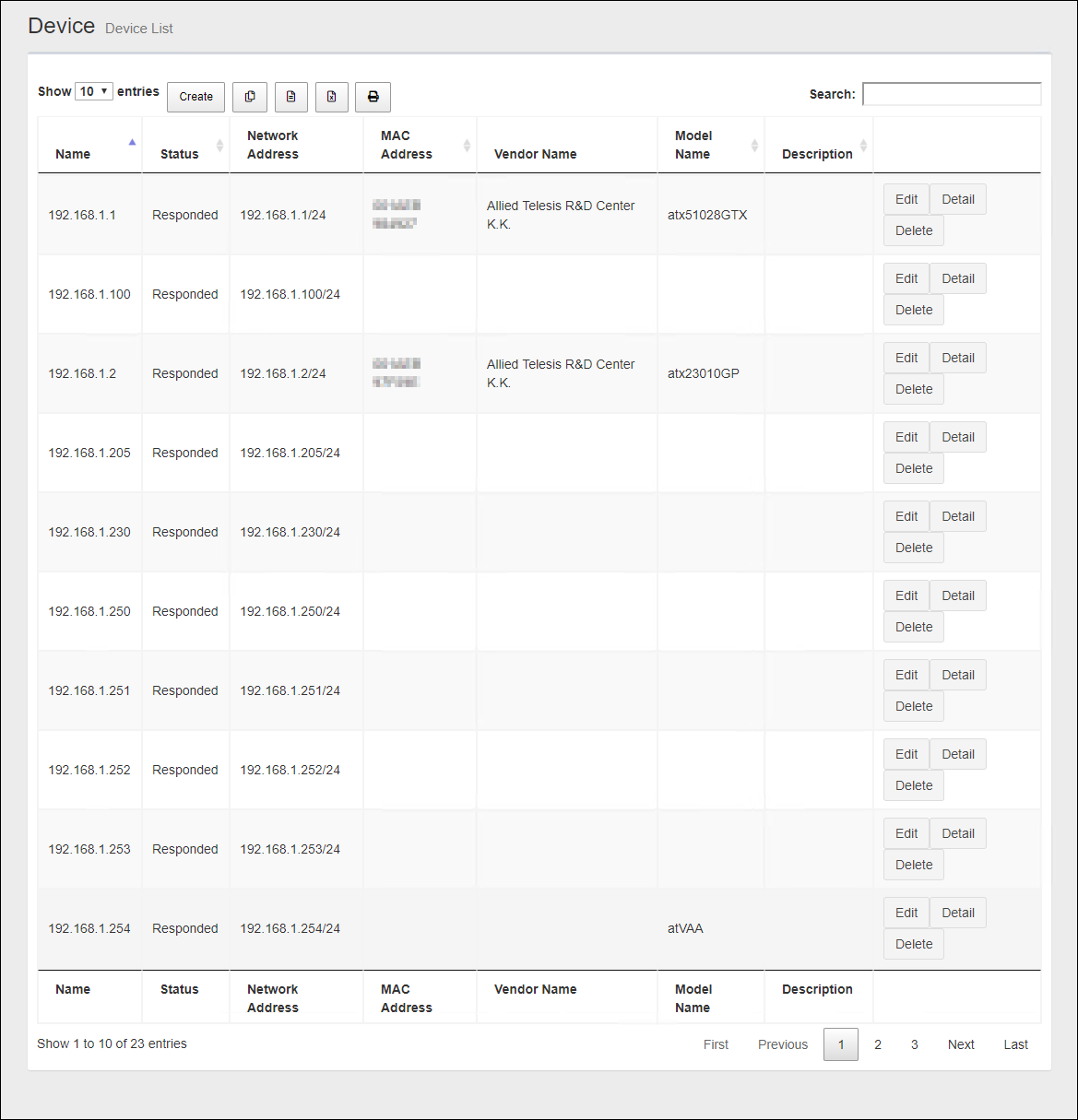
| Item Name | Description |
|---|---|
| Number of items displayed on the page | Lets you select a number of devices displayed on a single page. |
| "Create" button | Lets you add a new device to monitor. |
 Copy to Clipboard |
Copies the device list (name, status, network address, MAC address, vendor name, model name and comment) to clipboard as a tab-delimited text. It is useful when you want to copy a list to your text editor. You can filter target subnets with "Search" box. "Number of items on the page" and the current page do not affect an output. |
 Export to CSV file |
Exports the device list (name, status, network address, MAC address, vendor name, model name and comment) to a CSV file. You can filter target subnets with "Search" box. "Number of items on the page" and the current page do not affect an output. |
 Export to Excel |
Exports the device list (name, status, network address, MAC address, vendor name, model name and comment) to an Excel book file (.xlsx for Microsoft Excel 2007 or later). You can filter target subnets with "Search" box. "Number of items on the page" and the current page do not affect an output. |
 |
Shows the device list (name, status, network address, MAC address, vendor name, model name and comment) on another browser window or tab and opens a print dialog box. You can filter target subnets with "Search" box. "Number of items on the page" and the current page do not affect an output. |
| Search field | Lets you filter target subnets by keywords. The search ignores case. "." and "/" in the search keywords do not match them in the network address ("." and "/" in "192.168.1.0/24"). |
| Subnet Name | Shows the device name. |
| Status | Shows the status of ping test from SNMP Plug-in to the device. |
| Network Address | Shows a subnet address block by an IPv4 address and a prefix length (xxx.xxx.xxx.xxx/xx format). |
| MAC Address | Shows the device MAC address. |
| Vendor Name | Shows the vendor name of the device. |
| Model Name | Shows the model information (SysObjectID). |
| Notes | Shows a comment configured for the device. |
| "Edit" button | Open the Edit Device page for the device. |
| "Details" button | Open the Device Details page for the device. |
| "Delete" button | The Delete Device dialog is displayed. Click the "Yes" button to delete the device. Click the "No" or "Close (x)" button at the top left of the dialog to return to the Device List. |
| Displayed Range | Currently displayed range of the list is shown as "From Xth to Yth out of Z items". |
| Page Navigation |
Lets you view a specific page of the list.
|
Device
Create devices, view details, and change settings.Device Details
You can open the Device Details page by selecting a device on the Tree View and clicking a device name in the node attributes section on the Device Tree View page.The Device Details page shows its attributes and an event list.
Node Attributes
| Item Name | Contents |
|---|---|
| "Gear" icon |
Clicking "Gear" icon shows the operation submenu for the device.
|
| Subnet Name | Shows a name of the device. |
| Hostname | Shows the hostname of the device. |
| Network Address | IPv4 address and prefix length (xxx.xxx.xxx.xxx/xx format) |
| MAC Address | Shows the device MAC address. |
| Vendor Name | Shows the vendor name of the device. |
| Model Name | Shows the model information (SysObjectID). |
| Community Name (Get) | The community name used to retrieve information from the device via SNMP. |
| Community Name (Set) | The community name used to write information to the device via SNMP. |
| Status | The response status of the device to Ping sent from the SNMP plug-in. |
| Edit | Click to open the Edit Device page for that device. |
| Delete | Click to open the Delete Device dialog. Click the "Yes" button to delete the device. Click the "No" or "Close (x)" button at the top left of the dialog to return to the Device Details. |
Add Device
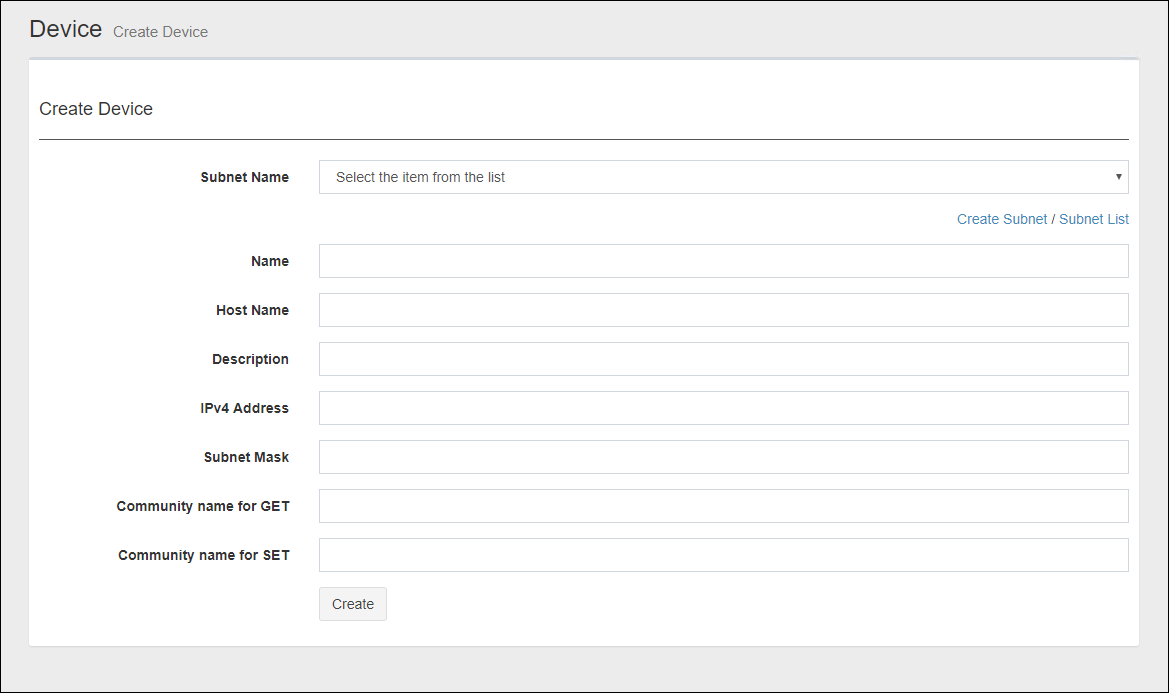
Select a subnet in the Tree view of the Tree View and select "Create Device" from the gear icon submenu to display the Add Device page.The Add Device page creates a new device in the subnet under the management of the SNMP plug-in.
NoteWhen manually adding a device, the MAC address, IPv4 address, and vendor name may not be displayed on the Device list page depending on the model. In that case, perform an Auto Discovery on the target subnet. Depending on the result of the Auto Discovery, the information is displayed.
| Item Name | Contents |
|---|---|
| Subnet Name | Select a subnet to which the new device belongs to. |
| Add Subnet | The Create Subnet page is displayed. |
| Subnet List | The Subnet List page is displayed. |
| Subnet Name | Enter the name of the device. You can specify any character string. |
| Hostname | Enter the hostname of the device. You can specify any character string. |
| Notes | Shows a comment configured for the device. |
| IPv4 address | Enter the IPv4 address of the device (for example, 192.168.1.0). |
| Subnet Mask | Enter the subnet mask of the device (for example, 255.255.255.0). |
| Community Name (Get) | Enter the community name used to retrieve information from the device via SNMP. |
| Community Name (Set) | Enter the community name to use when writing information to the device via SNMP. |
| "Create" button | Saves the specified device information as a new device and moves it to theDevice Tree View. |
Edit Device
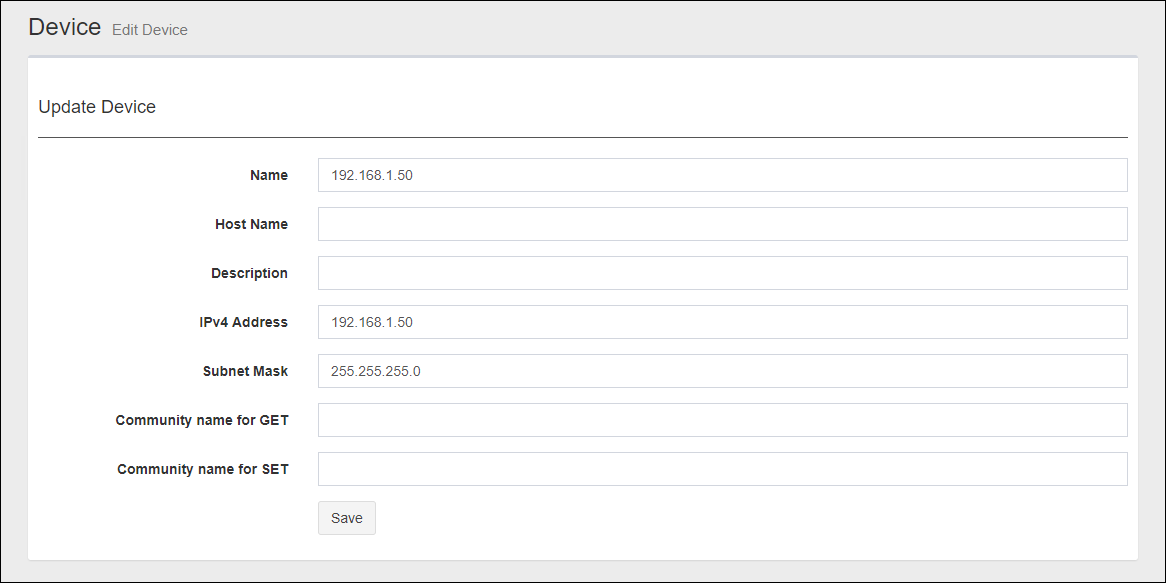
Click "Edit" in "Node Attributes" on the Device Details page to display the Update Device page.In the Update Subnet page, you can edit the node attributes of the corresponding subnet.
| Item Name | Contents |
|---|---|
| Subnet Name | Enter the name of the device. You can specify any character string. |
| Hostname | Enter the hostname of the device. You can specify any character string. |
| IPv4 address | Enter the IPv4 address of the device (for example, 192.168.1.0). |
| Subnet Mask | Enter the subnet mask of the device (for example, 255.255.255.0). |
| Community Name (Get) | Enter the community name used to retrieve information from the device via SNMP. |
| Community Name (Set) | Enter the community name to use when writing information to the device via SNMP. |
| "Save" button | Save the changes to the settings for that subnet and go to the Device Details page. |
20 Sep 2021 14:30