Add Firmware
This page lists the firmware files that have been uploaded to the AWC Plug-in. You can also assign a firmware file to APs so that the APs can be updated to the specified firmware by a scheduled or manual task.
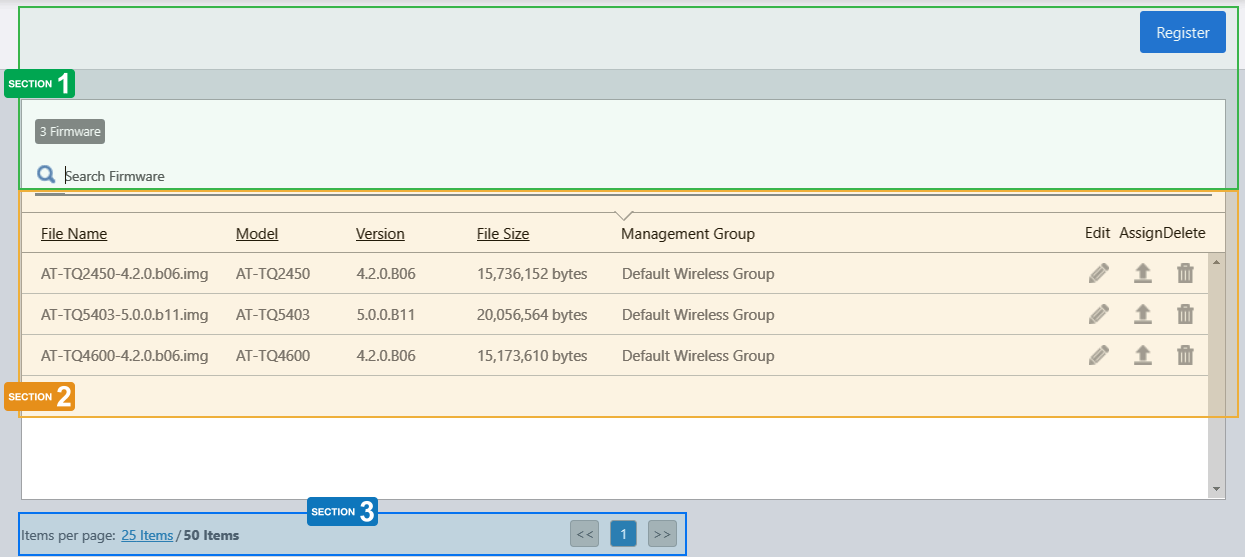
Section 1
| Item Name | Description |
|---|---|
| "Register" button |
Add a firmware file to the AWC Plug-in's firmware database. Refer to Operation Reference > Miscellaneous Settings > Reboot AP and Update AP Firmware > Add Firmware for more details. |
| X Firmware | Shows the number of firmware files in the list. |
| Search Firmware |
Lets you filter the list of firmware files. The Search field lets you enter a partial string to match. The screen displays entries with that string in one of the following fields: "Filename", "Device Type" or "Management Group". To remove the filter, delete the string from the search field and press enter. NoteThe search is case-sensitive. |
Section 2
| Item Name | Description |
|---|---|
| File Name | Shows the firmware filename. |
| Model | Shows the model name of the AP on which the firmware can be installed. |
| Version | Shows the version number of the firmware image. |
| File Size | Shows the firmware file size. |
| Management Group | Shows Management Groups for the firmware. |
| Edit (pencil icon) | Lets you change Management Groups for the firmware. |
| Assign |
Lets you select APs on which the firmware will be installed. When you update the APs' firmware manually or by a scheduled task, the selected firmware file will be installed on the APs. Refer to Operation Reference > Miscellaneous Settings > Reboot AP and Update AP Firmware > Assign Firmware to AP for more details. Firmware files assigned to APs can be confirmed in the Wireless AP Details or Wireless AP Status Details pages' General Information section. |
| Delete (trashbin icon) | Lets you delete the firmware from the AWC Plug-in's database. |
Section 3
| Item Name | Description |
|---|---|
| Items per page | Specifies the number of items per page. |
| << | Goes to the first page of the list. |
| (Page Number) | Shows the current page number in the list. |
| >> | Goes to the last page of the list. |
21 Oct 2022 11:57