Edit AWC Settings
This section explains how to configure AWC's behavior for optimizing channel and transmit power.
NoteAWC parameters can be configured for each Management Group.Refer to Use AWC" > "Prerequisite for the configuration required for AP Profiles and Wireless AP Individual Configuration for AWC Calculation.
- Select "Wireless Configuration" > "AWC Settings".
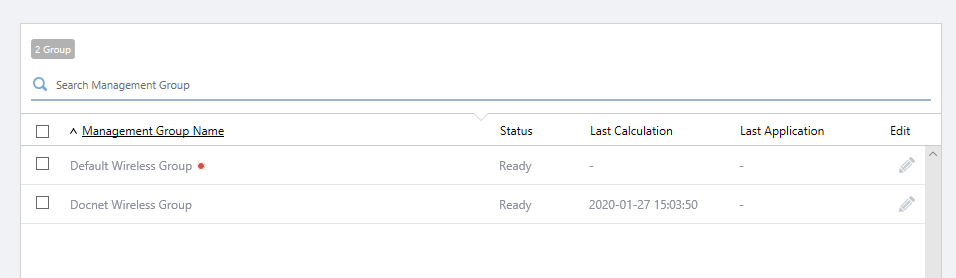
- Click the "Edit (pencil)" icon for the target Management Group.
- The "Edit AWC Settings" dialog box will appear.
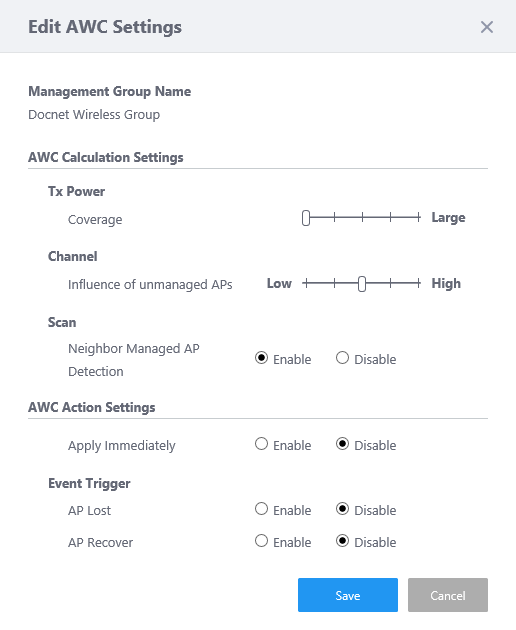
Table 1: "Edit AWC Settings" dialog box. Item Name Description Management Group Shows the target Management Group Name. AWC Calculation Settings This allows you to change the calculation parameters used by the AWC function.
- Tx Power
- Coverage:
Moving the slider to the right widens the area covered by each AP in the Management Group.
Moving the slider to the left narrows the area covered by each AP in the Management Group.
- Coverage:
- Channel
- Unmanaged AP Influence:
Moving the slider to the right makes AWC more sensitive to the channels used by unmanaged APs. Channels with less interference from those unmanaged APs will be selected for use by the managed APs.
Moving the slider to the left makes AWC more sensitive to the channels used by managed APs. Channels with less interference from other managed APs will be selected for use by the managed APs.
- Unmanaged AP Influence:
- Scan
- Neighbor Managed AP Detection:
Set whether to detect the signal strength of Neighboring Managed APs.
When enabled, channels used by all Managed APs are scanned and used for AWC Calculation. In this case, the channel currently being used is periodically stopped, so the performance of the wireless network service slightly decreases.
When disabled, detection does not work. In this case, the effect of Managed APs may not be reflected correctly.
Note
If you disable Neighbor Management AP Detection, AWC Calculation may not work properly.
- Neighbor Managed AP Detection:
AWC Action Settings Specify when to run calculation or application.
- Apply Immediately:
When enabled, AWC applies calculated channel and transmit power to the APs immediately after the calculation is completed. When disabled, you can create a scheduled task to apply the calculation results at an particular time.
- Event Trigger
- AP Lost:
When enabled, AWC recalculates transmit powers and applies them to all APs in the Management Group when it detects the loss of an AP operating with the previously calculated results. Channels are not changed.
Note
The clients will not be disconnected if only the transmit power is changed on TQ4400, TQ4400e, and TQ4600 APs. For TQ1402, TQm1402, TQ5403, TQ5403e, TQm5403, TQ6602, TQ6602 GEN2, TQm6602 GEN2, TQ6702 GEN2, and TQm6702 GEN2, Wireless Clients connected to the AP are disconnected.
- AP Recover:
When enabled, AWC recalculates transmit powers and applies them to all APs in the Management Group when it detects the recovery of an AP which had operated with the calculated results and had left the network. Channels are not changed.
Note
The clients will not be disconnected if only the transmit power is changed on TQ4400, TQ4400e, and TQ4600 APs. For TQ1402, TQm1402, TQ5403, TQ5403e, TQm5403, TQ6602, TQ6602 GEN2, TQm6602 GEN2, TQ6702 GEN2, and TQm6702 GEN2, Wireless Clients connected to the AP are disconnected.
- AP Lost:
- Tx Power
- Edit AWC settings as required.
- Click "Save" to close the dialog box.
The modified AWC configuration is used the next time AWC calculates optimal channels and transmit powers. If the target Management Group has a scheduled task for applying AWC Calculation Results, the latest AWC Calculation Results are applied the next time the task runs.
◼ Manually Apply AWC Calculation Results
If you want to immediately recalculate and apply optimal channels and transmit powers, perform the following steps:
- On the "AWC Settings" page, check the Management Group that you want AWC to recalculate and apply optimal channels and transmit powers.
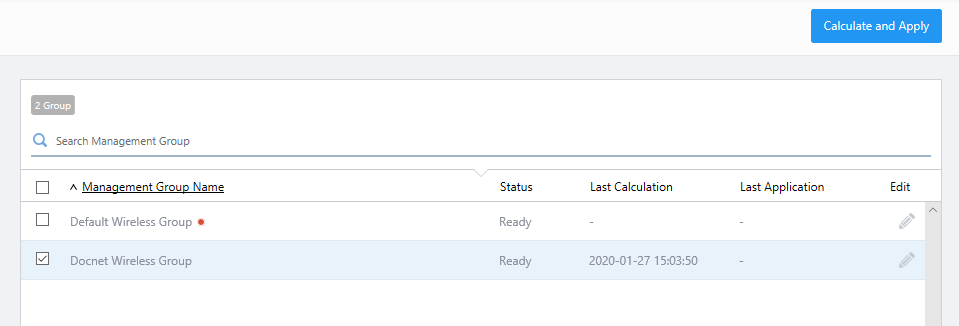
- Click the "Calculate and Apply" button at the top right of the Content section.
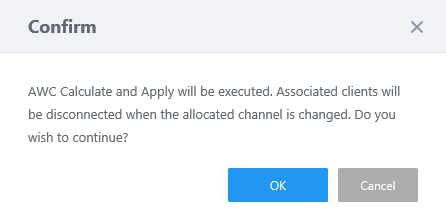
- The "Confirm" dialog box will appear.
If new channels are applied to APs, wireless clients connected to those APs will be disconnected.
To recalculate and apply channels and transmit powers, click "Run".
- AWC begins calculation and will apply the results.
The current status of this operation is displayed in the "State" field in the "AWC Settings" page.
14 Dec 2023 11:12