Channel Blanket
This page shows basic channel blanket (CB) information for each SSID.
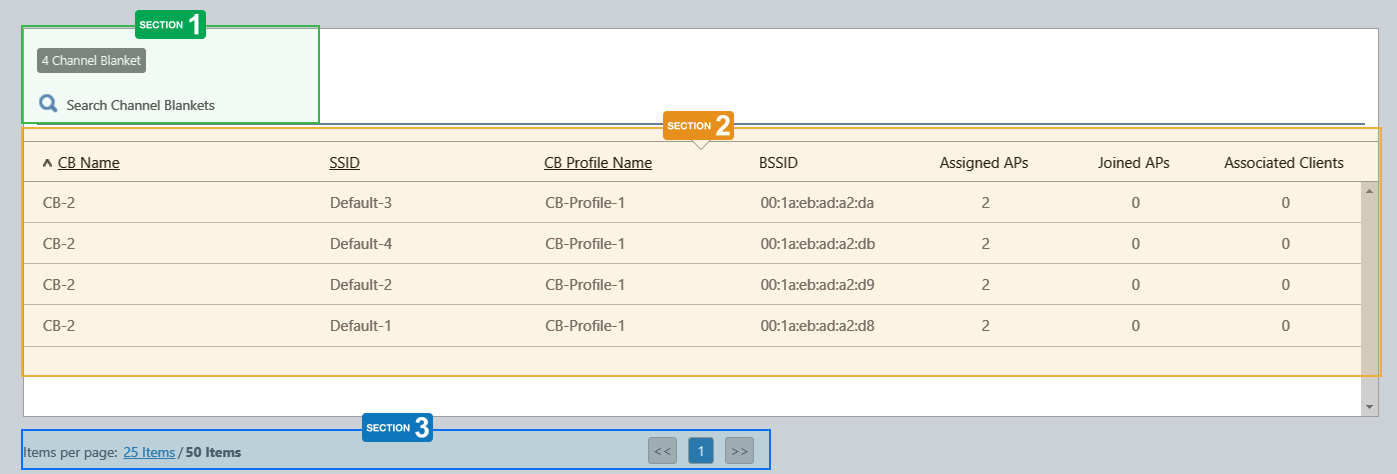
Section 1
| Item Name | Description |
|---|---|
| X Channel Blanket | Shows the number of CB VAPs. |
| Search Channel Blankets | Filter entries in the list by entering a partial string in the search box. The Search field lets you enter a partial string to match. The screen displays entries with that string in one of the following fields: "CB Name", "SSID", "CB Profile Name". To remove the filter, delete the string from the search field and press enter. NoteThe search is case-sensitive. |
Section 2
| Item Name | Description |
|---|---|
| CB Name | Shows the name of the channel blanket. |
| SSID | Shows the SSID of the CB VAP. |
| CB Profile Name | Shows the CB Profile name for the channel blanket. |
| BSSID | Shows the BSSID of the CB VAP. |
| Assigned APs | Shows the number of APs which the CB Profile is assigned to. This number includes APs that are not operational (e.g. temporarily powered off). |
| Joined APs | Shows the number of APs that have joined the channel blanket. This number only includes the APs that are actually providing wireless access as members of the channel blanket. It does not include APs that are temporarily powered off, or those that stop their radio signal because of being too close to other APs. |
| Associated Clients | Shows the number of clients that are connected to the CB VAP. |
Section 3
| Item Name | Description |
|---|---|
| Items per page | Specifies the number of items per page. |
| << | Goes to the first page of the list. |
| (Page Number) | Shows the current page number in the list. |
| >> | Goes to the last page of the list. |
14 Dec 2023 11:12