Add Task
You can use Tasks to perform operations such as applying configuration, updating firmware, and applying AWC calculation results at specific times.
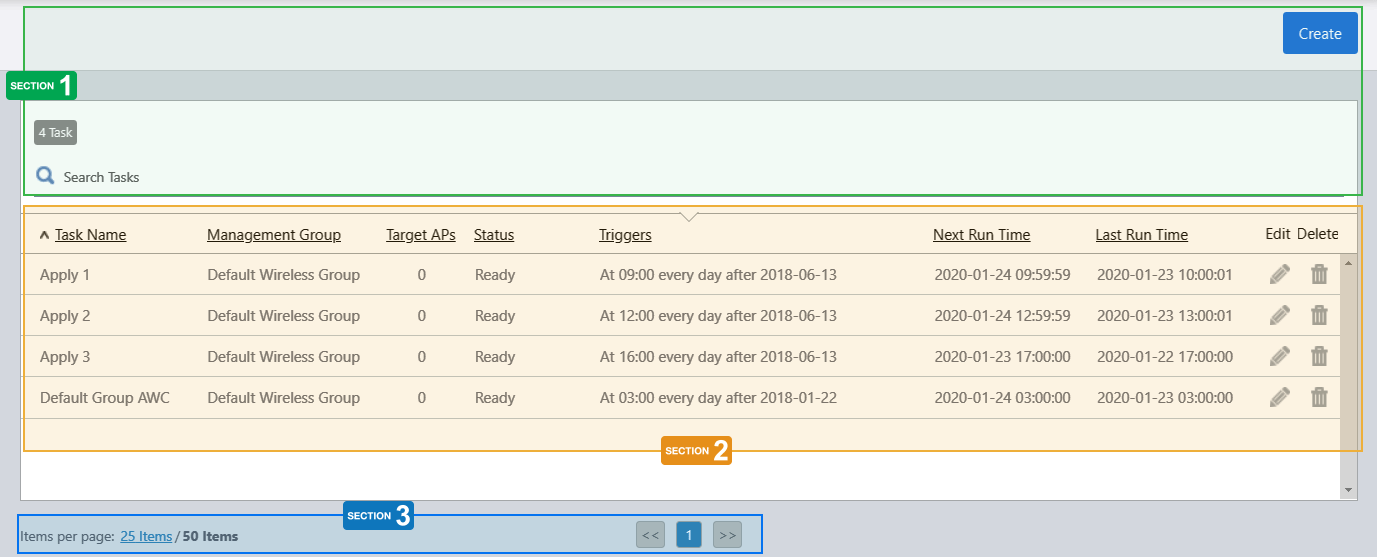
Section 1
| Item Name | Description |
|---|---|
| "Create" button | Creates a new Task. |
| X Task | Show the number of Tasks in the list. |
| Search Tasks |
Lets you filter the list of Tasks. The Search field lets you enter a partial string to match. The screen displays entries with that string in one of the following fields: "Task Name" or "Management Group". To remove the filter, delete the string from the search field and press enter. NoteThe search is case-sensitive. |
Section 2
| Item Name | Description |
|---|---|
| Task Name | Shows the Task name. |
| Management Group | Shows the Management Group for the task. |
| Deployed APs | Shows the number of APs on which the task will be performed. |
| Status | Shows whether the task is enabled. |
| Trigger | Shows the schedule for when the task is performed. |
| Next Run Time | Shows the date/time when the task will next be performed. |
| Last Run Time | Shows the date/time when the task was last performed. |
| Edit (pencil icon) | Lets you edit the task. |
| Delete (trashbin icon) | Lets you delete the task. |
Section 3
| Item Name | Description |
|---|---|
| Items per page | Specifies the number of items per page. |
| << | Goes to the first page of the list. |
| (Page Number) | Shows the current page number in the list. |
| >> | Goes to the last page of the list. |
21 Oct 2022 11:59