Account Group
This section describes how to create multiple Accounts and manage them in multiple Account Groups.
What is Account Group
Accounts can be divided into accounts with permission to edit the Authorization database and accounts with permission to modify system settings. System administrators and general users can be registered separately.Account Groups associate accounts with switches (AMF Members). For each Account Group, you can view AMF Members that can be managed, and the devices under their management.
Using Account Groups not only clarifies switches to be managed and the devices connected to switches, but also enhances security by not being able to display switches that are not managed.
Add Account Group
Set the following items in Account Group.- Account Group ID
- Note
NoteRefer to System Settings > Account Group List for how to create Account Group.There is no default Account Group. If you do not create Account Group, you cannot select "Account Group ID" when creating Account or registering Device.
Add Account
Set the following items in Account.- Account Name
- Password
- Email Address
- Account Group ID (can be selected when Account Group is created)
- Whether authentication database can be edited
- Whether system settings can be changed
NoteYou need to initialize (delete and recreate) the AMF Security mini application instance in the Web GUI of your AlliedWare Plus device, if you forget Password for all Accounts that have the "Configure system settings" check box, including the default "manager". Please make sure that you keep your passwords safely and never forget them.
Refer to the AlliedWare Plus device manual for the setting method.
NoteRegister your Email Address in your account and set the Email Notification on the System Settings > Email Notification Settings page. This allows you to recover your password by email if you forget it.
Refer to Appendix / If you forget your password for instructions on how to recover your password by email.
NoteRefer to System Settings > Account List for how to create Account.Allied Telesis recommends that you do not set Account Group for the default "manager" or for Account created to manage the entire network.
Example of device management using Account Group
Account Groups associate accounts with switches (AMF Members).In the page below, only Switches that have the same Account Group as the Account Group set for the logged-in Account and devices connected to the Switch are displayed.
For example, the following describes an example in which there is one AMF Master (AT-AR4050S) in the machine room and one AMF Member (AT-x510) for each floor, and Account Group is created for each floor.
- Creating Account Name and Account Group
| Account Name | Account Group | Switch / Installation location |
|---|---|---|
| manager | (None) | All Switches / Machine room |
| 1F_admin 1F_user |
group_1 | AMF Member (AT-x510_1F) / First floor |
| 2F_admin 2F_user |
group_2 | AMF Member (AT-x510_2F) / Second floor |
| Switches | Account Group |
|---|---|
| AMF Master (AT-AR4050S) | admin_group |
| AMF Member (AT-x510_1F) | group_1 |
| AMF Member (AT-x510_2F) | group_2 |
- When logged in with the "manager" Account (no Account Group)
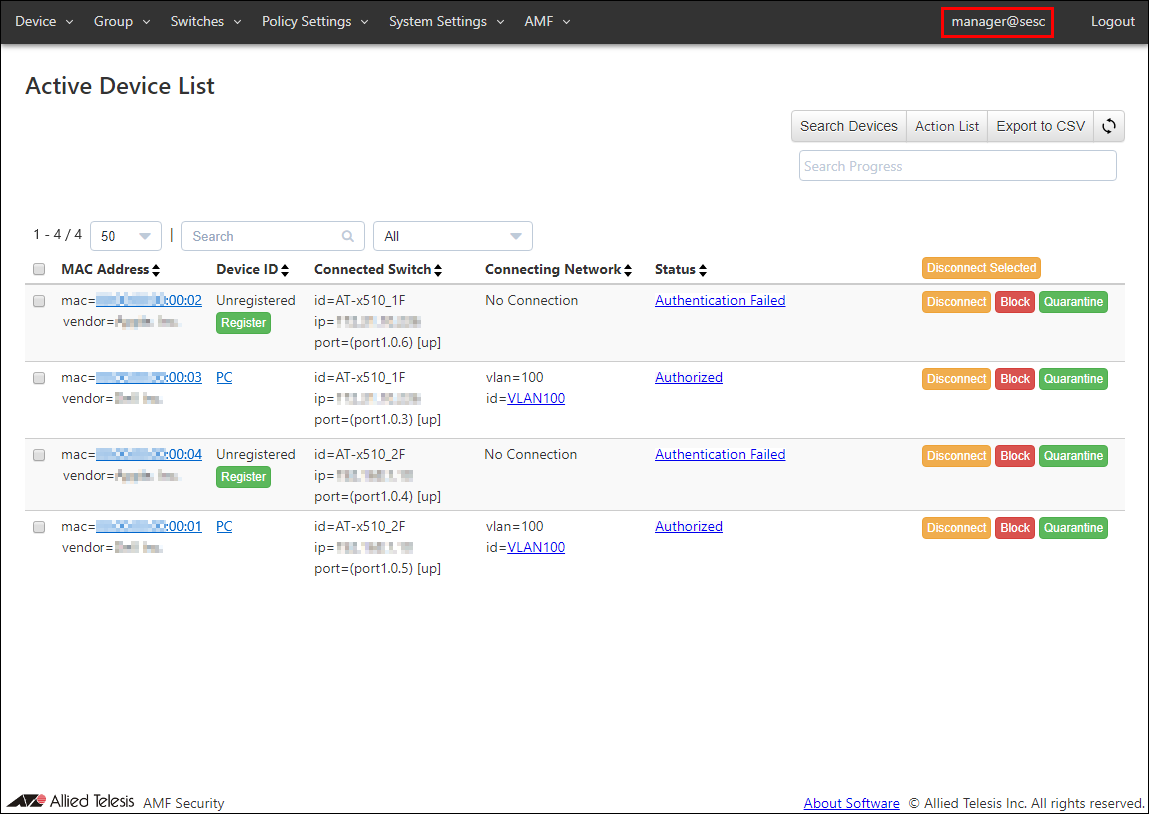
- When logging in with the "1F_admin" Account belonging to "group_1"
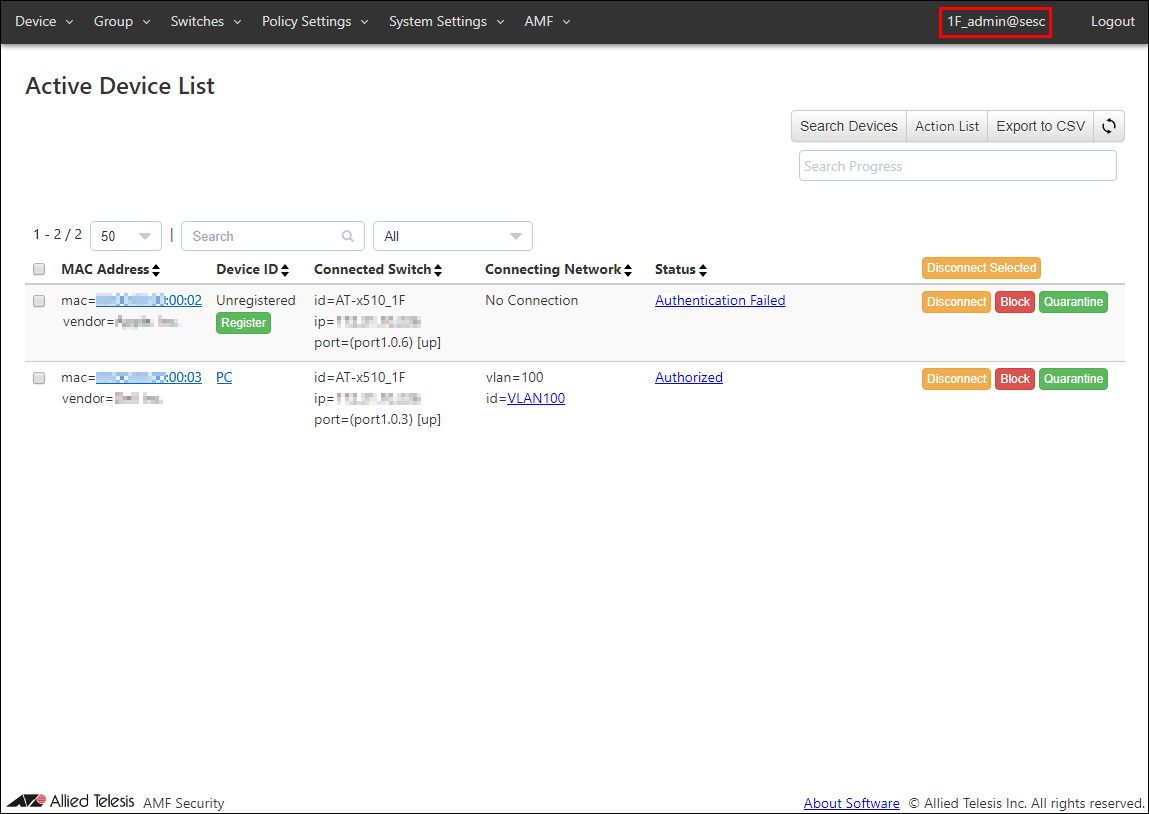
Note that the Switches > Active AMF Member List page, the related Switches are also displayed. However, in the above example, no Account Group has been set for the system administrator Account "manager" that manages the entire system, and AMF Master (AT-AR4050S) has Account Group "admin_group" that is different from AMF Members for each floor. By setting, AMF Master (AT-AR4050S) is displayed only with "manager" Account.
Registering Device
Refer to Quick Tour for the instruction on how to register Device.By selecting "Account Group ID" on the page for adding or editing Device, you can associate that device with the "Account Group ID".
The following is an example of the Switches > AMF Member Add page.
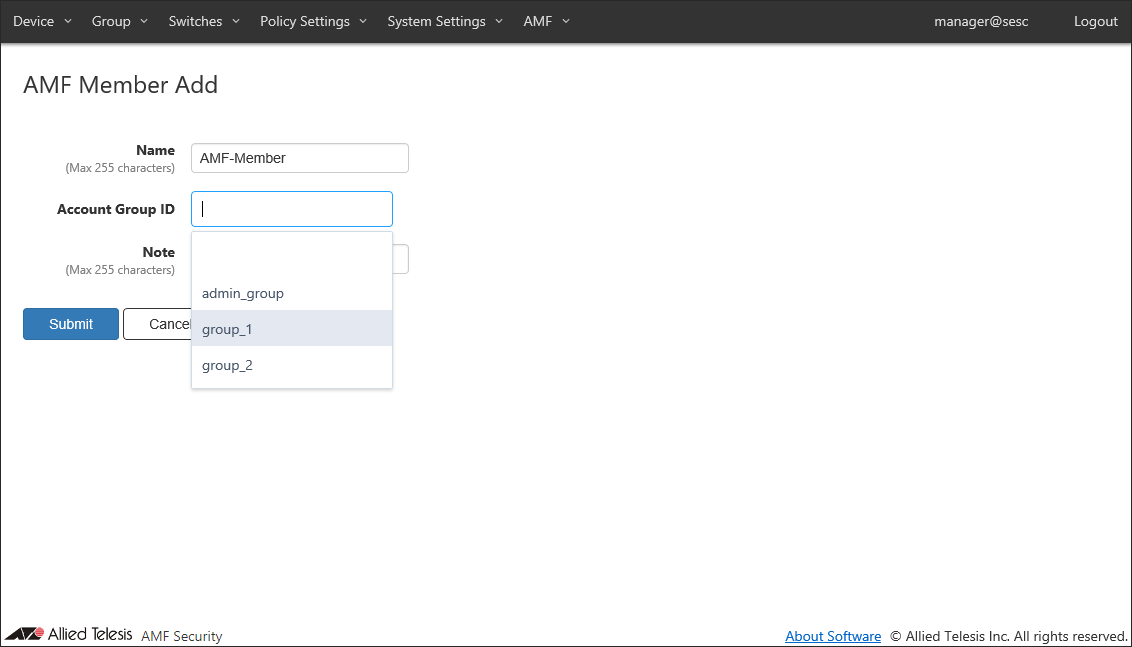
NoteDevices associated with "Account Group ID" are not displayed unless you log in with Account belonging to that "Account Group ID" or "manager" (no Account Group). Be careful not to register another "Account Group ID" by mistake.
06 Sep 2023 16:33