MAC Address List
This page lets you view, add, edit, and delete MAC Address Lists.
Only a single MAC Address List can be assigned to an AP Profile regardless of its type (whitelist or blacklist).
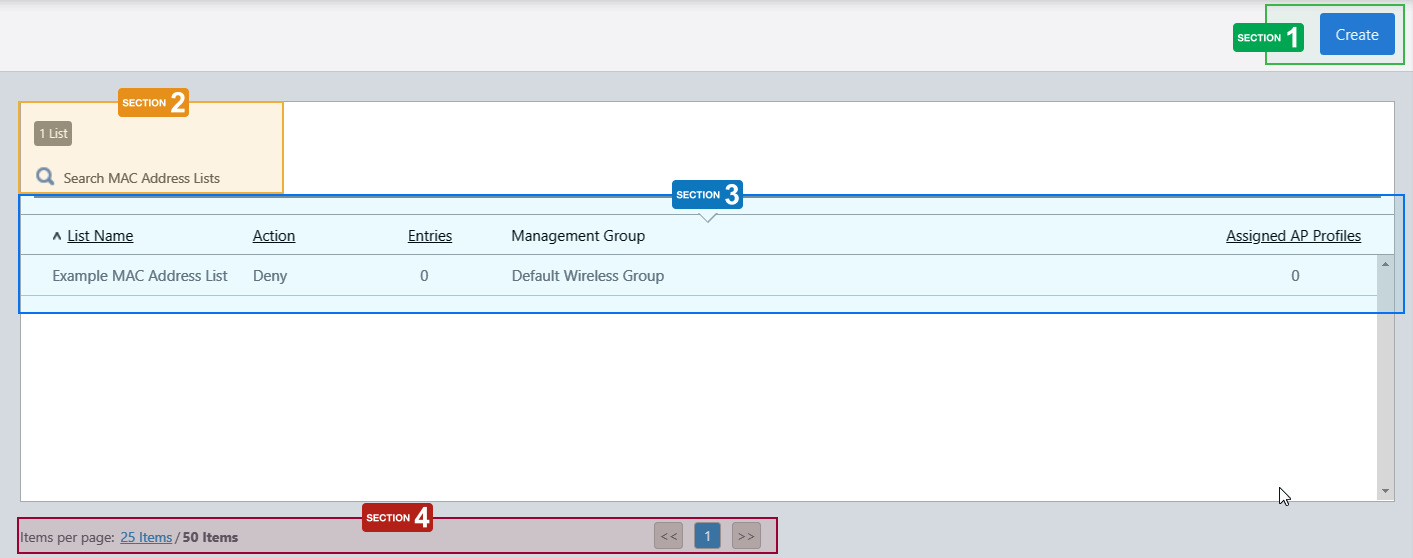
Section 1
| Item Name | Description |
|---|---|
| "Create" button | Creates a new MAC Address List. Refer to Operation Reference > Wireless Configuration > Configure MAC Address Lists for more details. |
Section 2
| Item Name | Description |
|---|---|
| X List | Shows the number of MAC Address Lists. |
| Search MAC Address Lists |
Lets you filter the MAC address lists. The search field lets you enter a partial string to match. The screen displays entries with that string in one of the following fields: "List Name", "Action" or "Management Group". To filter with the Action field, specify either "0" (Deny) or "1" (Allow). To remove the filter, delete the string from the search field and press enter. NoteThe search is case-sensitive. |
Section 3
| Item Name | Description |
|---|---|
| List Name | Shows the name of the MAC Address List. |
| Action | Shows the action of the MAC Address List (either "Allow" or "Deny"). |
| Entries | Shows the number of MAC Address in the list. |
| Management Group | Shows the Management Groups for the MAC Address List. |
| Assigned AP Profiles | Shows the number of AP Profiles to which the MAC Address List is assigned. |
Section 4
| Item Name | Description |
|---|---|
| Items per page | Specifies the number of items per page. |
| << | Goes to the first page of the list. |
| (Page Number) | Shows the current page number in the list. |
| >> | Goes to the last page of the list. |
02 Nov 2021 15:51