AP Status
This page allows you to review the administrative and configuration status of the managed APs.
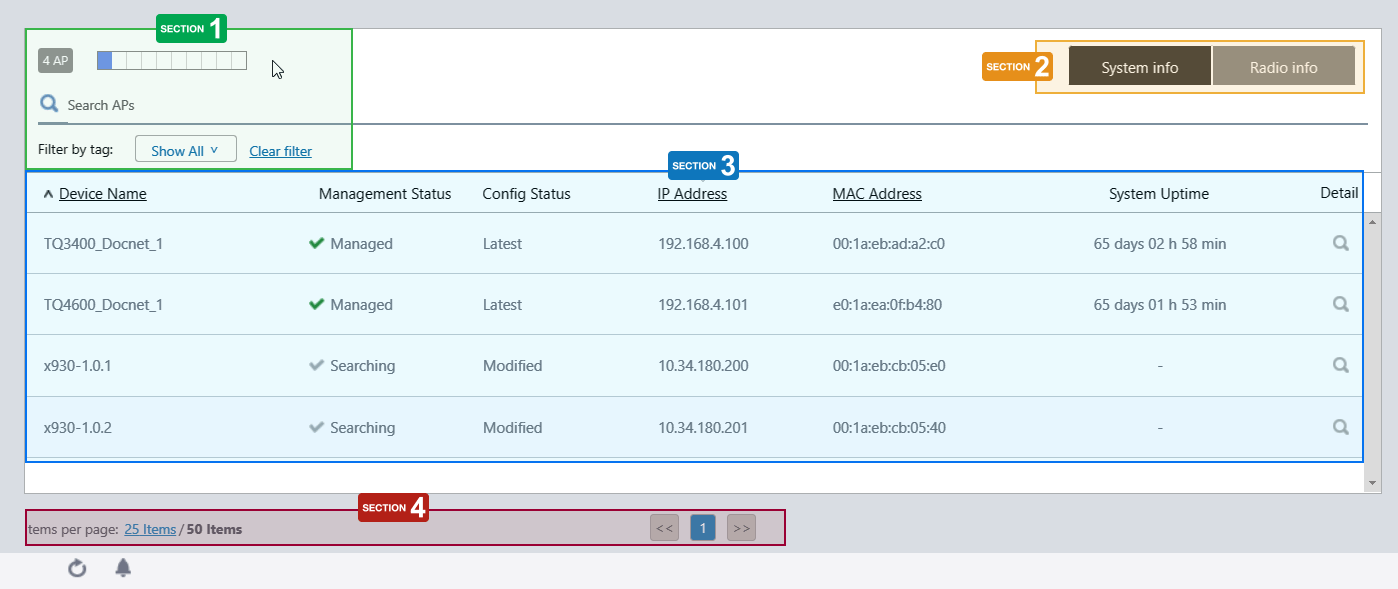
Section 1
| Item Name | Description |
|---|---|
| X AP | Shows the number of APs added to the AWC Plug-in's management database. |
| Refresh Timer | Shows the status of the timer that automatically refreshes the page with the blue progress bar. The list is automatically refreshed at the interval configured in "Refresh Rates" > "AP Status" in the User Management menu. (The default is 1 minute.) |
| X SELECTED | Shows the number of selected APs. |
| Search Wireless AP |
Lets you filter the list of Managed APs. The Search field lets you enter a partial string to match. The screen displays entries with that string in one of the following fields: "Device Name", "IP address", "MAC address", "Device Type", "Current Firmware" or "Serial Number". To remove the filter, delete the string from the search field and press enter. Refer to Wireless AP Details to see the "Device Type", "Current Firmware" and "Serial Number". NoteThe search is case-sensitive. |
| Filter by tag | Lets you filter APs with tags. Clicking tags uses tags to filter the list. Clicking them again removes the filter. Clicking "Clear filter" removes the filter for all tags. |
| Tag | Clicking "Show All" under the "Search AP" box displays all tags. Clicking "Close filter list" returns to the initial format. |
Section 2
| Item Name | Description |
|---|---|
| "System info" / "Radio info" buttons | Switches the contents of the list. |
Section 3
| Item Name | Description |
|---|---|
| System Info | |
| Device Name | Shows the name of the AP. If the AP was added from the Guest Device list, the guest device name is displayed. |
| Management Status |
Shows the Management Status of the AP.
|
| Config Status |
Shows the configuration status of the AP.
|
| IP Address | Shows the AP's IP address. |
| MAC Address | Shows the device's MAC address. |
| System Uptime | Shows the uptime of the AP. |
| Detail (magnifying glass icon) | Shows the AP Details page. Refer to Operation Reference > Wireless Configuration > View AP Information for more details of the "AP Details" page. |
| Radio info | |
| Device Name | Shows the name of the AP. If the AP was added from the Guest Device list, the guest device name is displayed. |
| Radio 1 | Shows standards used on Radio 1. |
| Radio 2 | Shows standards used on Radio 2. |
| Radio 3 | Shows standards used on Radio 3. |
| Associated Clients (Radio 1) | Shows the number of clients connected to the AP on Radio 1 |
| Associated Clients (Radio 2) | Shows the number of clients connected to the AP on Radio 2 |
| Associated Clients (Radio 3) | Shows the number of clients connected to the AP on Radio 3 |
| Detail (magnifying glass icon) | Shows the AP Details page. Refer to Operation Reference > Wireless Configuration > View AP Information for more details of the "AP Details" page. |
Section 4
| Item Name | Description |
|---|---|
| Items per page | Specifies the number of items per page. |
| << | Goes to the first page of the list. |
| (Page Number) | Shows the current page number in the list. |
| >> | Goes to the last page of the list. |
26 Mar 2022 18:26