System Settings
Account List
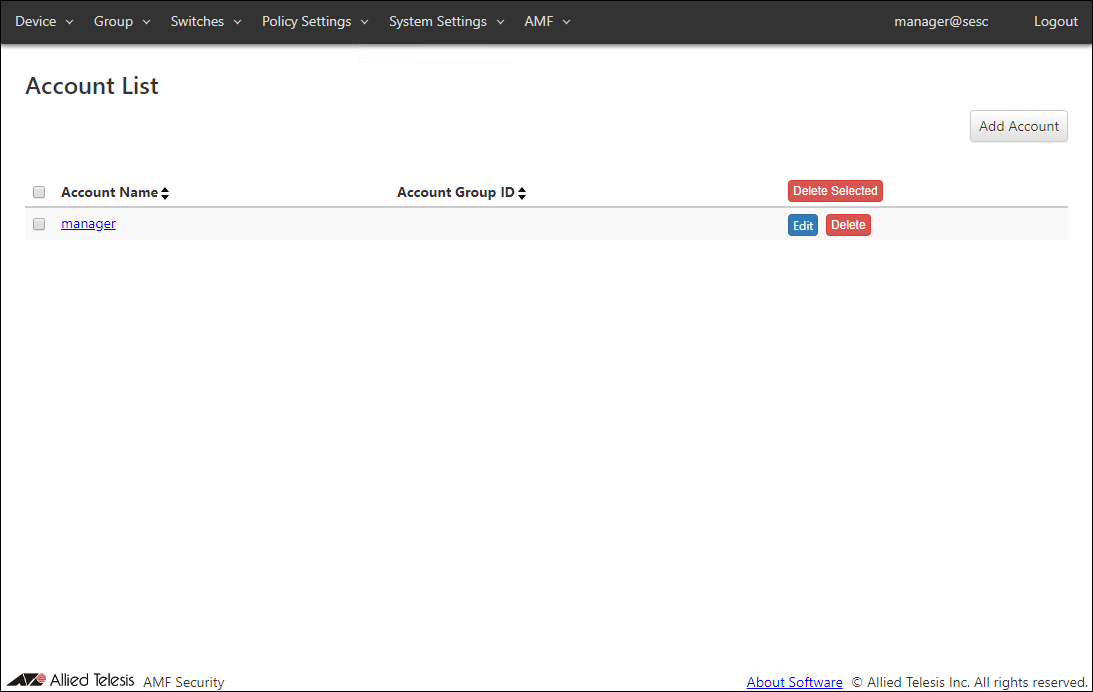
| Item Name | Sort |
|---|---|
| Account Name | × |
| Account Group ID | × |
| Item Name | Description |
|---|---|
| Account Name | Name of the login account. When clicked, the Update Account page for the account is displayed. |
| Account Group ID | Account group to which the Login Account belongs. When clicked, the Update Account Group page for the account group is displayed. If you delete the account group on the System Settings > Account Group List page after registering the account group to the login account, the link to the Update Account Group page above is deleted. |
| Item Name | Description |
|---|---|
| Page Top | |
| Add Account | Go to Add Account page. |
| Account List | |
| Delete Selected | Delete all the checked accounts. |
| Edit | Go to Update Account page for the account. |
| Delete | Delete the account. |
NoteDefault account "manager" cannot be deleted.
Add Account
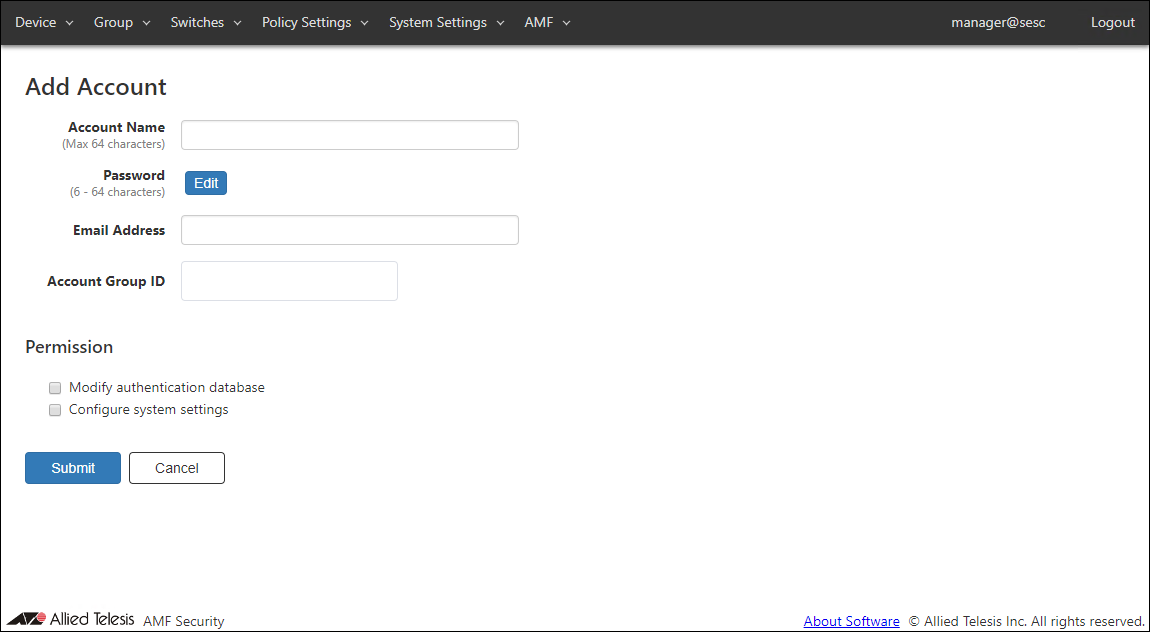
| Item Name | Description |
|---|---|
| Account Name (Mandatory) | Name of the login account. Maximum length is 64 characters. Allowed characters are as follows. a-z, A-Z, 0-9, ' - _ . |
| Password | Login password for the account. Click "Edit" to configure password. |
| Email Address | Enter the Email Address associated with the account. If you forget your password, you can recover it by email. |
| Account Group ID | Select the Account Group ID to which the Login Account belongs. |
| Permission | |
| Modify authentication database | Check this to grant permission to change authentication database to the account. |
| Configure system settings | Check this to grant permission to change system configurations to the account. |
| Item Name | Description |
|---|---|
| Password | |
| Edit | Open Password Configuration dialog to configure the account's password. |
| Page Bottom | |
| Submit | Add a new account with the input information. |
| Cancel | Cancel the operation for adding a new account. |
NoteIf you forget the passwords for all accounts with the "Configure system settings" checkbox checked, the AMF Security mini instance needs to be initialized (deleted → recreated) on the AW+ Web GUI / Vista Manager mini --AMF Security mini page. Please make sure that you keep your passwords safely and never forget them.
Refer to the x950 Series / x908GEN2 documentation for working with AMF Security mini instances.
NoteRegister your Email Address in your account and set the Email Notification on the System Settings > Email Notification Settings page. This allows you to recover your password by email if you forget it.
Refer to Appendix > If you forget your password for instructions on how to recover your password by email.
Password Configuration
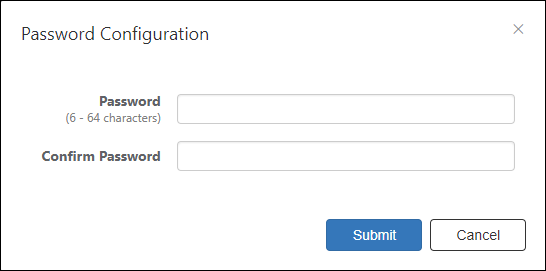
| Item Name | Description |
|---|---|
| Password (Mandatory) | Login password for the account. Password must be 6 to 64 characters long. Allowed characters are as follows. a-z, A-Z, 0-9, ! # $ % & ' * + - / = ? ^ _ ` { | } ~ . |
| Confirm Password (Mandatory) | Enter the password again. |
| Item Name | Description |
|---|---|
| Bottom of the dialog | |
| Submit | Configure the input password. |
| Cancel | Cancel the operation for configuring a password. |
Update Account
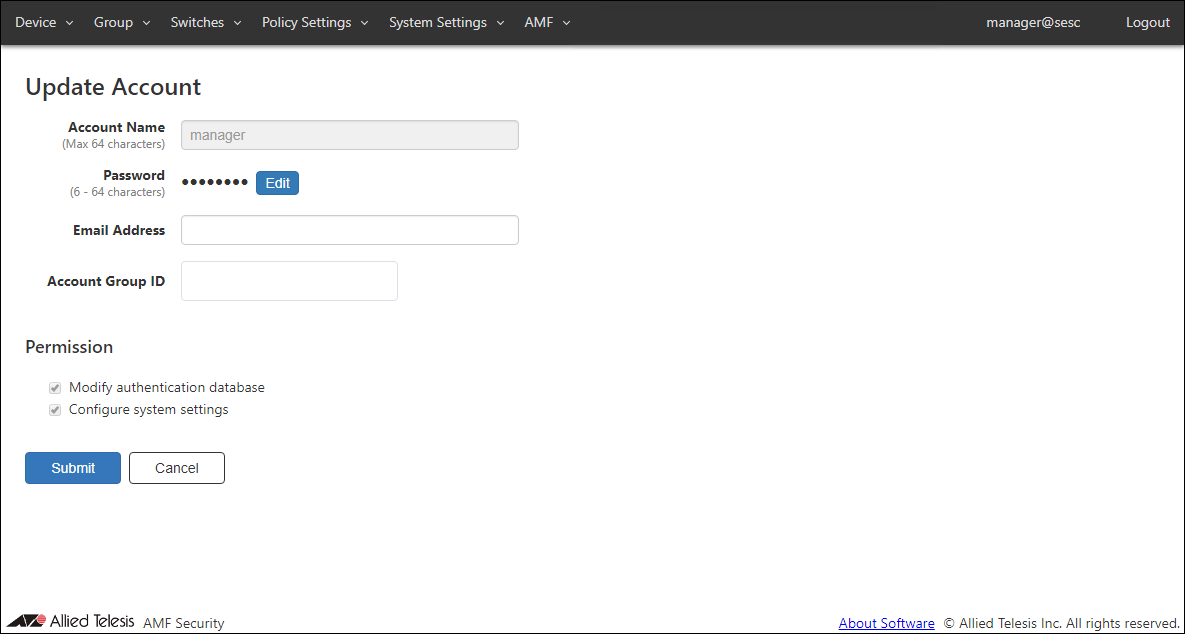
| Item Name | Description |
|---|---|
| Account Name (Mandatory) | Name of the login account. Maximum length is 64 characters. Allowed characters are as follows. a-z, A-Z, 0-9, ' - _ . |
| Password | Login password for the account. Click "Edit" to configure password. |
| Email Address | Enter the Email Address associated with the account. If you forget your password, you can recover it by email. |
| Account Group ID | Select the Account Group ID to which the Login Account belongs. |
| Permission | |
| Modify authentication database | Check this to grant permission to change authentication database to the account. |
| Configure system settings | Check this to grant permission to change system configurations to the account. |
| Item Name | Description |
|---|---|
| Password | |
| Edit | Open Password Configuration dialog to configure the account's password. |
| Page Bottom | |
| Submit | Update the account with the input information. |
| Cancel | Cancel the operation for updating the account. |
NoteAccount name and permissions of the default account "manager" cannot be changed.
NoteIf you forget the passwords for all accounts with the "Configure system settings" checkbox checked, the AMF Security mini instance needs to be initialized (deleted → recreated) on the AW+ Web GUI / Vista Manager mini --AMF Security mini page. Please make sure that you keep your passwords safely and never forget them.
Refer to the x950 Series / x908GEN2 documentation for working with AMF Security mini instances.
NoteRegister your Email Address in your account and set the Email Notification on the System Settings > Email Notification Settings page. This allows you to recover your password by email if you forget it.
Refer to Appendix > If you forget your password for instructions on how to recover your password by email.
Password Configuration
| Item Name | Description |
|---|---|
| Password (Mandatory) | Login password for the account. Password must be 6 to 64 characters long. Allowed characters are as follows. a-z, A-Z, 0-9, ! # $ % & ' * + - / = ? ^ _ ` { | } ~ . |
| Confirm Password (Mandatory) | Enter the password again. |
| Item Name | Description |
|---|---|
| Bottom of the dialog | |
| Submit | Configure the input password. |
| Cancel | Cancel the operation for configuring a password. |
Account Group List
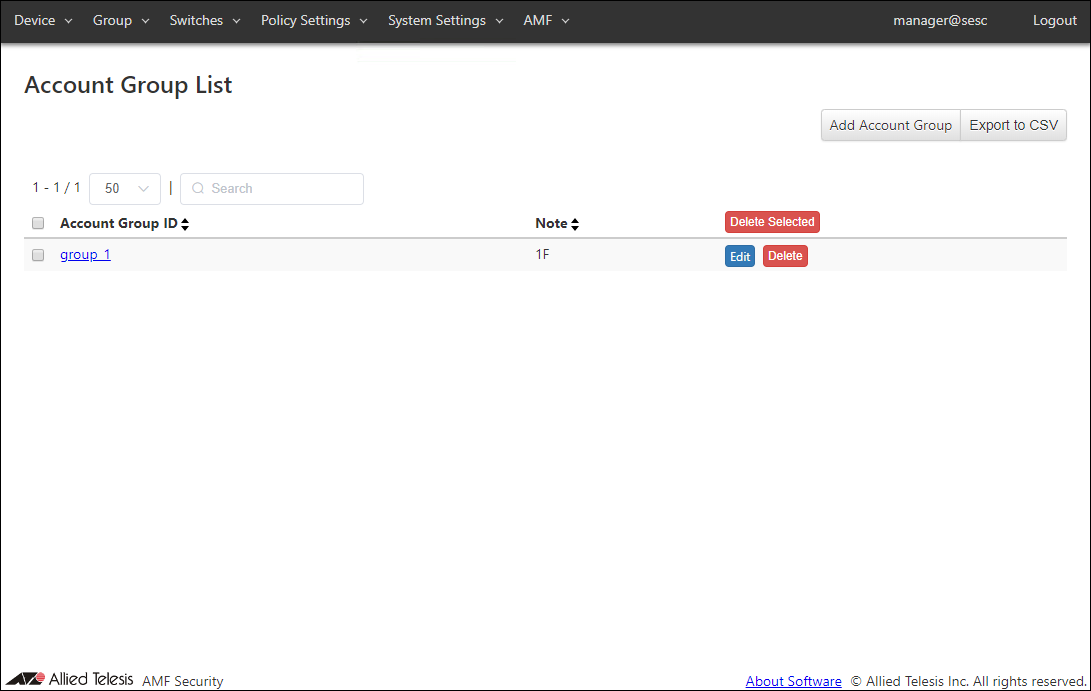
| Item Name | Search | Sort |
|---|---|---|
| Account Group ID | × | × |
| Note | × | × |
| Item Name | Description |
|---|---|
| Account Group ID | Account group name. |
| Note | Arbitrary string (comment) for the Account Group. |
| Item Name | Description |
|---|---|
| Page Top | |
| Add Account Group | Go to Add Account Group page. |
| Export to CSV | Start downloading of a list of account groups in CSV format. |
| Account Group List | |
| Delete Selected | Delete all the checked account groups. |
| Edit | Go to Update Account Group page for the account group. |
| Delete | Delete the account group. |
NoteRefer to Appendix > CSV File for CSV Files.
Add Account Group
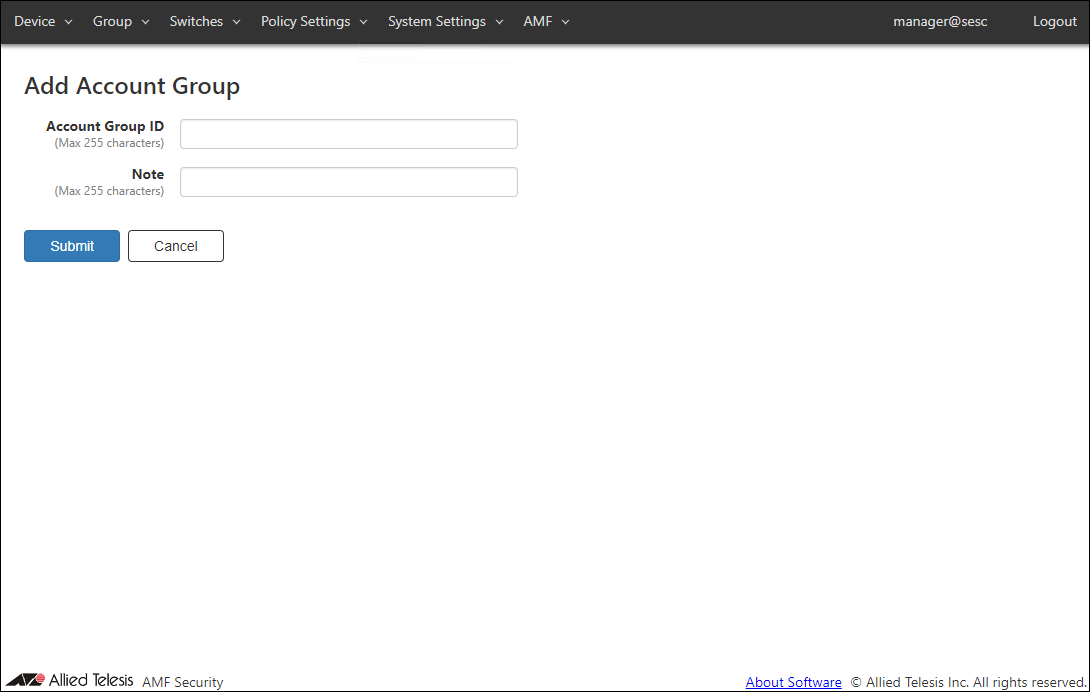
| Item Name | Description |
|---|---|
| Account Group ID (Mandatory) | Account group to which the Login Account belongs. Account Group ID must be unique. Max 255 characters |
| Note | Arbitrary string (comment) for the Account Group. |
| Item Name | Description |
|---|---|
| Submit | Add a new account group with the input information. |
| Cancel | Cancel the operation for adding a new account group. |
Update Account Group
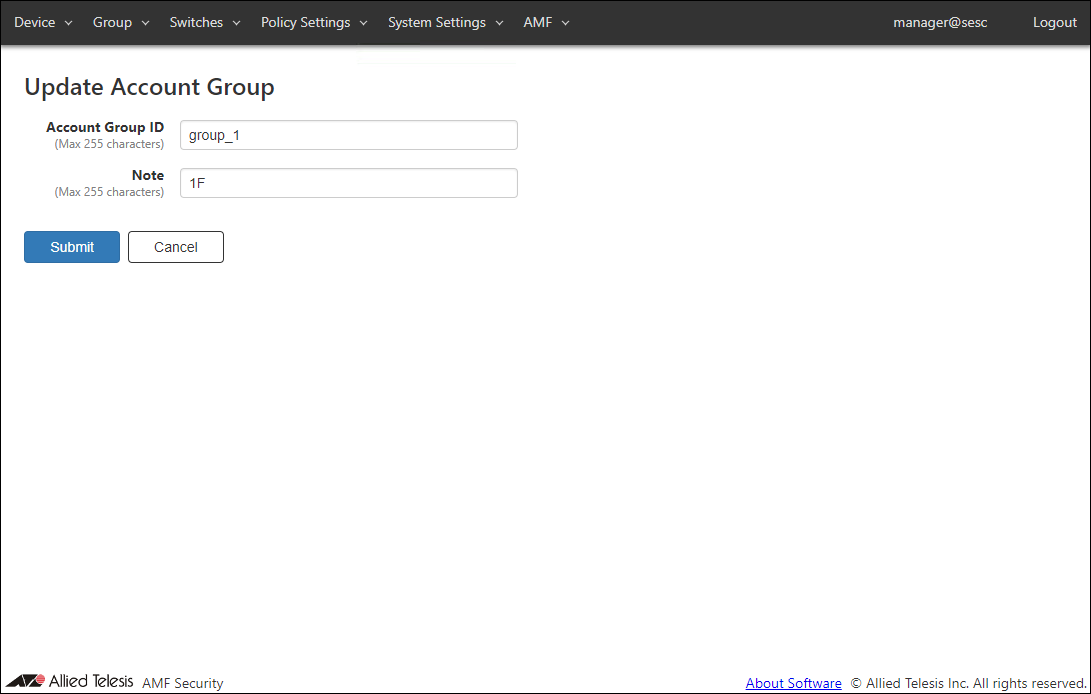
| Item Name | Description |
|---|---|
| Account Group ID (Mandatory) | Account group to which the Login Account belongs. Account Group ID must be unique. Max 255 characters |
| Note | Arbitrary string (comment) for the Account Group. |
| Item Name | Description |
|---|---|
| Submit | Go to Update Account Group page for the account group. |
| Cancel | Cancel the operation for updating the account group. |
Network Settings
View and change network configurations for the AMF Security system.NoteIf you set the upload / delete of the SSL Certificate of the Web server, the connection with the connected AMF Master is temporarily disconnected.
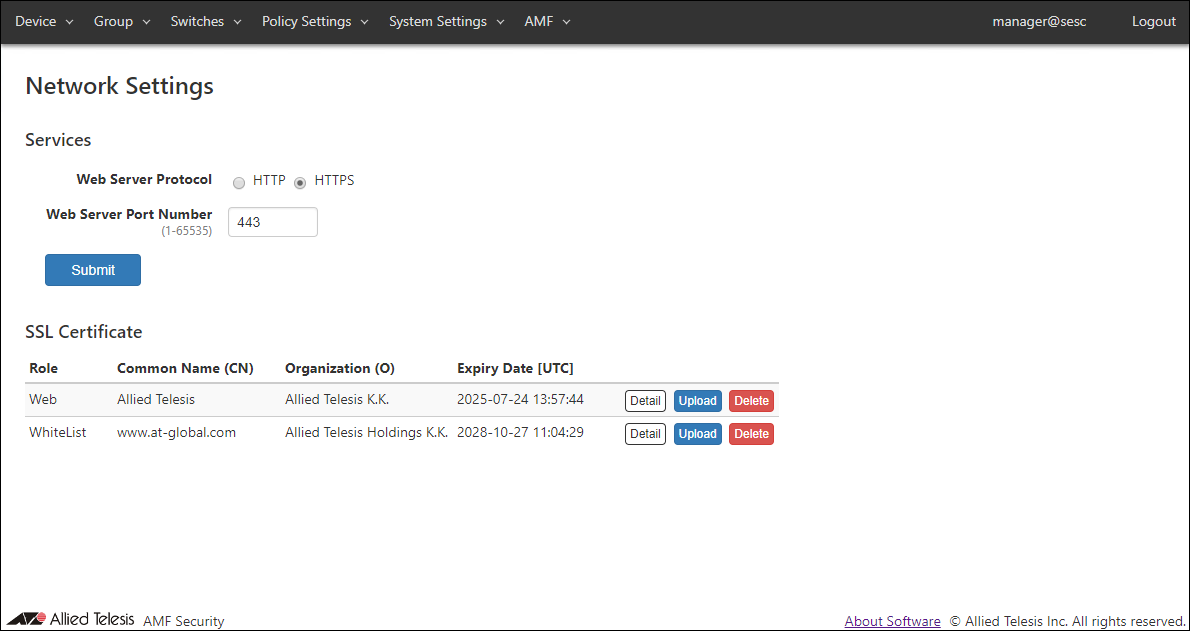
Services
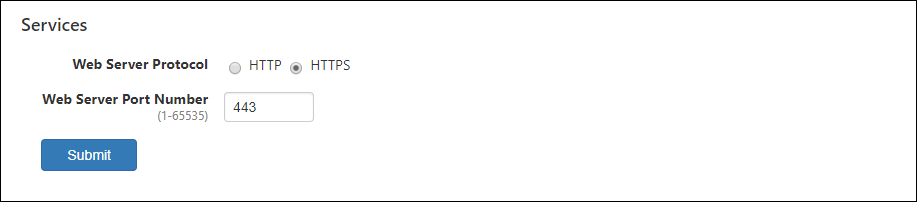
| Item Name | Description |
|---|---|
| Web Server Protocol | Protocol (HTTP or HTTPS) to use for the web interface. Default is HTTPS. |
| Web Server Port Number | TCP port number that AMF Security mini's web interface is listening on. Valid range is 1 to 65535. Default is 443. |
NoteOnly TLS 1.1 and TLS 1.2 are supported for HTTPS.
NoteAMF Security mini is using several ports internally. Refer to Appendix > TCP or UDP port used by AMF Security mini for the ports used by AMF Security mini.
NoteIf you specify HTTP as the web server protocol and 80 as the port number when accessing the web setting screen, you will be redirected to the web server protocol and port number set above.
NoteThe combination of web server protocol and port number HTTPS / 80 is non-configurable (reserved).
| Item Name | Description |
|---|---|
| Submit | Save the input services configurations. |
SSL Certificate
Register the SSL server certificate of the Web server (AMF Security mini) and the SSL server certificate of the whitelist authentication server installed in AMF Security mini.If you want external applications to interact with AMF Security mini via HTTPS, you may have to install an SSL server certificate issued by a trusted certificate authority (CA).
If you want to encrypt control session between AMF Master and Whitelist Server (AMF Security mini), upload an SSL server certificate issued by a trusted certificate authority (CA).
"SSL Certificate" section shows a summary of the installed SSL server certificate.

- If your CA provides you with intermediate CA certificates or cross root CA certificates in addition to your server certificate, concatenate those certificates into a single file then upload the file to AMF Security. Contact the CA for detailed information on how to concatenate certificate files.
- To install a certificate file, it must meet the following requirements.
Table 21: SSL Certificate Requirements
Type X.509, RFC6818 Encryption PEM (Privacy Enhanced Mail) Extension .crt
| Item Name | Description |
|---|---|
| Role | Displays Web (Web server) or WhiteList (Authentication server). |
| Common Name(CN) | Displays the common name of the Web server (AMF Security mini) or authentication server (AMF Security mini). |
| Organization(O) | Displays the name of the organization to which the Web server (AMF Security mini) or authentication server (AMF Security mini) belongs. |
| Expiration Date [UTC] | Expiration date of the certificate. |
| Item Name | Description |
|---|---|
| Detail | The detailed information of the registered SSL server certificate is displayed. |
| Upload | Open the Upload SSL Certificate dialog to register the SSL Certificate with AMF Security mini. |
| Delete | Delete the installed SSL server certificate and restore the default certificate which is self-signed by AMF Security mini. |
NoteAfter setting the AMF Master, AMF Security mini accepts both unencrypted and encrypted sessions. You cannot disable one of them.
Upload SSL Certificate
This dialog lets you upload your own SSL Certificate for the White-list Authentication Server.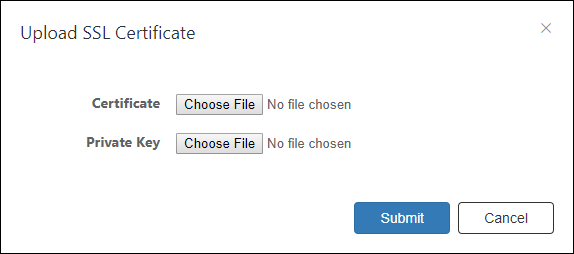
| Item Name | Description |
|---|---|
| Certificate | Click the "Choose File" button and select the SSL Certificate to upload. |
| Private Key | Click the "Choose File" button and select the SSL private key to upload. |
| Item Name | Description |
|---|---|
| Submit | Import the specified private key and certificate. |
| Cancel | Cancel the operation for importing SSL Certificate. |
Logging Settings
NoteWith this setting, the connection with the connected AMF Master is temporarily disconnected.
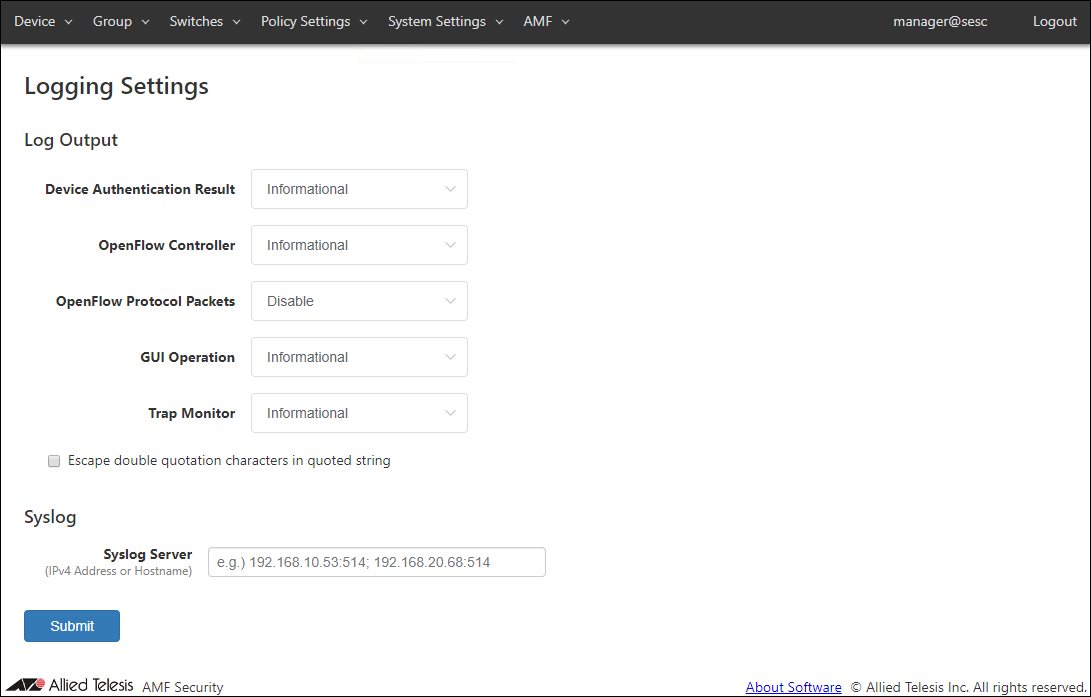
◼ Log Output
You can view and configure levels for various types of logs.
| Item Name | Description |
|---|---|
| Device Authentication Result | Minimum level for device authentication logs to be output. Default is Informational. |
| OpenFlow Controller | Not supported in this version. |
| OpenFlow Protocol Packets | Not supported in this version. |
| GUI Operation | Minimum level for the web interface logs to be output. Default is Informational. |
| Trap Monitor | Minimum level for the trap monitor logs to be output. Default is Informational. |
| Escape double quotation characters in quoted string | Escape double quotes in the log message. Default is disabled. |
◼ Syslog
| Item Name | Description |
|---|---|
| Syslog Server | Set the IPv4 Address or hostname and UDP port number of the external Syslog server that sends the log. The forwarding destination should be in the form of "A.B.C.D:P" where the A.B.C.D is an IPv4 Address and P is a port number. Multiple Syslog servers can be specified by separating each address by a semicolon (;). A colon (:) and a port number can be omitted if the host is listening on the default syslog port (514). Examples: 192.168.1.100 (IPv4 Address only) 192.168.1.100:60514 (Specify port number) 192.168.1.100; 192.168.2.100 (multiple settings separated by semicolons) example100.co.jp (Hostname) The following IPv4 Address formats with leading 0 (zero) can be entered, but they are not supported. 192.168.001.001 172.016.0.1 |
NoteAMF Security mini is using several ports internally. Refer to Appendix > TCP or UDP port used by AMF Security mini for the ports used by AMF Security mini.
| Item Name | Description |
|---|---|
| Page Bottom | |
| Submit | Save the input logging configurations. |
Date / Time Settings
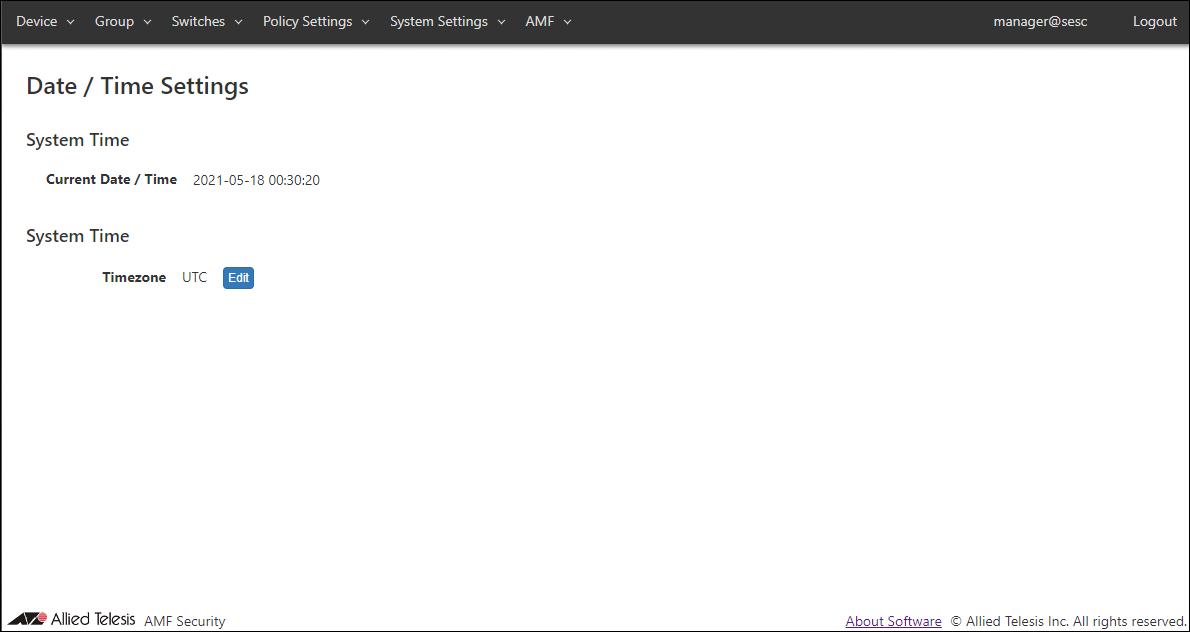
| Item Name | Description |
|---|---|
| Current Date / Time | Display system date. |
| Item Name | Description |
|---|---|
| Timezone | Display the system timezone. Default is UTC. |
| Item Name | Description |
|---|---|
| Edit | Display the Select Timezone dialog and set the system timezone. |
Select Timezone
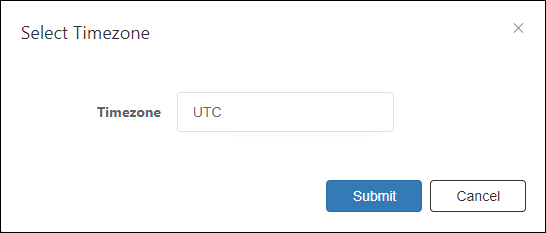
| Item Name | Description |
|---|---|
| Timezone | Select the timezone from the dropdown list. |
| Item Name | Description |
|---|---|
| Submit | Save the selected timezone. |
NoteIf you change the timezone setting, AMF Security mini restarts. After that, restart (Stop → Start) the AMF Security mini instance on the AW + Web GUI / Vista Manager mini - AMF Security mini page. Refer to the x950 Series / x908GEN2 documentation for working with AMF Security mini instances.
After that, the timezone setting is retained.
System Information
This page lets you perform maintenance operations such as backup, restore and system restart.NoteWhen changing the hostname, the connection with the connected AMF Master is temporarily disconnected.
NoteSystem settings export and import features are intended for pure backup and restore. Do not modify an exported file nor imported a modified file using the feature.
When importing System Settings, you can specify a file with any extension as long as the contents of the file are correct.
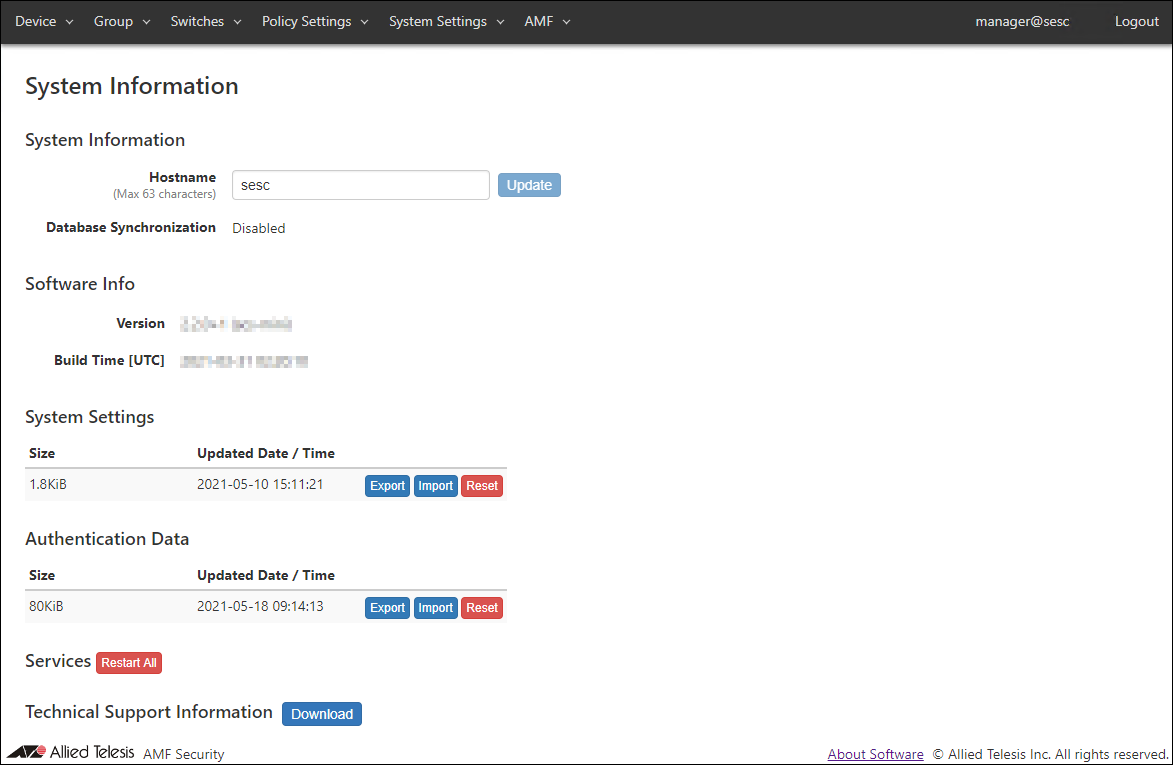
◼ System Information
| Item Name | Description |
|---|---|
| Hostname | Hostname of the system Default is "sesc". To change the hostname, enter a new hostname and click "Update". Max 63 characters. Allowed characters are as follows. a-z, A-Z, 0-9, - Hyphen (-) cannot be used for the first letter. |
| Database Synchronization | Not supported in this version. "Disabled" is always displayed. |
| Item Name | Description |
|---|---|
| Refresh | Update the hostname. |
◼ Software Info
| Item Name | Description |
|---|---|
| Version | Version and build number (internal version) of the installed AMF Security mini. |
| Build Time | Build date and time of the installed AMF Security mini software. |
◼ System Settings
| Item Name | Description |
|---|---|
| Size | Displays the file size of system setting data. |
| Updated Date / Time | Displays the date and time when the system setting data was updated. |
| Item Name | Description |
|---|---|
| Export | Download system configuration for backup. |
| Import | Import and restore system settings. |
| Reset | Reset system configuration to factory default. |
Manually backup, configure or delete those elements.
- Configurations to be backed up, restored and reset.
- Account List
- Network Settings - Services
- Logging Settings
- Date / Time Settings
- Trap Monitor Settings
- Email Notification Settings
- AMF Settings
- TQ Settings
- Account List
- Configurations not to be backed up, restored and reset.
- Network Settings - SSL Certificate
- Trap Monitor Settings - Uploaded Rules
- AMF - SSL Certificate
- AMF Security Log
- Action Log
- Network Settings - SSL Certificate
◼ Authentication Data
| Item Name | Description |
|---|---|
| Size | Displays the file size of the authentication data. |
| Updated Date / Time | Displays the date and time when the authentication data was updated. |
| Item Name | Description |
|---|---|
| Export | Download authentication data for backup. |
| Import | Import authentication data from a CSV file. |
| Reset | Delete all authentication data on this system. |
NoteAuthentication data file to import should be in CSV format. Refer to Appendix > CSV File for CSV Files.
NoteThe Start Date / Time and End Date / Time of the schedule included in the Authentication Data are the date and time of the currently set timezone.
For details, refer to Policy settings > About the start date and time and end date and time of the schedule.
NoteWhen you import and update authentication data, AMF Security mini resets packet control flows for the devices which are contained in the Authentication Data.
NoteThe method of uploading authentication data of AT-SESC software version 1.3.x or earlier cannot remove the network, location, and schedule settings from the security policy set for the device that has already been registered. To delete, delete the device once and then upload the authentication data, or update the security policy directly on the Device > Update Device page.
◼ Services
| Item Name | Description |
|---|---|
| Restart All | Only restart AMF Security mini related services. The AlliedWare Plus device itself running AMF Security mini is not be restarted, only the application processes related to AMF Security mini is restarted. |
◼ Technical Support Information
| Item Name | Description |
|---|---|
| Download | Download technical support information for trouble shooting. |
Trap Monitor Settings
This page lets you configure various parameters required for interaction with external applications.You can also setup AMF Security mini to forward SNMP traps and syslog messages to other systems.
NoteTrap monitor only responds to specific set of log messages and SNMP traps. You cannot define actions for arbitrary messages and traps.
NoteWhen changing the Device Lookup, the connection with the connected AMF Master is temporarily disconnected.
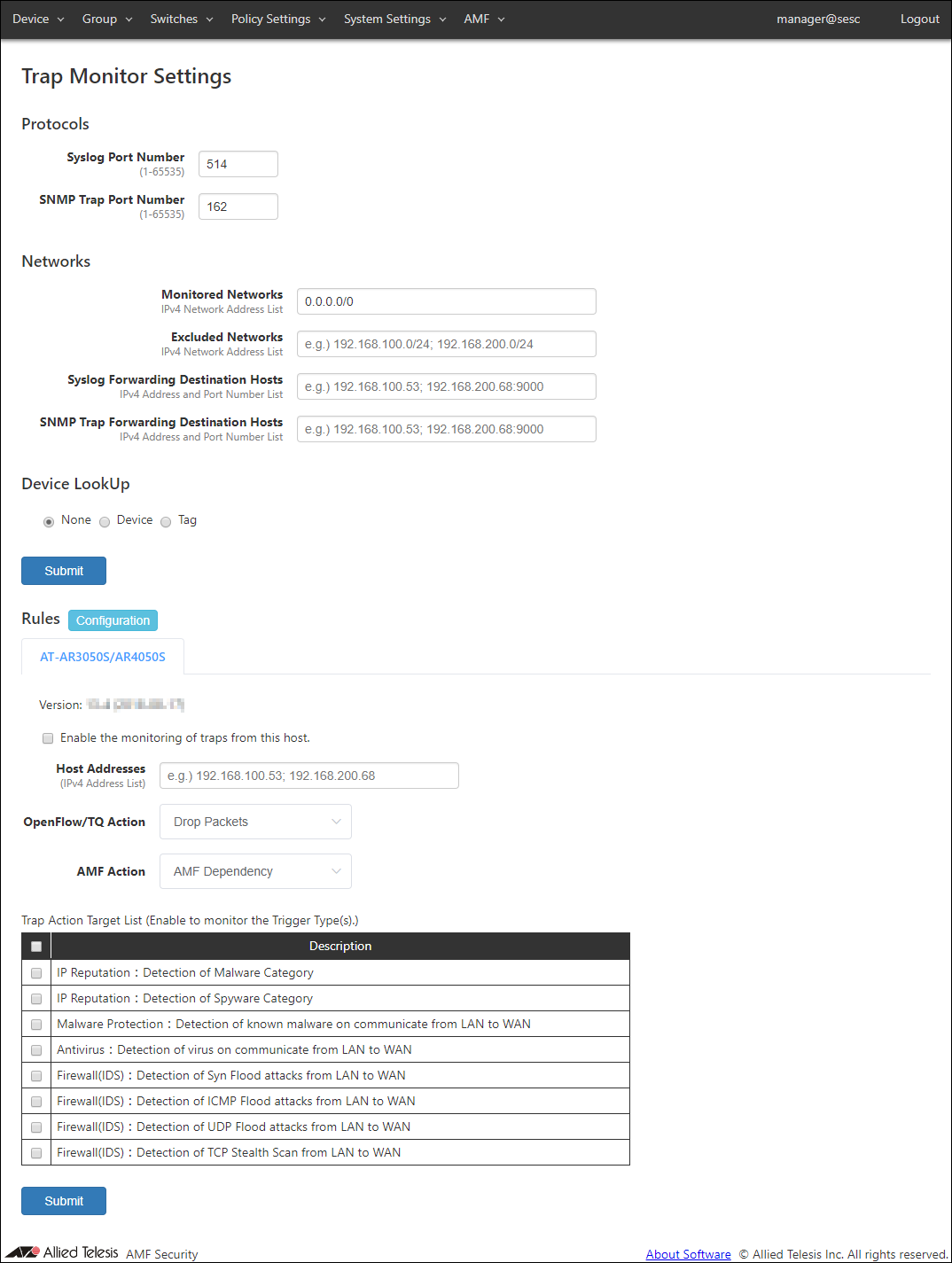
◼ Protocols
| Item Name | Description |
|---|---|
| Syslog Port Number | Listening port number to receive syslog messages. Valid range is 1 to 65535. Default is 514. |
| SNMP Trap Port Number | Listening port number to receive SNMP traps. Valid range is 1 to 65535. Default is 162. |
NoteAMF Security mini is using several ports internally. Refer to Appendix > TCP or UDP port used by AMF Security mini for the ports used by AMF Security mini.
◼ Networks
Specify the monitored or unmonitored network, Syslog message, and SNMP Trap transfer destination host.
If Monitored Networks and Excluded Networks overlap, Exclude Networks have precedence.
NoteSome external applications do not respect settings of Monitored Networks and Excluded Networks.
| Item Name | Description |
|---|---|
| Monitored Networks | IPv4 networks to monitor using syslog and trap messages. Multiple networks can be specified by separating each network by a semicolon (;). If this field is empty or 0.0.0.0/0 is specified, all networks are monitored. Default is 0.0.0.0/0. |
| Excluded Networks | IPv4 networks not to monitor. Multiple networks can be specified by separating each network by a semicolon (;). |
| Syslog Forwarding Destination Hosts | Specify a host to which AMF Security forwards the received syslog messages. The forwarding destination should be in the form of "A.B.C.D:P" where the A.B.C.D is an IPv4 Address and P is a port number. Multiple hosts can be specified by separating each address by a semicolon (;). A colon (:) and a port number can be omitted if the host is listening on the default syslog port (514). Source IPv4 Address of the forwarded messages are the address of AMF Security mini. |
| SNMP Trap Forwarding Destination Hosts | Specify a host to which AMF Security forwards the received trap messages. The forwarding destination should be in the form of "A.B.C.D:P" where the A.B.C.D is an IPv4 Address and P is a port number. A colon (:) and a port number can be omitted if the host is listening on the default trap port (162). Multiple hosts can be specified by separating each address by a semicolon (;). Source IPv4 Address of the forwarded messages are the address of AMF Security mini. |
◼ Device Lookup
Specify a target range of the action to notify.
| Item Name | Description |
|---|---|
| None | Notify actions on MAC address. |
| Device | Notify actions on Device. |
| Tag | Notify actions on Device Tag. |
NoteDevice Lookup is not supported for AMF Application Proxy's IP-Filter action.
NoteWhen the action is applied to the target device by the IP Address of the device, the IP Address is displayed as "ip =" in the "MAC address" item of the Device > Active Device List page. This IP Address is the IP Address that caused the action to be applied.
| Item Name | Description |
|---|---|
| Submit | Save the settings. |
◼ Rules
Trap monitor rules can be updated and added through trap monitor rule files.
By default, trap monitor rules for the UTM functions of AT-AR3050S/AT-AR4050S routers are installed.
NoteTrap monitor rule files are provided by our "AMF-SEC Technology Partner Program". Contact our sales engineer for the Technology Partner Program.
- AT-AR3050S/AR4050S
This tab lets you configure trap monitor rules for the UTM functions of AT-AR3050S/AT-AR4050S routers.
To receive and monitor syslog messages from AT-AR3050S/AT-AR4050S routers, check "Enable the monitoring of traps from this host.".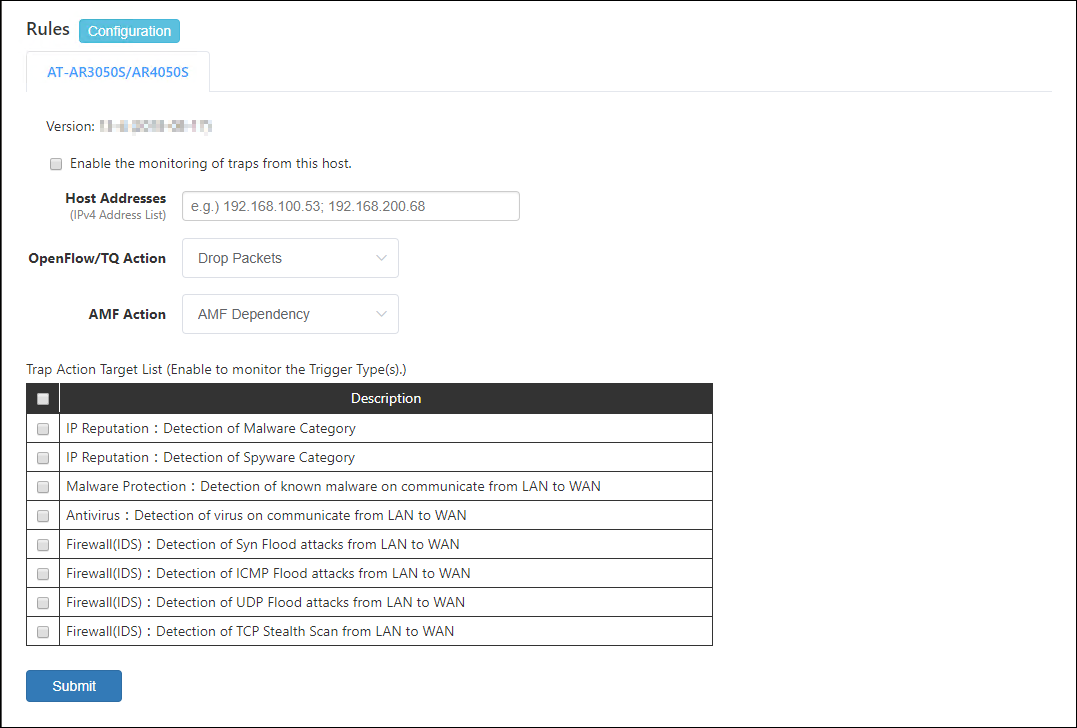
Then, check events which you want to monitor in the "Trap Action Target Trigger" table.
- IP Reputation:Detection of Malware Category
Block traffic from a device when AMF Security receives a syslog message indicating that the IP reputation feature on the router detects the device tries to communicate with a destination classified as Malware category (Malware C&C server (CnC), Malware-infected host (Bot) or Mobile C&C Server (Mobile_CnC)).
- IP Reputation:Detection of Spyware Category
Block traffic from a device when AMF Security receives a syslog message indicating that the IP reputation feature on the router detects the device tries to communicate a destination classified as Spyware category (drop site (Drop), Spyware C&C server (SpywareCnC) or Mobile Spyware C&C server (Mobile_Spyware_CnC)).
- Malware Protection:Detection of known malware on communicate from LAN to WAN
Block traffic from a device when AMF Security receives a syslog message indicating that the malware protection feature on the router detects the known malware on the device.
- Antivirus:Detection of virus on communicate from LAN to WAN
Block traffic from a device when AMF Security receives a syslog message indicating that the anti-virus feature on the router detects the known virus on the device.
- Firewall(IDS):Detection of Syn Flood attacks from LAN to WAN
Block traffic from a device when AMF Security receives a syslog message indicating that the firewall's IDS feature on the router detects the SYN Flood attack from the device.
- Firewall(IDS):Detection of ICMP Flood attacks from LAN to WAN
Block traffic from a device when AMF Security receives a syslog message indicating that the firewall's IDS feature on the router detects the ICMP Flood attack from the device.
- Firewall(IDS):Detection of UDP Flood attacks from LAN to WAN
Block traffic from a device when AMF Security receives a syslog message indicating that the firewall's IDS feature on the router detects the UDP Flood attack from the device.
- Firewall(IDS):Detection of TCP Stealth Scan from LAN to WAN
Block traffic from a device when AMF Security receives a syslog message indicating that the firewall's IDS feature on the router detects the TCP Stealth Scan attack from the device.
Note
To use those rules, you also have to configure AT-AR3050S/AT-AR4050S. Refer to the AT-AR3050S/AT-AR4050S's documentation for more details.
Table 47: Buttons
Item Name Description Value Open the Rule Setup page.
Table 48: Displayed columns
Item Name Description Version Version of the Trap Monitor Rules
Table 49: Configurable fields
Item Name Description Enable the monitoring of traps from this host. If you want to monitor the device by receiving Syslog message from AT-AR3050S or AT-AR4050S, check the check box. Host Addresses IPv4 Address of AT-AR3050S/AT-AR4050S routers. Multiple hosts can be specified by separating each address by a semicolon (;). Default is unspecified (empty) which means that AMF Security accepts syslog messages from any IPv4 Address. OpenFlow/TQ Action In TQ managed by AMF Security mini, select the action to control the communication of the corresponding device. - Drop Packets: Block traffic from the device at the layer two (MAC) level.
- Quarantine: Move the device to the quarantine network.
- Log-Only: Record the device information.
AMF Action An action to be taken on the AMF network deploying AMF Application Proxy feature. - Drop Packets: Block traffic from the device at the layer two (MAC) level.
- Link-Down: Shutdown the port where the device is connected.
- Quarantine: Move the port where the device is connected to the quarantine VLAN.
- AMF Dependency: AMF Security mini does not specify an action and lets AMF devices determine its action.
- IP-Filter: Block traffic from the device at the layer 3 (IP) level.
- Log-Only: AMF Security mini does not specify an action and records the device information.
Table 50: Buttons
Item Name Description Page Bottom Submit Save the settings. - IP Reputation:Detection of Malware Category
Rules
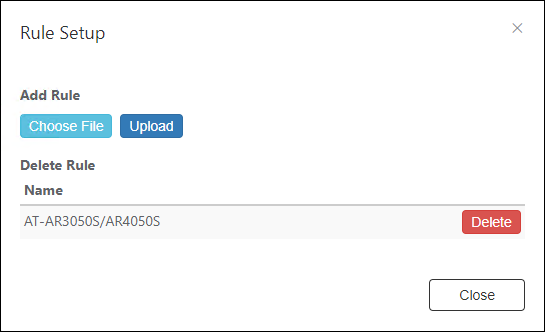
| Item Name | Description |
|---|---|
| Name | Name of the Trap Monitor Rules |
| Item Name | Description |
|---|---|
| Choose File | Select the rule settings file to upload. |
| Upload | Upload the selected rule settings file. |
| Delete | Delete the registered rule settings. |
| Close | Go back to the Trap Monitor Settings page. |
Email Notification Settings
This page lets you configure Email Notifications.AMF Security can send email to the set address when an event such as device authentication or blocking occurs or when you forget your password.
AMF Security mini also sends emails to forward the contents of syslog messages and SNMP traps it receives.
NoteEmail Notification of syslog and trap messages are always enabled and cannot be disabled.
NoteWith this setting, the connection with the connected AMF Master is temporarily disconnected.
NoteTo recover your password if you forget it, you need to register your Email Address on the Add Account page or Update Account page in advance.
AMF Security queues the notification emails by the following rules and tries to resend them upon failure.
- When an event occurs, AMF Security queues up to 100 emails for the event in the first 10 seconds after the event.
- Queued emails are sent out as a single email after 10 seconds.
- If 100 or more events occur in 10 seconds after the first event, AMF Security queues them too.
- A Queue is created for each event types of Email Notification Settings.
- AMF Security attempts up to four retries, i.e. AMF Security tries to send an email up to 5 times.
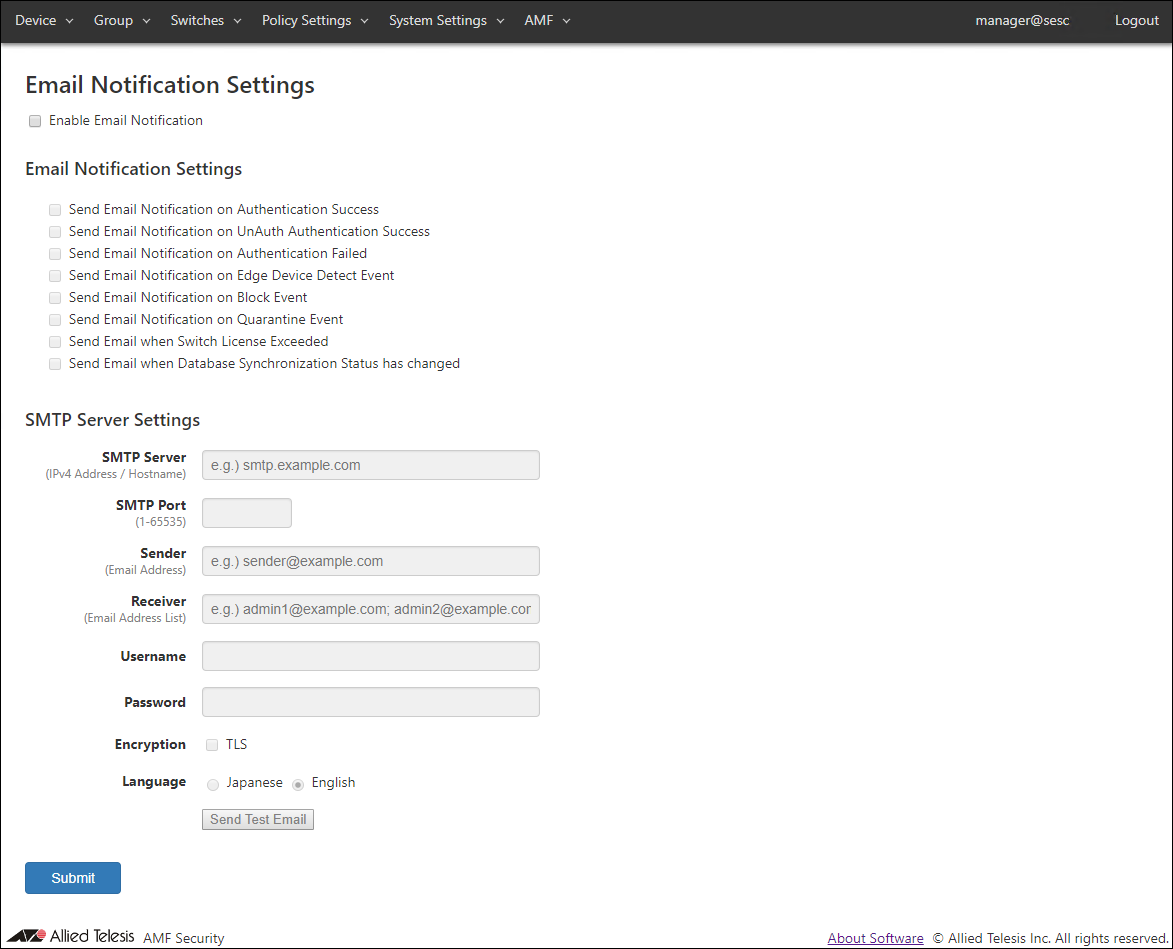
◼ Email Notification Settings
You can enable or disable email notification for each event with checkboxes.
- Send Email Notification on Authentication Success
- Send Email Notification on UnAuth Authentication Success
- Send Email Notification on Authentication Failed
- Send Email Notification on Edge Device Detect Event
- Send Email Notification on Block Event
- Send Email Notification on Quarantine Event
- Send Email when Switch License Exceeded (Not supported in this version)
- Send Email when Database Synchronization Status has changed (Not supported in this version)
Note"Send Email Notification on Block Event" or "Send Email Notification on Quarantine Event" is checked, AMF Security also sends notification email when a device is blocked or quarantined by AMF Application Proxy.
If you want to notify by email in the AMF Action Log, check "Send Email Notification on Block Event".
◼ SMTP Server Settings
| Item Name | Description |
|---|---|
| SMTP Server | IPv4 Address of a SMTP server which AMF Security uses to send out emails. |
| SMTP Port | Listening port of the SMTP server. |
| Sender | Mail address of the sender. |
| Receiver | Mail address of the recipient. Multiple addresses can be specified by separating them with a semicolon (;). |
| Username | Username for SMTP authentication. |
| Password | Password for SMTP authentication. |
| Encryption | Check this to use TLS connection to the SMTP server. |
| Language | Select a language used in emails. |
NoteAMF Security mini is using several ports internally. Refer to Appendix > TCP or UDP port used by AMF Security mini for the ports used by AMF Security mini.
NoteIf your browser is configured to use Japanese, some part of emails is written in Japanese even if Language setting for Email Notification is English. If both browser and Email Notification are configured to use English, mail body is written in English. Note that strings contained in authentication data or messages received from an external application are left unchanged.
NoteWhen you want AMF Security to send notification emails when a device is blocked by the AMF Application Proxy with "Drop Packets", "Link-Down" or "IP-Filter" action, check "Send Email Notification on Block Event" .
| Item Name | Description |
|---|---|
| SMTP Server Settings | |
| Send Test Email | Send a test email. |
| Page Bottom | |
| Submit | Save the SMTP server settings. |
AMF Security Log
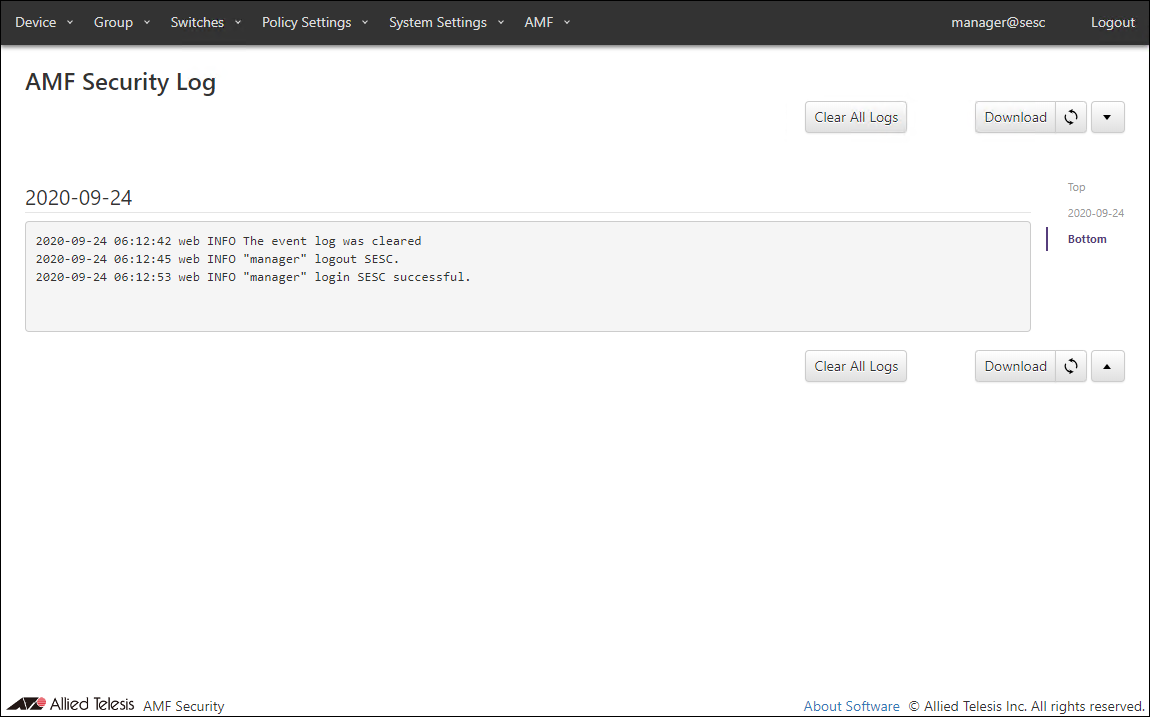
This page shows log messages generated by AMF Security mini service. The latest 1000 messages are displayed in this page.You can view messages for a specific date by selecting a date at the right side of the page.
| Item Name | Description |
|---|---|
| Clear All Logs | Clear all log messages. |
| Download | Download the latest log messages. |
| Refresh | Refresh the AMF Security Log page. |
Action Log
This page shows AMF Security mini services' log messages related to actions.It is possible to filter messages by each field's content.
NoteDepending on the specifications of the Web browser, it may not be possible to display all action logs on this page. In that case, download and check the action log.
NoteWhen clearing the action log, the connection with the connected AMF Master is temporarily disconnected.

| Item Name | Description |
|---|---|
| Date / Time | Date / Time the action was applied to a device. |
| MAC Address | MAC address of the device. |
| Device ID | Device ID |
| Device IPv4 Address | IPv4 Address of the device. |
| Device Tag | Device Tag |
| Connected Switch ID | ID of the switch to which the device is connected. |
| Connected Switch IPv4 Address | IPv4 Address of the connected switch |
| Connected Port ID | ID of the port to which the device is connected. |
| Connected Port Number | Port number of the port to which the device is connected. |
| Status | Type of action applied to the device. |
| VLAN ID | VLAN ID to which the device belongs |
| Network ID | Network ID to which the device belongs |
| Action ID | ID of the action applied to the device |
| Priority | Priority of the action applied to the device |
| Action Originator | Originator of the action applied to the device |
| Reason | Reason of the action applied to the device. |
| Item Name | Description |
|---|---|
| Refresh | Refresh the Action Log page. |
| Download | Download the latest log messages. |
| Clear Action Log | Deletes action logs. |
| Item Name | Search | Filter | Sort |
|---|---|---|---|
| Duration | × | − | − |
| MAC Address | × | − | − |
| Device IPv4 Address | × | − | − |
| Device Tag | × | − | − |
| Action Originator | × | − | − |
| Status | − | × | − |
09 Jul 2021 12:05