IDS/IPS Report
This page shows the Wireless Intrusion Detection/Prevention System (IDS/IPS) Report. The report lists the neighbor APs and wireless clients that the managed APs detected, whether each detected neighbor AP or client is a "Rogue", and the history of intrusion prevention against rogue clients. Detection of neighbor APs and clients is attempted at 5 minute intervals.
IDS/IPS can be configured on the Screen Reference > Wireless Configuration > IDS/IPS Settings page.
Refer to Supported Functions per AP Model > Wireless Configuration" > "Configure IDS/IPS Settings for APs that support this function.
NoteWhen a neighbor AP or client is detected by multiple managed APs, it is shown as a rogue if at least one managed AP decides it is a rogue.
Wireless IDS Report
Neighbor Wireless AP List View
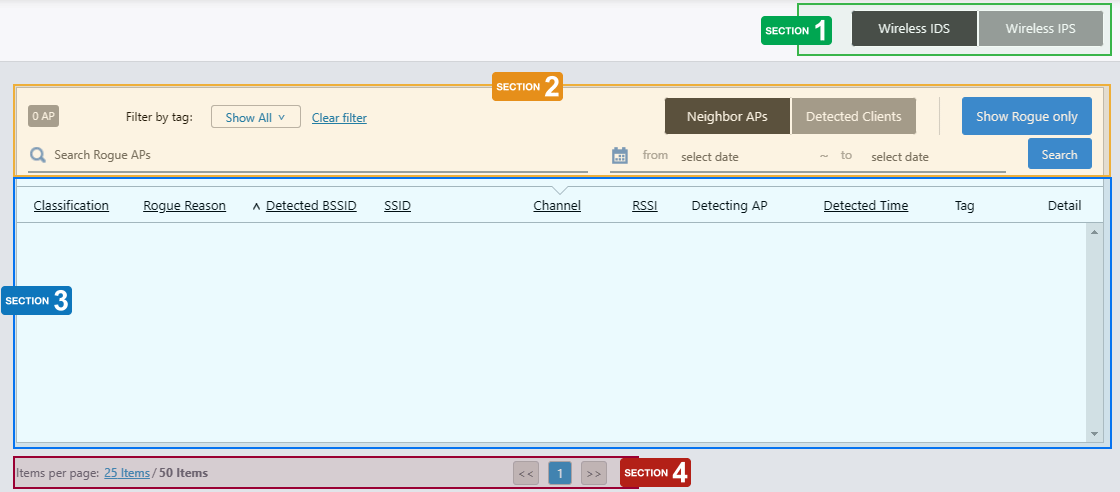
Section 1
| Item Name | Description |
|---|---|
| "Wireless IDS" / "Wireless IPS" buttons | Switch between the IDS and IPS report pages. |
Section 2
| Item Name | Description |
|---|---|
| X AP | Shows the number of detected APs. |
| "Neighbor APs" / "Detected Clients" buttons | Switch between the "Neighbor APs" and "Detected Clients" views. |
| "Show Rogue Only" button | Shows only "rogue" APs. To show all APs again, click the "Show All APs" button. |
| Search Rogue AP | Lets you filter the list of detected rogue APs. The Search field lets you enter a partial string to match. The screen displays entries with that string in one of the following fields: "Detected BSSID" or "SSID". To remove the filter, delete the string from the Search field and press Enter. NoteThe search is case-sensitive. NoteThe "Search Rogue AP" search box is cleared whenever you change either of the "from" or "to" date fields. |
| Time Period (from/to) | Lets you filter detected AP reports by a specified time period. If you specify one or both of "from" and "to" and click "Search", the list will only show entries with a "Detection Time" within the specified time period. You can enter a date in "YYYY-MM-DD hh:mm" format. Alternatively, you can select a day on the calendar that appears when you click the field. To reset the time period, click the "x" mark in the field or click "Clear Date/Time" at the bottom of the calendar control. NoteThe "Search Rogue AP" search box is cleared whenever you change either of the "from" or "to" date fields. |
| "Search" button | Shows only entries with a "Detection Time" within the specified time period. |
| Filter by tag | Lets you filter APs by tags. |
Section 3
Shows the list of detected neighbor APs. The list's contents depend on the "IDS Report History" configuration in the "Data Retention Period Configuration" section of the System Setting page.
- When "IDS Report History" is set to "Save only latest":
The list shows only the latest data for each detected AP.
- When "IDS Report History" is set to "Set Retention Period":
The list shows all the data for each detected AP.
| Item Name | Description |
|---|---|
| Classification | Shows the category AWC has applied to the detected AP. |
| Rogue Reason | Shows the reason to consider the detected neighbor AP a rogue. |
| Detected BSSID | Shows the BSSID of the detected AP. |
| SSID | Shows the SSID of the detected AP. |
| Channel | Shows the channel of the detected AP. |
| RSSI | Shows the received signal strength of the detected AP. |
| Detecting AP | Shows the name of the AP that detected the neighbor AP. |
| Detected Time | Shows the date and time when the managed AP detected the neighbor AP. |
| Tag | Shows tags added to the AP. |
| Detail (magnifying glass icon) | Shows a list of APs that detected the neighbor AP. The Detecting AP List page lists the managed APs that detected the neighbor AP. Therefore, the "Neighbor Wireless AP List" and "Detecting AP List" pages may display different information. The list's contents depend on the "IDS Report History" configuration in the "Data Retention Period Configuration" section of the System Setting page.
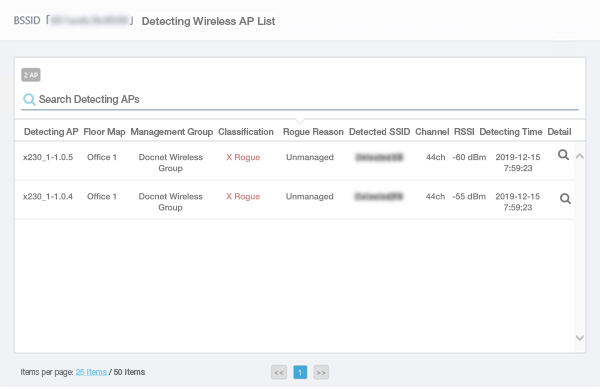
|
Section 4
| Item Name | Description |
|---|---|
| Items per page | Specifies the number of items per page. |
| << | Goes to the first page of the list. |
| (Page Number) | Shows the current page number in the list. |
| >> | Goes to the last page of the list. |
Detected Wireless Client View
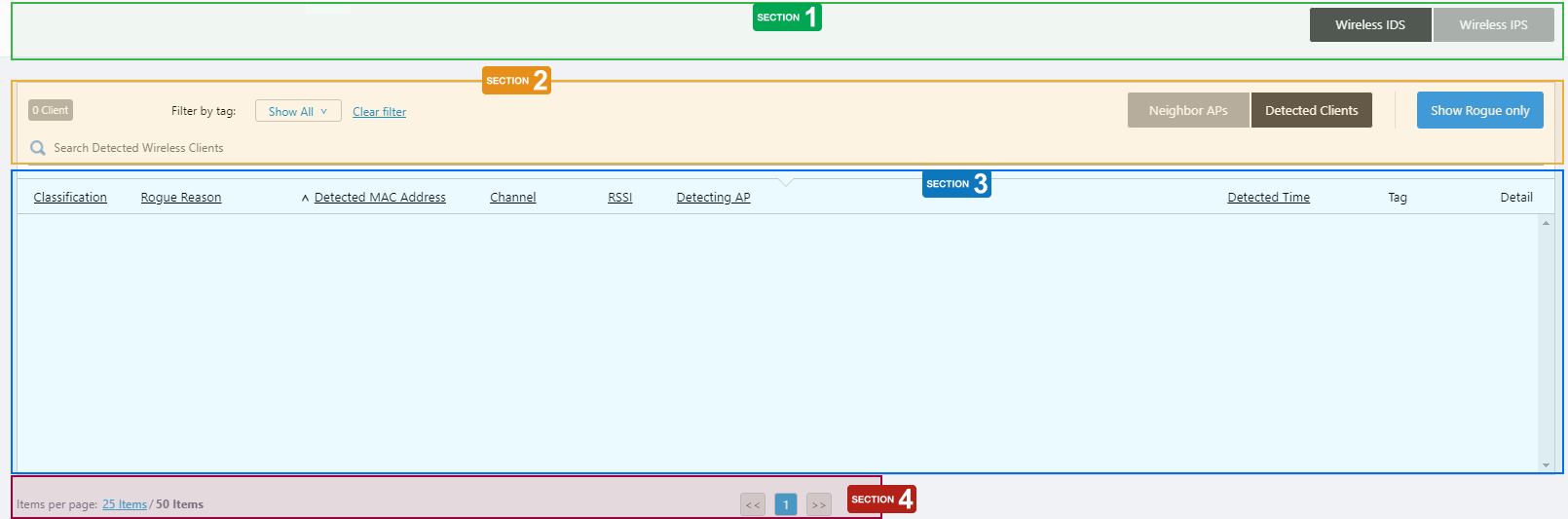
Section 1
| Item Name | Description |
|---|---|
| "Wireless IDS" / "Wireless IPS" buttons | Switch between the IDS and IPS report pages. |
Section 2
| Item Name | Description |
|---|---|
| "Neighbor APs" / "Detected Clients" buttons | Switch between the "Neighbor APs" and "Detected Clients" views. |
| "Show Rogue Only" button | Shows only "rogue" APs. To show all APs again, click the "Show All APs" button. |
| X Client | Shows the total number of detected clients. |
| Search Detected Wireless Client | Lets you filter the list of wireless clients. The Search field lets you enter a partial string to match. The screen displays entries with that string in one of the following fields: "Detected MAC Address" or "Detecting AP". To remove the filter, delete the string from the Search field and press Enter. NoteThe search is case-sensitive. |
| Filter by tag | Lets you filter APs by tags. |
Section 3
| Item Name | Description |
|---|---|
| Classification | Shows the category that AWC has applied to the detected AP. |
| Rogue Reason | Shows the reason to consider the detected wireless client a rogue. |
| Detected MAC Address | Shows the MAC address of the detected wireless client. |
| Channel | Shows the channel of the detected wireless client. |
| RSSI | Shows the received signal strength of the detected wireless client. |
| Detecting AP | Shows the name of the AP that detected the wireless client. |
| Detected Time | Shows the date and time when the managed AP detected the wireless client. |
| Tag | Shows tags added to the AP. |
| Detail (magnifying glass icon) | Shows a list of APs that detected the neighbor AP.NoteThe Detecting AP List page lists managed APs that detected the wireless client within the last day. 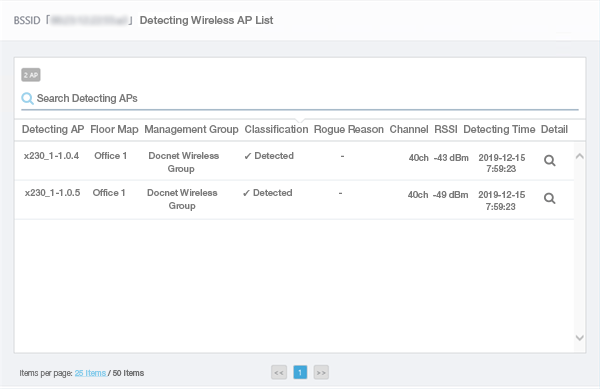
|
Section 4
| Item Name | Description |
|---|---|
| Items per page | Specifies the number of items per page. |
| << | Goes to the first page of the list. |
| (Page Number) | Shows the current page number in the list. |
| >> | Goes to the last page of the list. |
Wireless IPS Report
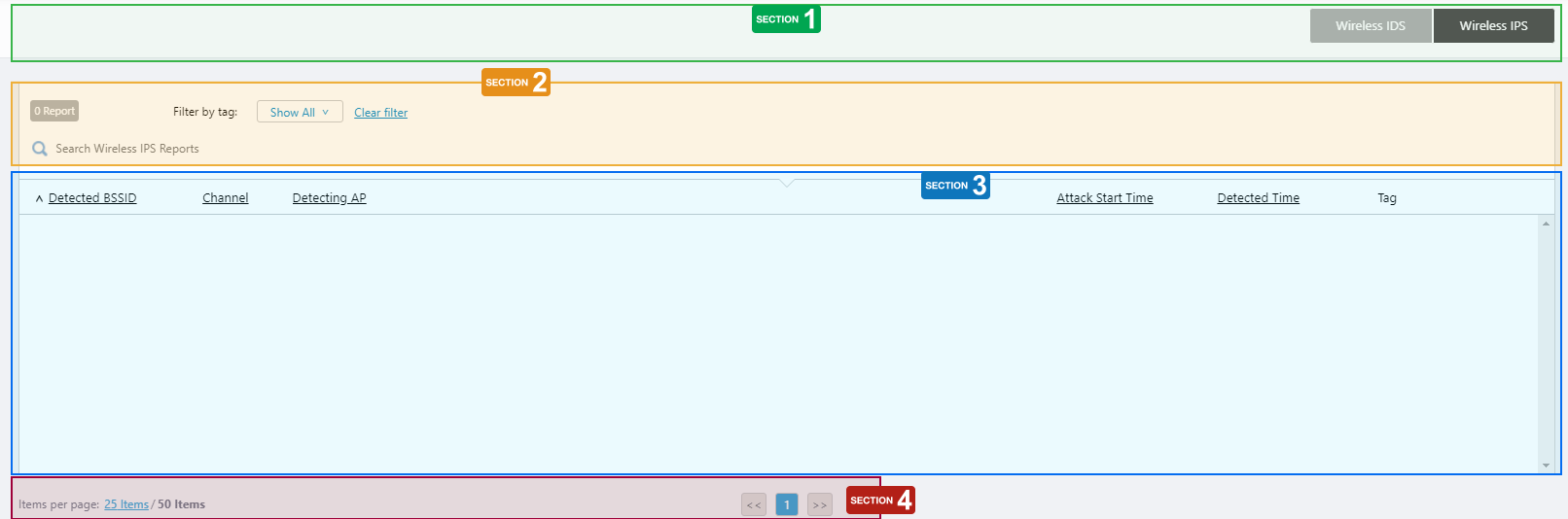
Section 1
| Item Name | Description |
|---|---|
| "Wireless IDS" / "Wireless IPS" buttons | Switch between the IDS and IPS report pages. |
Section 2
| Item Name | Description |
|---|---|
| X AP | Shows the number of detected APs. |
| Search Wireless IPS Report | Filter entries in the list by entering a partial string in the search box. The Search field lets you enter a partial string to match. The screen displays entries with that string in one of the following fields: "Detected BSSID" or "Detecting AP". To remove the filter, delete the string from the Search field and press Enter. NoteThe search is case-sensitive. |
| "Search" button | Shows only clients that have the matching string in one of the "Detected BSSID" or "Detecting AP" fields. |
| Filter by tag | Lets you filter APs by tags. |
Section 3
| Item Name | Description |
|---|---|
| Detected BSSID | Shows the BSSID of the detected rogue wireless client. |
| Channel | Shows the channel of the detected rogue wireless client. |
| Detecting AP | Shows the name of the managed AP that detected the rogue wireless client. |
| Attack Start Time | Shows the date and time when the managed AP began a deauthentication attack on the rogue wireless client. During the attack, the managed AP tries to disconnect wireless clients from the network by periodically sending IEEE 802.11 "De-authentication" management frames to the rogue client. |
| Detected Time | Shows the date and time when the managed AP detected the rogue wireless client. |
| Tag | Shows tags added to the AP. |
Section 4
| Item Name | Description |
|---|---|
| Items per page | Specifies the number of items per page. |
| << | Goes to the first page of the list. |
| (Page Number) | Shows the current page number in the list. |
| >> | Goes to the last page of the list. |
04 Jul 2023 09:16