Group
Devices that fail normal authentication and that match specific location and schedule conditions are called the UnAuth Group, and are connected to a dedicated network.
Devices are regarded as unauthenticated if
- its MAC address is not registered in AMF Security mini's database.
- it's registered but does not match its Location policy (e.g. moved to other floors or switch)
- it's registered but does not match its Schedule policy (e.g. used in restricted time or schedule expired)
When connecting the UnAuth Group to the network, you can set the Location and Schedule to allow the connection.
- If you specify a Location, UnAuth Group can access the network only from AMF Members in the Location. If no Location is selected, it is accessible to all AMF Members.
- If you specify a Schedule, the group can access the network only when the schedule is effective. If no Schedule is selected, it is always accessible.
While a device is connecting to the network as a member of an UnAuth Group, the device is automatically moved to the other network prepared for the authorized devices when the device gets promoted to the authorized state (because the scheduled time has begun for example).
This section describes an example in which the security policies shown in the following table:
| Schedule Start Date / Time | Schedule End Date / Time | Network |
|---|---|---|
| 20XX-04-01 00:00:00 | 20XX-09-30 23:59:59 | VLAN10 |
| Schedule Start Date / Time | Schedule End Date / Time | Network |
|---|---|---|
| None | None | VLAN20 |
When the device connects to "20XX-04-01 10:00:00" it authenticates and matches the normal device security policy, so the device is assigned to the network on VLAN 10.
But if the device gets connected before "20XX-04-01 00:00:00" (e.g. at "20XX-03-30 10:00:00"), it is put into the UnAuth group and assigned to the VLAN20 because it does not match the security policy of the registered device (i.e. the access time is out of the schedule of the policy) but matches the policy of the UnAuth group.
As the time goes on, the device is re-assigned to the VLAN10 at "20XX-04-01 00:00:00" because the time suddenly goes into the valid range of the security policy for the registered device.
UnAuth Group List
This page shows a list of UnAuth Groups registered in AMF Security mini's database.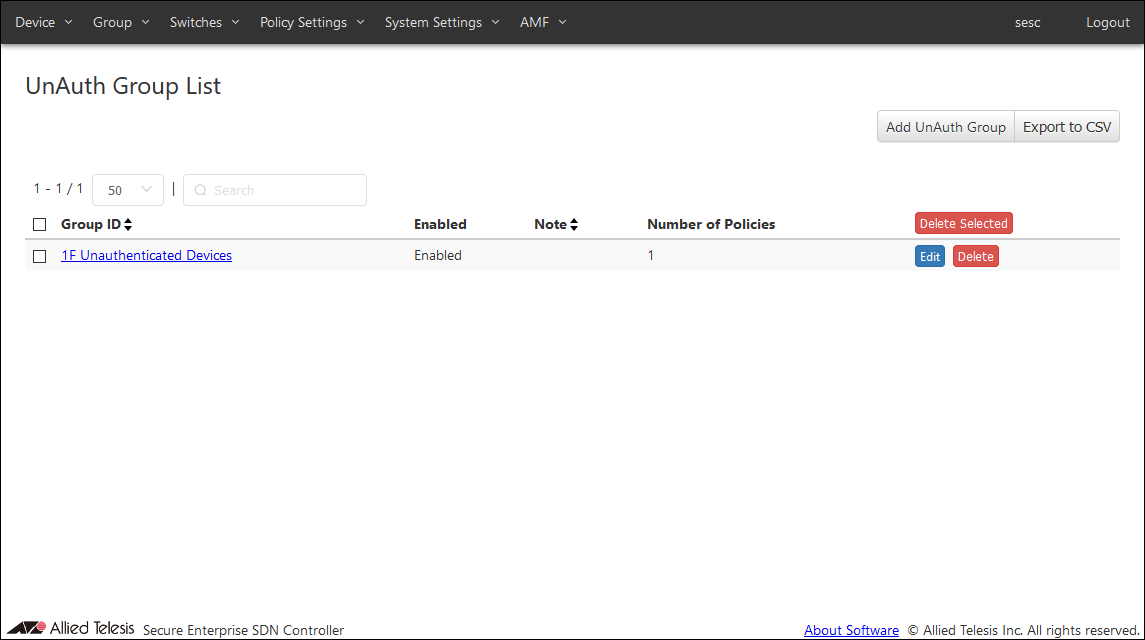
| Item Name | Search | Sort |
|---|---|---|
| Group ID | × | × |
| Enabled | × | × |
| Note | × | × |
| Number of Policies | × | × |
| Item Name | Description |
|---|---|
| Group ID | ID (Name) of the UnAuth Group. |
| Enabled | Whether the group is enabled or not. |
| Note | Arbitrary string (comment) for the Group. |
| Number of Policies | Number of security policies applied to the group. |
| Item Name | Description |
|---|---|
| Page Top | |
| Add UnAuth Group | Open the Add UnAuth Group page. |
| Export to CSV | Start downloading of a list of UnAuth Groups in CSV format. |
| UnAuth Group List | |
| Delete Selected | Delete all the checked groups. |
| Edit | Open the Update UnAuth Group page for the selected group. |
| Delete | Delete the group. |
NoteRefer to CSV File in Appendix for CSV Files.
Add UnAuth Group
This page lets you add a new UnAuth Group.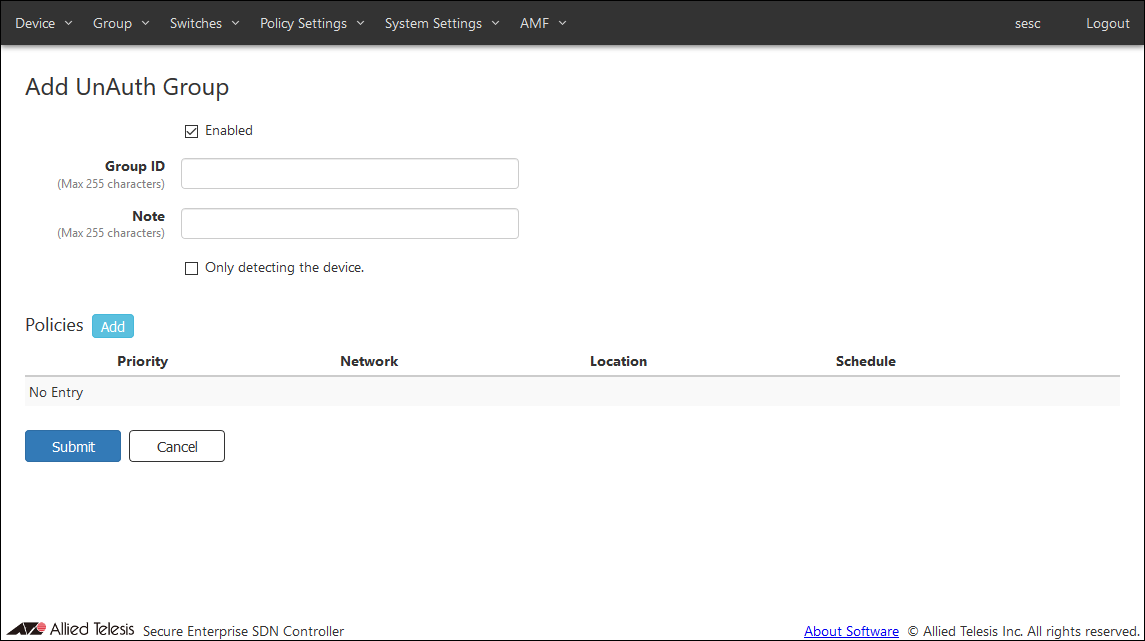
| Item Name | Description |
|---|---|
| Enabled | Uncheck this if you want the group to be disabled. |
| Group ID (Mandatory) | ID (Name) of the group to be created. Group ID must be unique. Max 255 characters |
| Note | Arbitrary string (comment) for the Group. Max 255 characters. |
| Only detecting the device. | Check this if you want the group to be used only for detecting unregistered devices without allowing them to access the network. |
| Item Name | Description |
|---|---|
| Policies | |
| Policies | List of security policies attached to the group. |
| Priority | A priority value of the security policy. It must be an integer in the range of 0 to 255. When multiple security policies are set, when an interface registered to a device in the UnAuth Group is connected to the AMF member, it is determined whether the security policy with the lowest priority value is matched first. |
| Network | ID of the network to which AMF Security mini is assign the device in the group. |
| Location | Specify a location where the device can be for AMF Security mini to categorize it in the group. |
| Schedule | Specify a schedule when the device can be connected for AMF Security mini to categorize it in the group. |
| Item Name | Description |
|---|---|
| Policies | |
| Add | Open the Edit Policy dialog to add a new security policy for a UnAuth Group. |
| Edit | Open the Edit Policy dialog to edit the selected security policy. |
| Delete | Mark to delete the security policy attached to the device. The security policy to be deleted is indicated with the DEL mark on the left side of its record line. |
| Revert | Clear the DEL mark on the security policy. |
| Page Bottom | |
| Submit | Add a new group with the input information on this page and subordinate dialogs by committing the information for the newly added group. |
| Cancel | Cancel the operation for adding the new group. |
NoteInterfaces and security policies marked with DEL is deleted when the "Submit" button is clicked. Once you click the "Submit" button, you cannot undo the delete operations.
Edit Policy
This dialog lets you add a new security policy to the group or update an existing security policy attached to the group.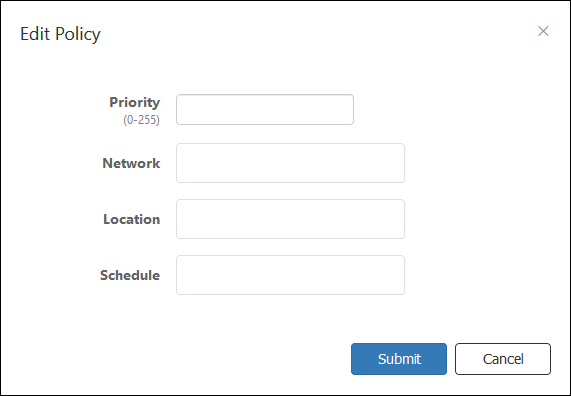
| Item Name | Description |
|---|---|
| Priority (Mandatory) | A priority value of the security policy. It must be an integer in the range of 0 to 255. When multiple security policies are set, when an interface registered to a device in the UnAuth Group is connected to the AMF member, it is determined whether the security policy with the lowest priority value is matched first. |
| Network | ID of the network to which AMF Security mini is assign the device in the group. Maximum 100 IDs of the existing networks are shown in the drop-down list. If you enter text in the field, Network IDs in the drop-down list are dynamically filtered to the ones which contain the input text in Network ID, VLAN ID or Note (it shows maximum 100 elements). From the drop-down list, select a Network ID. If the registered device is connected to the AMF Member, the device is connected to the VLAN subnet configured in the network. If the network is not registered in the device (if this setting is blank or the VLAN ID is set to 0 in the network security policy setting), the device is connected to the VLAN set for the AMF Member. The connection to the VLAN subnet is realized by sending as a tagged VLAN with the set VLAN ID when it is sent to the upper network of the connected the AMF Member. You have to add the network before assigning a group to the network. Refer to Policy Settings > Add Network for the instruction on how to register a network. |
| Location | Specify a location where the unauthenticated device can be so that it is categorized in the group. Maximum 100 IDs of the existing locations are shown in the drop-down list. If you enter text in the field, location IDs in the drop-down list are dynamically filtered to the ones which contain the input text in Location ID or Note (it shows maximum 100 elements). From the drop-down list, select a Location ID. If you specify a Location, UnAuth Group can access the network only from AMF Members in the Location. If no Location is selected, it is accessible to all AMF Members. You have to add the location before specifying it for a group. Refer to Policy Settings > Add Location for the instructions on how to add a location. |
| Schedule | Specify a schedule when the unauthenticated device can be connected to the network so that it is categorized in the group. Maximum 100 IDs of the existing schedules are shown in the drop-down list. If you enter text in the field, Schedule IDs in the drop-down list are dynamically filtered to the ones which contain the input text in Schedule ID or Note (it shows maximum 100 elements). From the drop-down list, select a Schedule ID. If you specify a Schedule, the group can access the network only when the schedule is effective. If you do not specify a schedule, a device can always access the network. You have to add the schedule before specifying it for a group. Refer to Policy Settings > Add Schedule for the instruction on how to register a schedule. |
NoteIf the VLAN set in the AMF Member is accessible, the device may be able to connect to the equipment on the control plane depending on the switch settings.
| Item Name | Description |
|---|---|
| Bottom of the dialog | |
| Submit | Add or update the security policy information. |
| Cancel | Cancel the operation for adding or updating policy. |
Update UnAuth Group
This page lets you update the information of an existing UnAuth Group.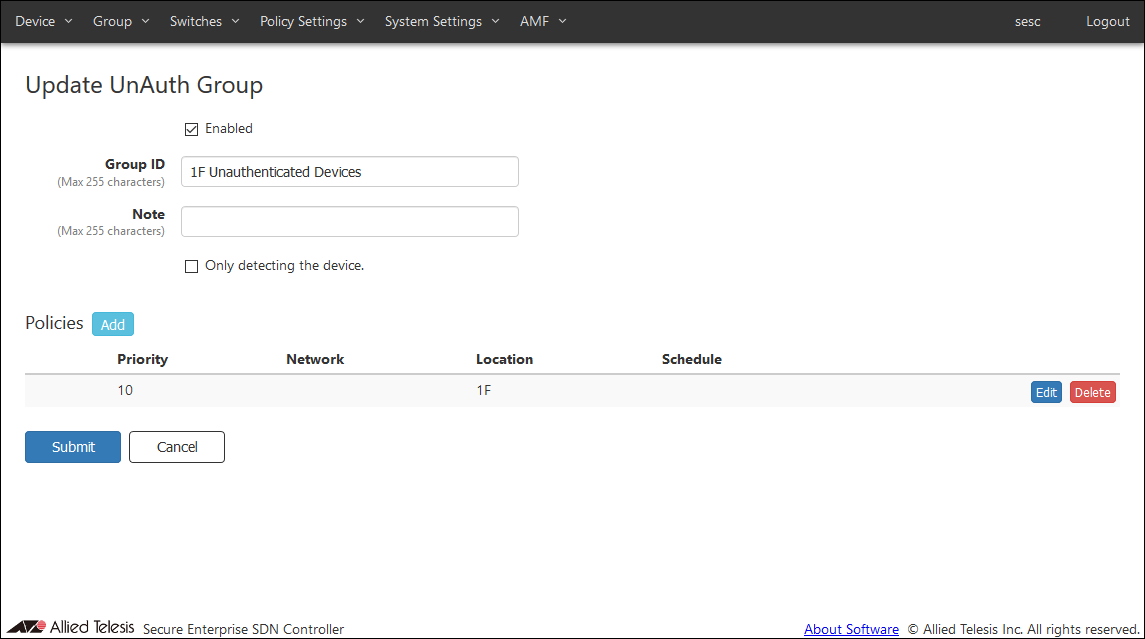
| Item Name | Description |
|---|---|
| Enabled | Uncheck this if you want the group to be disabled. |
| Group ID (Mandatory) | ID (Name) of the group to be created. Group ID must be unique. Max 255 characters |
| Note | Arbitrary string (comment) for the Group. Max 255 characters. |
| Only detecting the device. | Check this if you want the group to be used only for detecting unregistered devices without allowing them to access the network. If this option is enabled, devices in the group cannot access the network even if the Network is specified in the security policy for the group. |
| Item Name | Description |
|---|---|
| Policies | |
| Policies | List of security policies attached to the group. |
| Priority | A priority value of the security policy. It must be an integer in the range of 0 to 255. When multiple security policies are set, when an interface registered to a device in the UnAuth Group is connected to the AMF member, it is determined whether the security policy with the lowest priority value is matched first. |
| Network | ID of the network to which AMF Security mini is assign the device in the group. |
| Location | Specify a location where the device can be for AMF Security mini to categorize it in the group. |
| Schedule | Specify a schedule when the device can be connected for AMF Security mini to categorize it in the group. |
| Item Name | Description |
|---|---|
| Policies | |
| Add | Open the Edit Policy dialog to add a new security policy for a UnAuth Group. |
| Edit | Open the Edit Policy dialog to edit the selected security policy. |
| Delete | Mark to delete the security policy attached to the device. The security policy to be deleted is indicated with the DEL mark on the left side of its record line. |
| Revert | Clear the DEL mark on the security policy. |
| Page Bottom | |
| Submit | Update the group with the input information on this page and subordinate dialogs by committing the information for the existing group. |
| Cancel | Cancel the operation for updating the group. |
NoteInterfaces and security policies marked with DEL is deleted when the "Submit" button is clicked. Once you click the "Submit" button, you cannot undo the delete operations.
Edit Policy
This dialog lets you add a new security policy to the group or update an existing security policy attached to the group.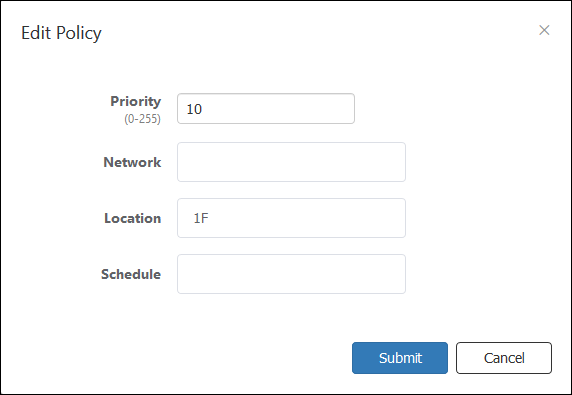
| Item Name | Description |
|---|---|
| Priority (Mandatory) | A priority value of the security policy. It must be an integer in the range of 0 to 255. When multiple security policies are set, when an interface registered to a device in the UnAuth Group is connected to the AMF member, it is determined whether the security policy with the lowest priority value is matched first. |
| Network | ID of the network to which AMF Security mini is assign the device in the group. Maximum 100 IDs of the existing networks are shown in the drop-down list. If you enter text in the field, Network IDs in the drop-down list are dynamically filtered to the ones which contain the input text in Network ID, VLAN ID or Note (it shows maximum 100 elements). From the drop-down list, select a Network ID. If the registered device is connected to the AMF Member, the device is connected to the VLAN subnet configured in the network. If the network is not registered in the device (if this setting is blank or the VLAN ID is set to 0 in the network security policy setting), the device is connected to the VLAN set for the AMF Member. The connection to the VLAN subnet is realized by sending as a tagged VLAN with the set VLAN ID when it is sent to the upper network of the connected the AMF Member. You have to add the network before assigning a group to the network. Refer to Policy Settings > Add Network for the instruction on how to register a network. |
| Location | Specify a location where the unauthenticated device can be so that it is categorized in the group. Maximum 100 IDs of the existing locations are shown in the drop-down list. If you enter text in the field, location IDs in the drop-down list are dynamically filtered to the ones which contain the input text in Location ID or Note (it shows maximum 100 elements). From the drop-down list, select a Location ID. If you specify a Location, UnAuth Group can access the network only from AMF Members in the Location. If no Location is selected, it is accessible to all AMF Members. You have to add the location before specifying it for a group. Refer to Policy Settings > Add Location for the instructions on how to add a location. |
| Schedule | Specify a schedule when the unauthenticated device can be connected to the network so that it is categorized in the group. Maximum 100 IDs of the existing schedules are shown in the drop-down list. If you enter text in the field, Schedule IDs in the drop-down list are dynamically filtered to the ones which contain the input text in Schedule ID or Note (it shows maximum 100 elements). From the drop-down list, select a Schedule ID. If you specify a Schedule, the group can access the network only when the schedule is effective. If you do not specify a schedule, a device can always access the network. You have to add the schedule before specifying it for a group. Refer to Policy Settings > Add Schedule for the instruction on how to register a schedule. |
NoteIf the VLAN set in the AMF Member is accessible, the device may be able to connect to the equipment on the control plane depending on the switch settings.
| Item Name | Description |
|---|---|
| Bottom of the dialog | |
| Submit | Add or update the security policy information. |
| Cancel | Cancel the operation for adding or updating policy. |
18 Jan 2021 10:56