AMF
AMF Application Proxy Settings
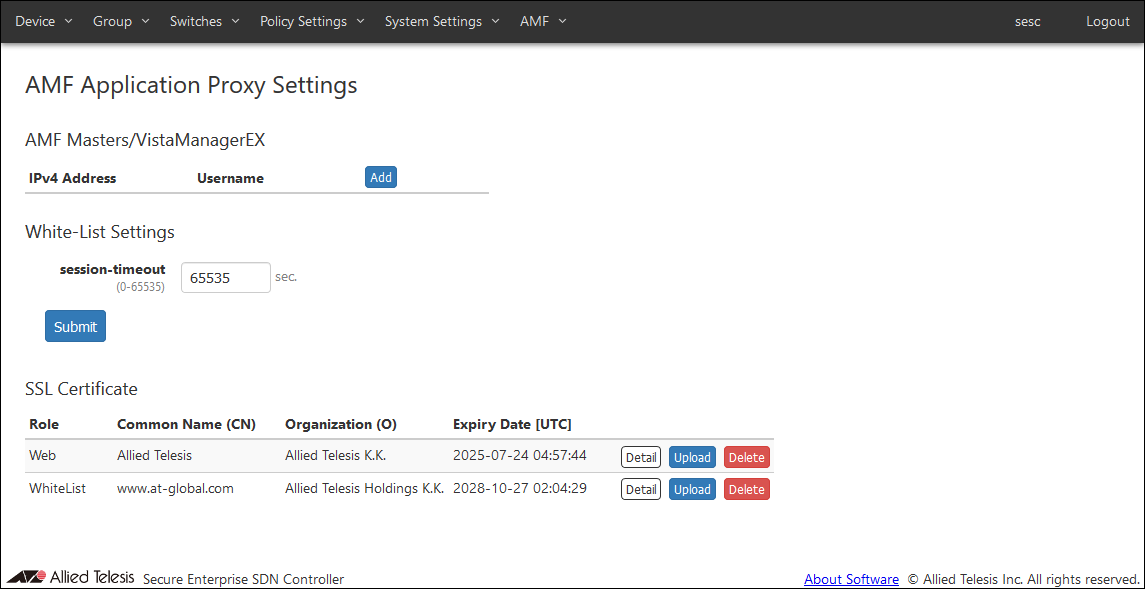
AMF Masters/VistaManagerEX
Register the AMF Master in AMF Security mini. It also shows a list of registered AMF Masters.NoteAT-Vista Manager EX is not supported and should not be registered.

| Item Name | Description |
|---|---|
| IPv4 Address | IPv4 address of AMF Master using the AMF Application Proxy. |
| Username | Username of a level 15 (privileged) account on the AMF Master. |
| Item Name | Description |
|---|---|
| Add | Open Update AMF Master/VistaManagerEX dialog to register a new AMF Master. |
| Edit | Open the Edit AMF Master/VistaManagerEX dialog to update AMF Master information. |
| Delete | Delete information of the selected AMF Master. |
Edit AMF Master/VistaManagerEX
This dialog lets you add or edit information of AMF Master.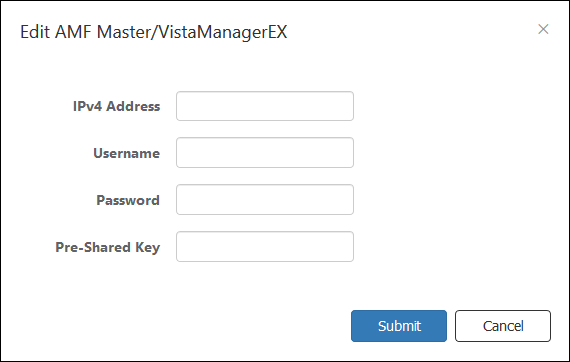
| Item Name | Description |
|---|---|
| IPv4 Address | Enter an IPv4 address of AMF Master using the AMF Application Proxy. Then enter the username and password below. |
| Username | Enter a username of a level 15 (privileged) account on the AMF Master. |
| Password | Enter a password for the above username. |
| Pre-Shared Key | Enter a pre-shared key used between the AMF Master and the Whitelist Server (AMF Security mini). |
NoteThe same privilege level 15 (privilege level) account must be set up for all AMF Members.
| Item Name | Description |
|---|---|
| Submit | Register a new AMF Master or update information of an existing AMF Master. |
| Cancel | Cancel the operation for registering or updating AMF Master information. |
NoteWhen you finish this configuration, the AMF Master (proxy node) is contacted periodically (every 30 seconds) in order to acquire edge node information.
It is recommended that the AMF Master account (Username and Password) set for AMF Security mini be different from the user account used for AMF Member console connection. Create a user account with authority level 15 in advance by AMF Master and AMF Member.
When sharing the user account used for the console connection of AMF Master and AMF Member with the account set in AMF Security mini, set the lockout time for login failure of AMF Master and AMF Member to less than 5 minutes (use the "aaa local authentication attempts lockout-time" command). Please note that the user is not able to log in under the following conditions and operations. - Lockout time for AMF Master and AMF Members when login fails is set to 5 minutes or more - Share the AMF Master and AMF Member CLI connection account with the account set in AMF Security mini. If the above two conditions are met and the account is locked out due to consecutive failures to log in to the AMF Master and AMF Members, or if the AMF Master account setting is incorrect in AMF Security mini, The terminal information of the AMF network cannot be obtained from SESC, and the lockout timer is continuously updated by polling from AMF Security mini, so that the user cannot log in.
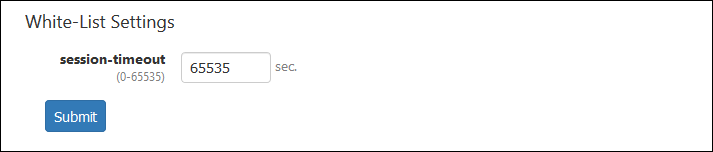
White-List Settings
| Item Name | Description |
|---|---|
| session-timeout | Specify a timer value (in seconds) to be configured on the switch when a device is successfully authenticated. When the timer expires, the device is reset to unauthenticated state. Valid range is 0 to 65535. Default is 65535. When set to zero, nodes are always in authenticated state because no timer is configured on switches. This value is used when a security policy for a device does not have Schedule. This value may be preceded by a Schedule's End Date / Time. This value is used as it is when the interval between the successful authentication and a scheduled End Date / Time is less than 65535 seconds. If the interval between the successful authentication and a scheduled End Date / Time is larger than or equals to 65535 seconds, actual timeout is set to 65535 seconds. |
| Item Name | Description |
|---|---|
| Submit | Save the entered session-timeout value. |
SSL Certificate
Register the SSL server certificate of the Web server (AMF Security mini) and the SSL server certificate of the whitelist authentication server installed in AMF Security mini.If you want external applications to interact with AMF Security mini via HTTPS, you may have to install an SSL server certificate issued by a trusted certificate authority (CA).
If you want to encrypt the control session with the AMF Application Proxy Whitelist, obtain the SSL server certificate from a trusted certificate authority and upload it to AMF Security mini.
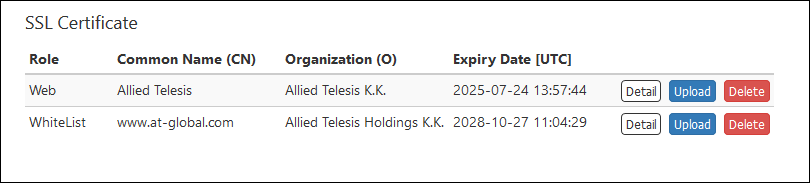
"SSL Certificate" section shows a summary of the installed SSL server certificate.
- If your CA provides you with intermediate CA certificates or cross root CA certificates in addition to your server certificate, concatenate those certificates into a single file then upload the file to AMF Security mini. Contact the CA for detailed information on how to concatenate certificate files.
- To install a certificate file, it must meet the following requirements.
Table 7: SSL Certificate Requirements
Type X.509, RFC6818 Encryption PEM (Privacy Enhanced Mail) Extension .crt
| Item Name | Description |
|---|---|
| Role | Displays Web (Web server) or WhiteList (Authentication server). |
| Common Name (CN) | Displays the common name of the web server (AMF Security mini) or authentication server (AMF Security mini). |
| Organization (O) | Displays the name of the organization to which the Web server (AMF Security mini) or authentication server (AMF Security mini) belongs. |
| Expiry Date [UTC] | Expiration date of the certificate. |
| Item Name | Description |
|---|---|
| Detail | The detailed information of the registered SSL server certificate is displayed. |
| Upload | Register the SSL server certificate in AMF Security mini. |
| Delete | Delete the installed SSL server certificate and restore the default certificate which is self-signed by AMF Security mini. |
NoteAfter setting the AMF master, AMF Security mini accepts both unencrypted and encrypted sessions. You cannot disable one of them.
18 Jan 2021 10:56