AWC Settings
This page allows you to view and configure AWC (Autonomous Wave Control) functions.
On the page, you can tune detailed AWC calculation parameters such as the cover area for transmit power, the influence of unmanaged APs on the channel, and timing for calculation and application.
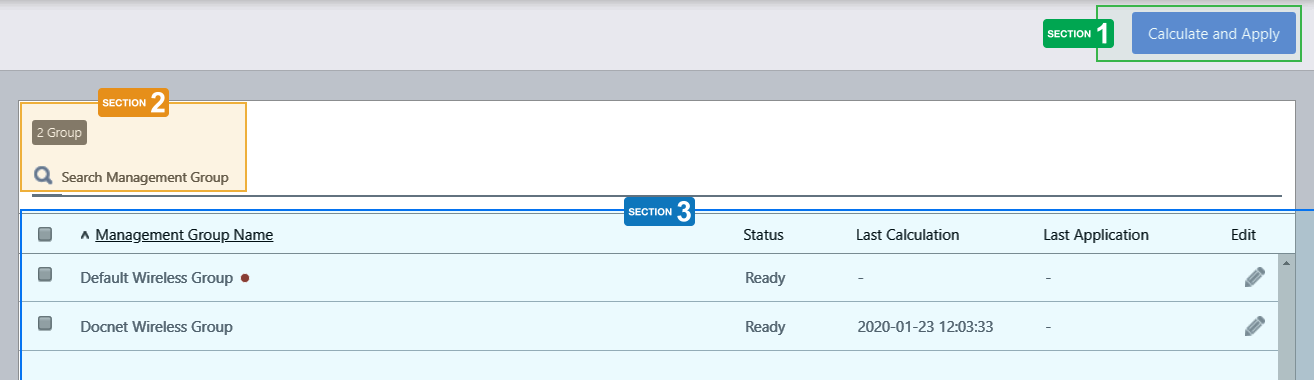
Section 1
| Item Name | Description |
|---|---|
| "Calculate and Apply" button | Perform AWC Calculation and apply the results to APs in the selected Management Groups. |
Section 2
| Item Name | Description |
|---|---|
| X Group | Shows the number of Management Groups. |
| Search Management Group | Lets you filter the list of management groups. The search field lets you enter a partial string to match. The screen displays entries with that string in their name. To remove the filter, delete the string from the search field and press enter. NoteThe search is case-sensitive. |
Section 3
| Item Name | Description |
|---|---|
| Management Group | Shows the Management Group name. |
| Status | Shows the status of AWC Calculation for the Management Group. |
| Last Calculation | Shows the last date/time when the AWC performed calculation. |
| Last Application | Shows the last date/time when the AWC applied the calculation results to APs. |
| Edit (pencil icon) | Lets you edit the AWC settings for the Management Group. |
14 Dec 2023 11:07