Overview
In this section, we will show you basic steps to configure an AWC-SC (AWC-Smart Connect) wireless network in a quick tour style.
NoteFor simplicity, we assume that we are going to create the following network with:AWC-SC is supported with TQ5403, TQ5403e and TQm5403 firmware version 6.0.1-1.x or later, and TQ6602 GEN2 and TQ6702 GEN2 firmware version 8.0.3-0.x or later.
Note that although the TQ6602 appears as the target model for the SC profile, it is not supported and should not be selected.
- AT-TQ5403 wireless APs.
Note
The TQ6602 GEN2 and TQ6702 GEN2 cannot coexist with the TQ5403/5403e or TQm5403 on the same Smart Connect network.
- There is one floor (3F).
- 5 APs, 1 Root AP and 4 Satellite APs.
The satellite APs will connect to the single Root AP and will act as Terminator APs, which do not bridge the connection between the Root AP and others.
- In usual client service communication, a multi-channel VAP will be used.
Channel Blanket Network will not be provided.
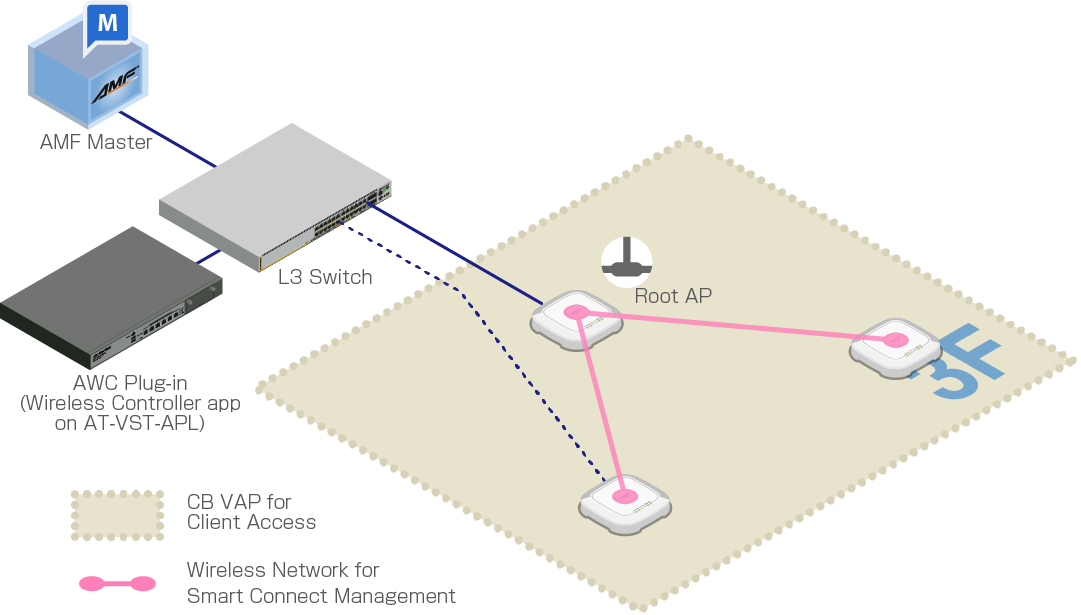
| Device Name | Node Name | IP Address | MAC Address | Role |
|---|---|---|---|---|
| Wireless Controller application container | 192.168.1.250 | AWC Plug-in | ||
| AlliedWare Plus Layer 3 Switch | 192.168.1.1 | PoE+ power sourcing, DHCP/NTP server | ||
| TQ5403 | TQ5403-SC-1 | 192.168.1.230 | 00:00:5E:00:53:00 | Root AP (wired) Powered by PoE+ |
| TQ5403-SC-2 | 192.168.1.231 | 00:00:5E:00:53:20 | Satellite AP (wired) Powered by AC Adapters |
|
| TQ5403-SC-3 | 192.168.1.232 | 00:00:5E:00:53:40 | Satellite AP (wireless) Powered by AC Adapters |
|
| TQ5403-SC-4 | 192.168.1.233 | 00:00:5E:00:53:60 | ||
| TQ5403-SC-5 | 192.168.1.234 | 00:00:5E:00:53:80 | ||
| Radio | VAP | AP Profile | SC Profile | Overview |
|---|---|---|---|---|
| Radio 1 | VAP1 | ForStaff | - | Wireless network for empolyees |
| Radio 2 | VAP1 | Default-1 (default) |
SC-Default-cVVGG (the last 5 characters are determined at random.) | For SC Management |
| VAP2 | - | sc-initial-provisioning (default) |
For bootstrapping factory default APs (Automatic setting) |
Therefore, VAP "Default-1" set by default on Radio 2 in the AP Profile is not used, "SC-Default-cVVGG" set in the SC Profile overrides the VAP.
In addition, for the VAP2 of the radio band declared to be used in the SC Profile, the SSID "sc-initial-provisioning" set by default for the factory default AP connection is used.
This is the same SSID defined for each radio band of the factory default AP, and is used for listening to the beacon of the factory default AP.
NoteIn the radio band used by AWC-SC, the other VAPs will be disabled automatically.
12 Jul 2024 09:31