Add Firmware
This page lists the firmware files that have been uploaded to the AWC Plug-in. You can also assign a firmware file to APs so that the APs can be updated to the specified firmware by a scheduled or manual task.
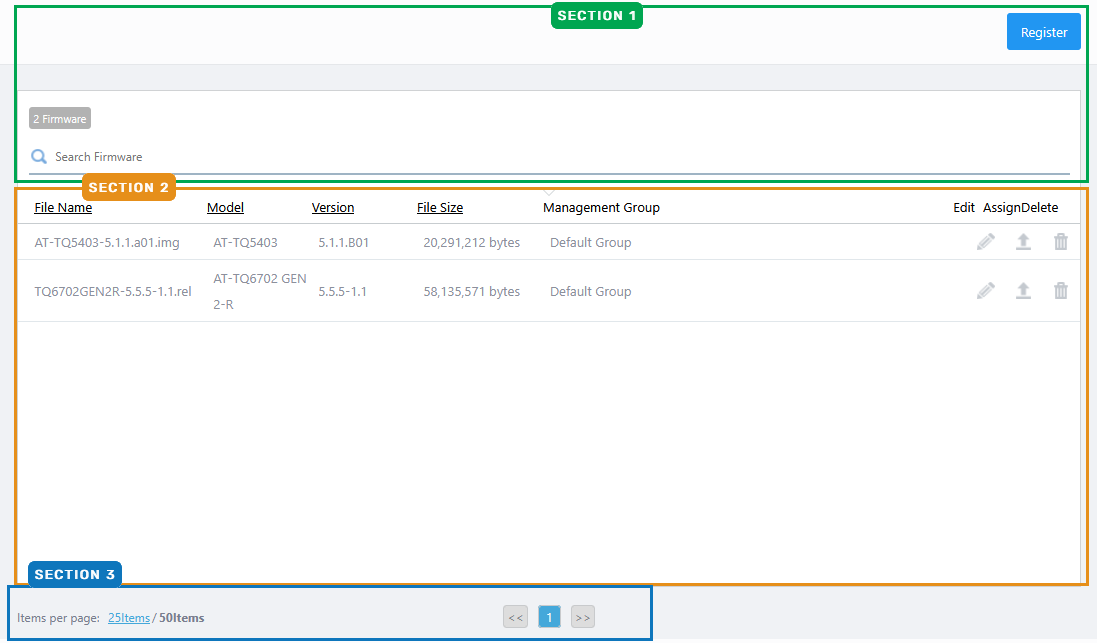
Section 1
| Item Name | Description |
|---|---|
| "Register" button | Add a firmware file to the AWC Plug-in's firmware database. Refer to Operation Reference > Miscellaneous Settings > Reboot AP and Update AP Firmware"'s "Add Firmware for more details. |
| X Firmware | Shows the number of firmware files in the list. |
| Search Firmware | Lets you filter the list of firmware files. The Search field lets you enter a partial string to match. The screen displays entries with that string in one of the following fields: "Filename", "Device Type" or "Management Group". To remove the filter, delete the string from the search field and press enter. NoteThe search is case-sensitive. |
Section 2
| Item Name | Description |
|---|---|
| File Name | Shows the firmware filename. |
| Model | Shows the model name of the AP on which the firmware can be installed. |
| Version | Shows the version number of the firmware image. |
| File Size | Shows the firmware file size. |
| Management Group | Shows Management Groups for the firmware. |
| Edit (pencil icon) | Lets you change Management Groups for the firmware. |
| Assign | Lets you select APs on which the firmware will be installed. When you update the APs' firmware manually or by a scheduled task, the selected firmware file will be installed on the APs. Refer to Operation Reference > Miscellaneous Settings > Reboot AP and Update AP Firmware"'s "Assign Firmware To AP for more details. The firmware file assigned to an AP can be reviewed in the Wireless AP Details or Wireless AP Status Details pages' under the Basic Information section. |
| Delete (trashbin icon) | Lets you delete the firmware from the AWC Plug-in's database. |
Section 3
| Item Name | Description |
|---|---|
| Items per page | Specifies the number of items per page. |
| << | Goes to the first page of the list. |
| (Page Number) | Shows the current page number in the list. |
| >> | Goes to the last page of the list. |
10 Nov 2025 11:47