Area Authentication
Area Authentication is a mechanism for allowing wireless clients to associate with APs using the "Area" set in the floor map.
When Area Authentication is enabled, the system can determine whether a wireless client is inside or outside the area on the floor map based on the Client Location Estimation function and allow the wireless client to associate with the appropriate VAP.
NoteFor Area Authentication, the use of a channel blanket by AWC-CB (AWC-Channel Blanket), described later, is required. For more information on channel blanketing, see Operation Reference > Channel Blanket > Overview.
NoteThe client location estimation function provides an estimate of the wireless client's location from the point in time when the wireless client requests to associate to the APs' channel blanket.Area Authentication cannot be used in combination with MAC Access Control.
For this reason, the following conditions must be met for area authentication in the channel blanket:
- "Associated Client Location Estimation History" is set effectively in the System Setting screen.
- CB profile including CB VAP with area authentication enabled is applied to the supported wireless AP (TQ5403/5403e/6602 GEN2/6702 GEN2) and channel blanket is operated.
- Wireless client has requested connection to the CB VAP of the corresponding channel blanket.
- "Associated Client Location Estimation History" is set effectively in the System Setting screen.
- AP profile including area authentication enabled is applied to the supported wireless AP (TQ5403/5403e/6602 GEN2/6702 GEN2) and channel blanket is operated.
- Wireless client has requested connection to the CB VAP of the corresponding channel blanket.
- If needed, create a management group.
- Next, create the AP profile.
In this example, the VAP provided in this AP profile will not use area authentication.
Note
If a cell-based (non channel blanket) VAP is not used with wireless APs that use an AP profile, it is recommended that a dummy VAP with security and a temporary password be created to prevent wireless clients from unnecessarily associating with the APs after the AP profile is applied to the APs and before the APs are assigned to a channel blanket.
- Assign the management group created in step 1 to the AP profile you created.
- Register the APs on the AP Settings screen.
Specify the management group created in step 1 as the management group to belong to.
- Assign the AP profile created in step 2 to the APs.
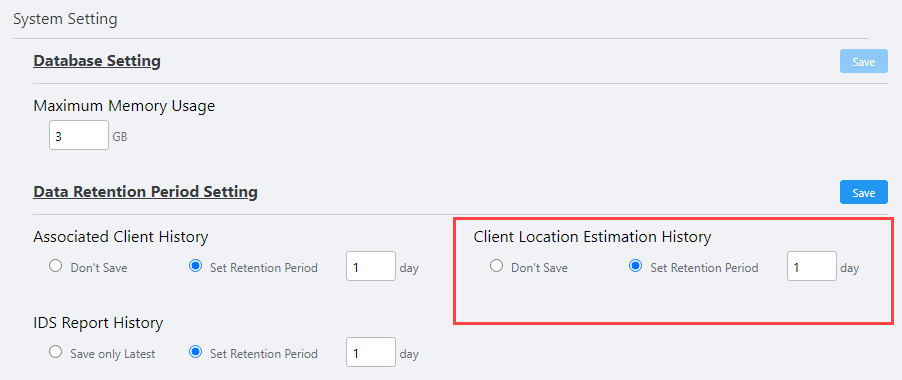
- In System Setting, configure to use the Client Location Estimation function.
On the "System Settings" screen, enable the Client Location Estimation History.
The default is "Don't Save". Select "Set Retention Period" and specify the period in the value between 1 to 14 (in days).
Note
The Data Retention Period Setting can be set up to 31 days on the screen, but the operation with the period up to 14 days is supported.
In addition, the retention period is affected by the performance of the server. For a general guide, please refer to the Installation Guide.
- Create the map.
Add a floor map with reference to Operation Reference > Floor Map > Configure Floor Maps.
Specify the management group created in step 1 as the management group to belong to.
- Place the APs on floor maps.
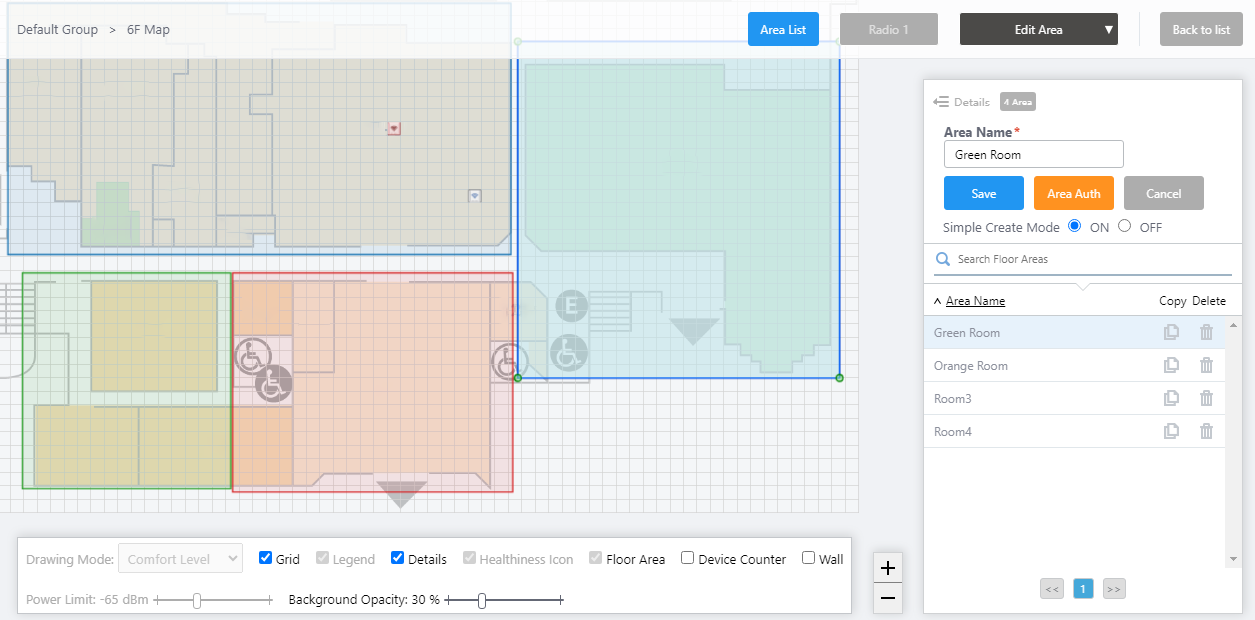
- In the "Edit Area" view of the floor map detail, create an area for area authentication.
- Create a CB profile and add the Area Authentication VAP (CB VAP with Area Authentication enabled) to the CB profile.
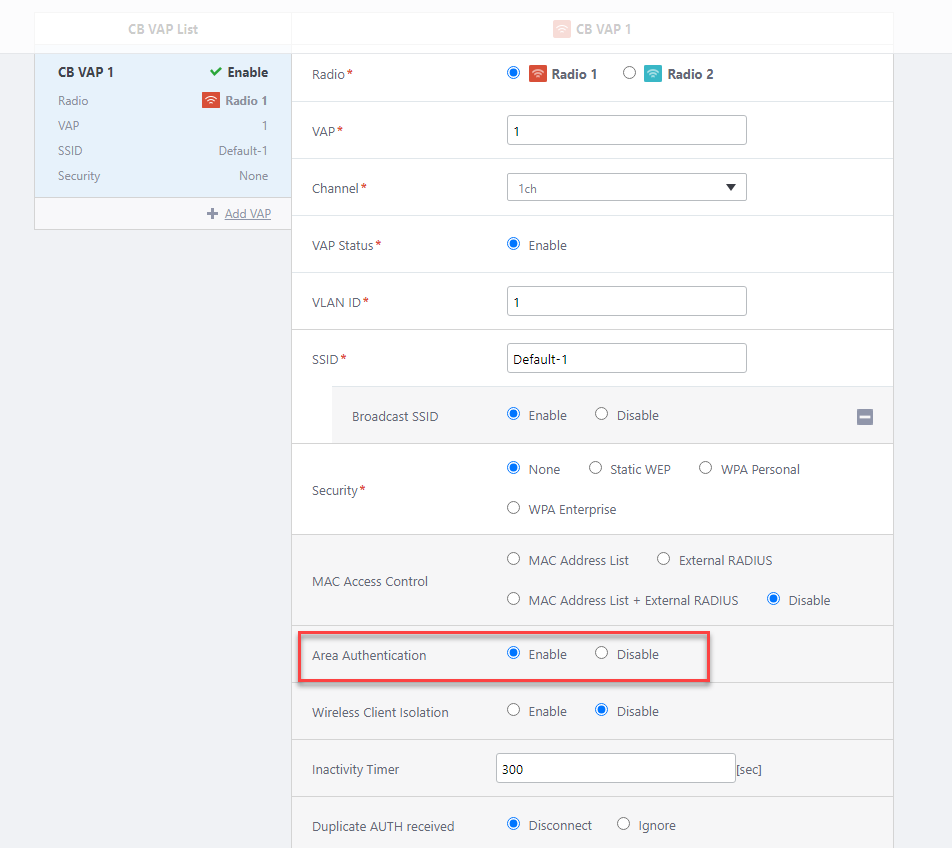
- Create a channel blanket in the Channel Blanket List of the CB profile and make the wireless APs added in step 4 belong to it.
- Apply settings to the wireless APs.
- Associate an Area Authentication VAP with an area on the floor map.
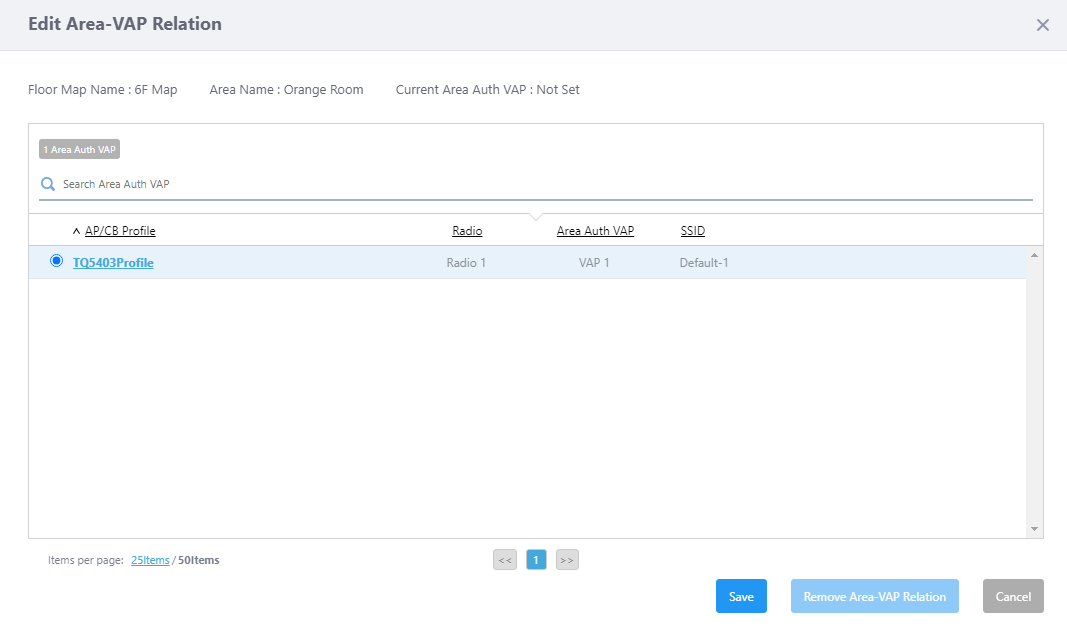
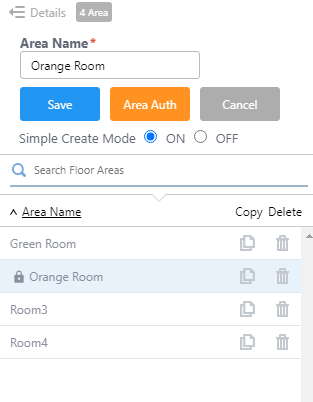
In the "Edit Area" view of the floor map details, select the appropriate area from the area list and click the "Area Auth" button to display the "Edit Area-VAP Relation" dialog.
The "Associate Area with Area Authentication VAP" dialog displays only the AP or CB profiles that contain the Area Authentication VAP settings that have been applied to the APs on the floor map.
Select the CB profile for which you created the Area Authentication VAP in step 10 and click "Save".
In the list of areas on the Create Area screen, the area with the lock icon to the left of the area name means the area associated with the Area Authentication VAP.
When a wireless client requests to associate with a AP that has been configured with a channel blanket, an estimation of the wireless client's location is performed. Only if the wireless client is estimated to be located in the area, will it be allowed to associate to the Area Authentication VAP.
14 Dec 2023 10:09