DCN Report
View a report on the optimization of wireless clients by AWC-DCN (Dynamic Client Navigation).
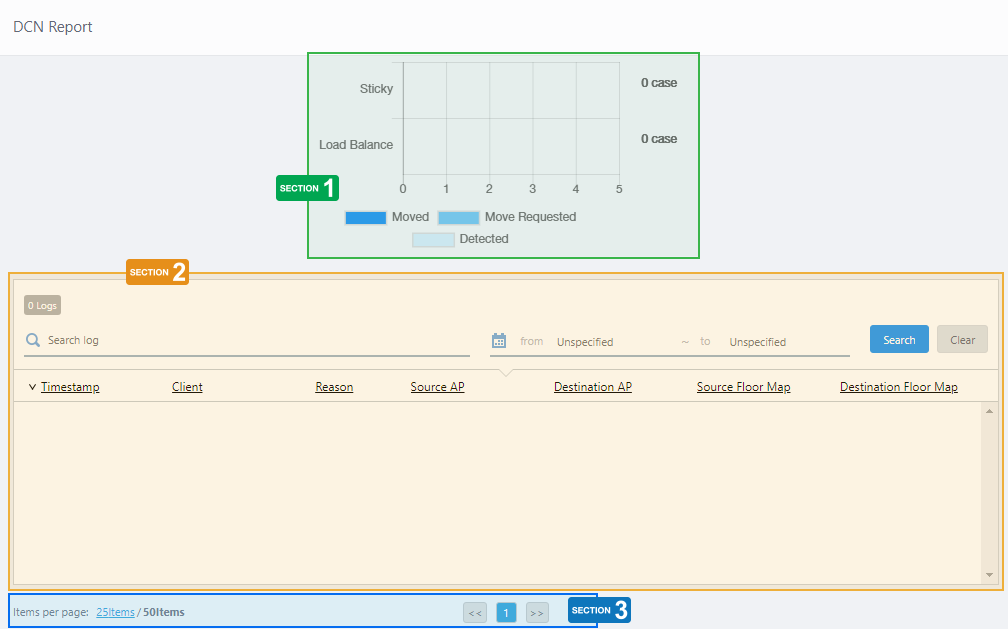
Section 1
The stacked bar graph shows the number of sticky terminal moves and load balancing detections, requests, and executions by AWC-DCN.
- Sticky Client:
Represents the number of wireless clients that have been completed, requested, or become candidates for migration to another wireless AP due to deteriorating signal conditions caused by moving within the service area while still associated with a wireless AP.
- Load Balance:
Represents the number of wireless clients that have been completed, requested, or become candidates for migration to another wireless AP in order to equalize the number of associating clients between APs.
- Dark blue: Detected, requested and completed the movements
- Medium blue: Detected, requested but yet completed the movements
- Light blue: Detected but not requested or completed the movements
Section 2
| Item Name | Description |
|---|---|
| X Logs | Shows the number of log entries. |
| Search Log | Lets you filter the list of log entries. Filter entries in the list by entering a partial string in the search box. The Search field lets you enter a partial string to match. The screen displays entries with that string in one of the following fields: "Detected Time", "Floor Map" or "Management Group". To remove the filter, delete the string from the Search field and press Enter. NoteThe search is case-sensitive. |
| from ... to | Lets you filter log entries by specifying a range of dates and times. |
| "Search" button | To filter log entries, click this button after entering a keyword or "from ... to" dates. |
| "Clear" button | Clears the search keyword and from ... to dates and shows all logs again. |
| Timestamp | Shows the date and time when the log entry was received. |
| Client | Shows the client MAC address. |
| Reason | Displays the reason to request the movement as "Sticky Client" or "Load Balance". |
| Source AP | Shows the device name of the AP from which the client being requested to move. |
| Destination AP | Shows the device name of the AP to which the client being requested to move. |
| Source Floor Map | Shows the floor map name of the destination AP from which the client being requested to move. |
| Destination Floor Map | Shows the floor map name of the destination AP to which the client being requested to move. |
Section 3
| Item Name | Description |
|---|---|
| Items per page | Specifies the number of items per page. |
| << | Goes to the first page of the list. |
| (Page Number) | Shows the current page number in the list. |
| >> | Goes to the last page of the list. |
14 Dec 2023 10:09