Data Format
Application Log
Event Management > Application LogManages the AT-RADgate application log.
Accessing this page displays a list of AT-RADgate event logs.
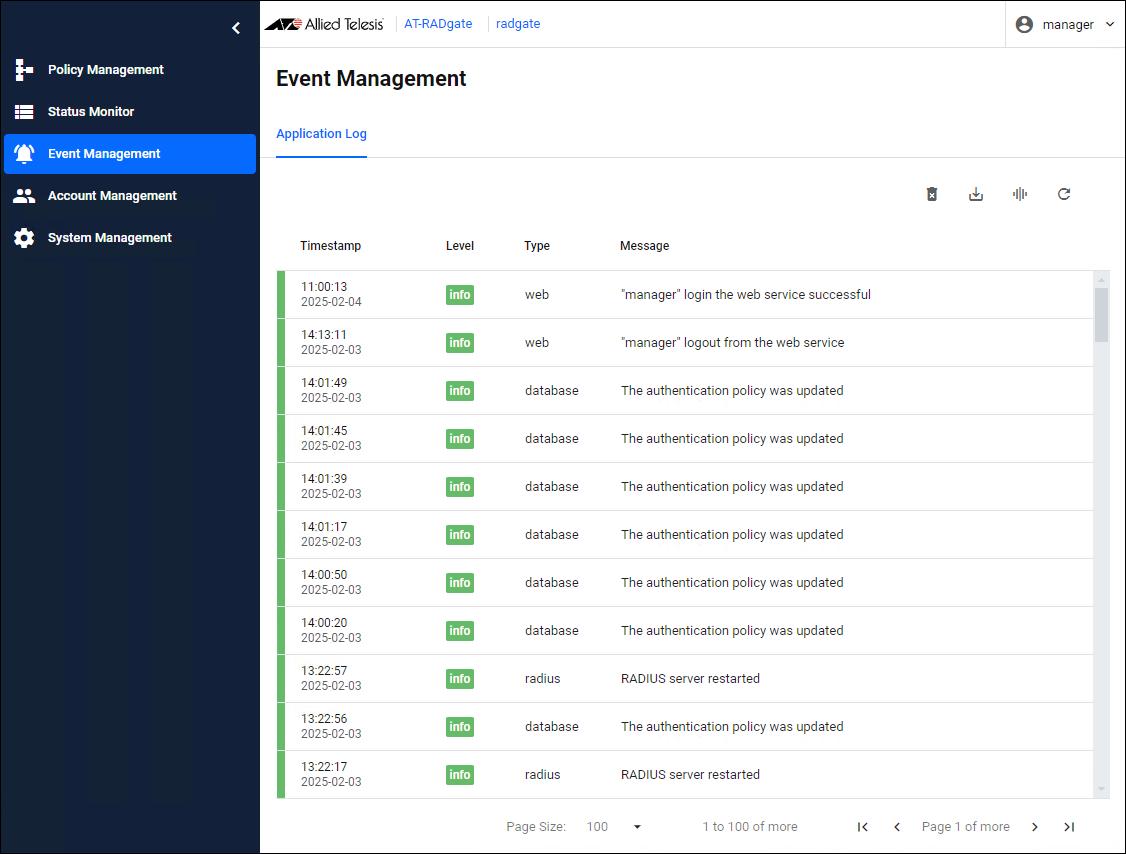
The contents of each column in the table are as follows:
| Item Name | Display | Description |
|---|---|---|
| Color | × | Indicates the importance of the event log. It is represented by color. Refer to Logging Level for more information. |
| Timestamp | × | The date and time the event occurred. It is displayed in local time. |
| Level | × | Indicates the importance of the event. This is displayed as the level name used by common logging systems. Refer to Logging Level for more information. |
| Type | × | Represents the type of event. These correspond to the types listed in Logging Level. |
| Message | × | The details of the event. |
| Button Name | Description |
|---|---|
 Clear all log |
Deletes all currently saved event logs. |
 Export as text |
Download the currently saved event log in text format. |
 Manage Columns |
Changes the visibility of each column in the table. |
 Reload |
Reload the event log. |
Logging Level
Event Management > Application Log > Logging LevelEach logged event has a level associated with it. The levels defined by AT-RADgate are as follows, in order of importance:
| Logging Level Name | Color | Description |
|---|---|---|
| error (ERROR) | Red | This is a log that is recorded when an error occurs within AT-RADgate. |
| warning (WARNING) | Yellow | This is a log that is recorded when the device with which AT-RADgate is communicating becomes abnormal, or when an event that requires attention occurs within AT-RADgate. |
| info (INFO) | Green | The importance assigned to a general event. |
| debug (DEBUG) | Gray | This is the severity level assigned to the log used to check the detailed operation of AT-RADgate.NoteThe debug log level is intended for cases where you need to check internal information, such as when troubleshooting, so please consult with our technical staff before using it. Do not set the debug log level during normal operation as it causes a large amount of log data to be recorded in the event log. |
01 Oct 2025 12:51